

Applitools
Applitools · Coding
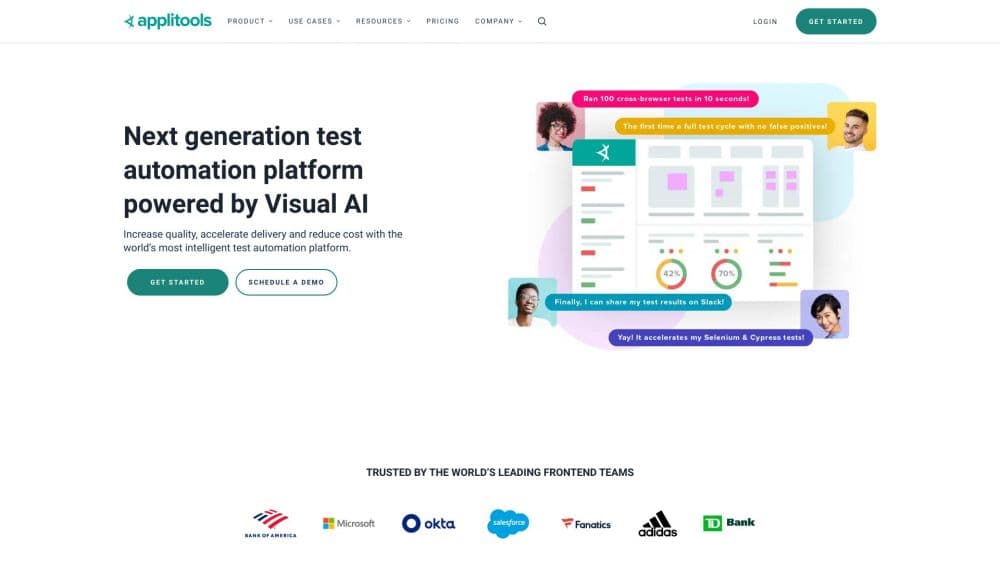
Applitools Eyes is an AI visual testing tool that catches UI regressions across browsers and devices. As a UI testing platform, it compares rendered screens with Visual AI instead of pixel diffing.
About Applitools
What Is Applitools Eyes
Applitools Eyes is a visual testing platform for web and mobile apps. You run your existing tests, and Eyes captures what each screen actually looks like, then compares it against a stored baseline. When something shifts, it flags the difference and points to the CSS or DOM element behind it.
The problem it targets is one functional tests miss. A checkout button can still work while dropping off the edge of the screen at a tablet breakpoint, and a passing test suite won't notice. Applitools was built in 2015 for exactly that gap, and the platform now markets itself as a visual referee for teams where AI coding tools generate UI faster than anyone can review it by hand. It sits in the same category as other visual regression testing tools, but leans on AI where they lean on pixel matching.
Two things shape whether it fits. It's a paid, enterprise-leaning tool. The entry plan runs $667 per month billed annually, so it's aimed at teams shipping software continuously, not hobby projects. And it plugs into test frameworks you already use like Playwright, Cypress, Selenium, or Appium, rather than replacing them. If your release process has no automated tests yet, this isn't the first tool to add.
Getting Started
- Sign up for an Applitools account and grab an API key from the dashboard.
- Install the SDK for your framework, which might be eyes-playwright, eyes-selenium, or eyes-cypress depending on what you run.
- Add a visual checkpoint to a test. In most setups that's one or two lines that call Eyes before or after your existing assertions.
- Run the test and review the first baseline. Eyes stores the current render as the reference for future runs.
- On later runs, Eyes compares each screen against the baseline and surfaces any drift in the dashboard, where you accept a change or trace it back to the failing element.
Product Information
A quick look at Applitools's pricing, supported platforms, and performance.
Best for
The users, tasks, and scenarios where this tool fits best.
Users
- QA engineers on web and mobile apps
- Frontend developers
- Teams adopting AI coding assistants
Tasks
- Catching responsive layout breaks
- Comparing component states early
- Guarding accessibility
- Cleaning up baseline noise after a redesign
- Auditing a site for a launch
Scenarios
- Shipping code fast with AI agents in the loop
- Running a test suite across many browsers without managing grid hardware
- Onboarding a QA team onto visual testing
Key features
Visual AI Comparison
This is the core of the visual AI testing tool. Instead of comparing pixels, Eyes uses computer vision trained on billions of UI renderings to judge what a human would see as a real change. It ignores harmless noise like font antialiasing or a shifted clock, and highlights the shifts that matter. That cuts the false positives that make teams abandon visual testing. Applitools puts its precision at 99.999%, a vendor figure worth treating as marketing rather than a benchmark.
Cross-Browser and Cross-Device Grid
The Ultrafast Grid captures a page's DOM state in one run, then re-renders it across 100+ browser, viewport, and mobile device combinations at once. You don't maintain your own browser driver farm. That's the feature that makes broad cross-browser testing practical, since you validate one snapshot rather than re-running a full suite per browser.
Native Test Framework Integrations
Eyes drops into Playwright, Cypress, Selenium, WebdriverIO, Appium, and Storybook, and it hooks into CI/CD tools like GitHub Actions, GitLab CI, and CircleCI. Adding a check usually means a line or two in an existing test. The platform also ships more than 30 SDKs, so most common languages and stacks are covered without a custom wrapper.
Root Cause and Baseline Maintenance
When a diff appears, you can click it and see the CSS rule, DOM element, or computed layout property responsible. Baseline grouping collects identical UI changes across hundreds of viewports so one click accepts them together. Over a long project that matters, since maintaining baselines by hand is where visual testing usually gets abandoned.
Accessibility and Functional Checks
Every visual run also checks color contrast, font sizes, and layout overlap against WCAG standards, so accessibility regressions surface with visual ones. On higher tiers, the platform adds AI-driven functional testing and NLP-based authoring, where you write test steps in plain English rather than code.
Applitools API and MCP Server
Applitools exposes an API and an MCP server, so AI coding agents can pull visual diff data and fix broken UI inside their own loop. A developer can integrate visual checks into a product or pipeline through the Applitools API. That access is what separates it from tools that only offer a dashboard.
Pros and cons
Pros
- Visual AI ignores rendering noise that trips pixel-diff tools, so teams spend less time triaging false failures.
- The cloud grid covers 100+ browser and device combinations without you managing any test infrastructure.
- It integrates with the frameworks and CI tools teams already run, so adoption is a few lines, not a rewrite.
- DOM-level root cause analysis and baseline grouping cut the time spent maintaining a visual test suite.
- An API and MCP server let AI coding agents use visual diffs to fix UI without a human in the loop.
Cons
- Pricing starts at $667 per month on the annual plan. That rules it out for solo developers and small side projects.
- It assumes you already have automated tests. With no suite to attach to, there's little for Eyes to validate.
- The most useful features, like private cloud, SSO, and functional testing, sit on the Professional and Enterprise tiers that quote custom pricing.
- Component checkpoints and page checkpoints have separate limits, so heavy UI work can burn through a plan faster than page-only testing suggests.
Frequently asked questions
Applitools Eyes catches visual and layout bugs in web and mobile apps. You add it to your existing tests, and it compares each rendered screen against a stored baseline across browsers and devices, flagging UI regressions that functional tests don't detect.
Related content
Explore related tools, skills, and articles for Applitools.
Applitools Alternatives

Base Code
Base44 (Wix) · Coding · ProductivityBase Code is a shared cloud development environment from Base44. Teammates describe changes to an existing GitHub codebase in chat, preview them live and send them back as pull requests.

Google EmbeddingGemma 2
Google DeepMind · Writing · Image · CodingGoogle EmbeddingGemma 2 is a 740M-parameter open model that turns text, code, images, audio, and video frames into vectors in one 768-dimension space, running on phones and laptops.

GitGlow
GitGlow · Coding · ProductivityGitGlow is a local-first desktop Git client that lets independent developers review their own code and their AI agents' changes in one place before shipping.