

AI Answer Generator
AI Answer Generator · Writing · Leaning · Chatbot
AI Answer Generator is a free browser tool that turns any typed question into a clear, structured answer in seconds, aimed at students and everyday users.
About AI Answer Generator
What Is AI Answer Generator
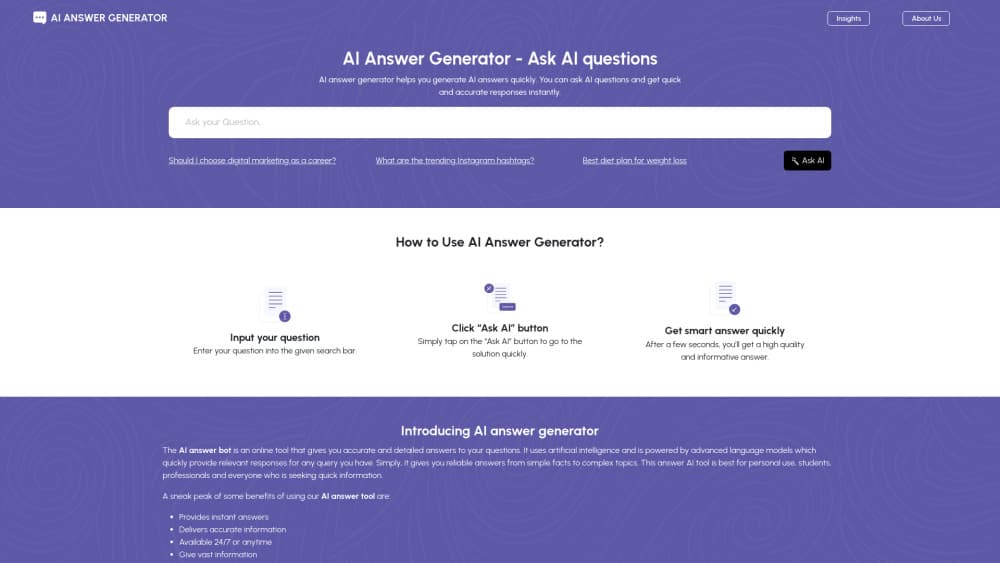
AI Answer Generator is a web tool that takes a plain-language question and returns a written answer almost immediately. You type what you want to know, press one button, and the page produces a structured response. There's no account, no install and no software to learn. Type, click, read.
The product's own description says it leans on language models plus natural language processing to understand a question and pick out relevant information. In practice that means you can ask about schoolwork, work tasks or general facts and get something readable back rather than a list of links. It's positioned as an always-available assistant for quick lookups and content ideas. Simple as that.
What holds it back is exactly what makes it easy to start. There's no account, which also means no saved history, no folders and no way to pick up a thread later. The site doesn't publish a model version or a list of what powers the answers, so you can't tell which AI is behind any given response. Treat it as a fast first pass, not a source you'd cite without checking. And because it's a free tool with no stated data policy, don't paste anything confidential into the box. That's a real risk with free tools.
Getting Started
- Open the tool in any browser on desktop or phone. Nothing is installed.
- Type your question in your own words. Phrasing is flexible.
- Press the Ask AI button to send it to the model.
- Read the structured answer that appears a couple of seconds later.
- Refine the question and ask again if the first answer misses the mark.
Product Information
A quick look at AI Answer Generator's pricing, supported platforms, and performance.
Best for
The users, tasks, and scenarios where this tool fits best.
Users
- Students
- Writers and marketers
- Curious everyday users
- Non-technical users
Tasks
- Explaining a topic
- Brainstorming content ideas
- Drafting quick answers
- Translating a fuzzy question into a clear one
- Getting a starting point on a fact
Scenarios
- A student stuck on a homework concept at 11pm with no one to ask.
- A freelancer needing a jump-start on a client brief with ten minutes to spare.
- Someone on a phone during a commute who wants a quick answer without opening another app.
Key features
Instant Answer Generation
The core loop is question in, answer out, in about the time it takes to read the question back. This is an instant answer generator first. You don't wait on a queue or a signup screen, and for a quick lookup that speed is the whole point. No lag, no friction.
Context Awareness
The tool is built to pick up on what you're actually asking, including in technical or historical topics where a keyword search would misfire. It handles natural language question answering, so it responds to the intent behind the words rather than just the words themselves.
Clean, No-Learning-Curve Interface
There's one field and one button. No settings, no model picker, no dashboard to navigate. That's a real advantage for casual users, and a real limitation for anyone who wants fine control over output format or tone.
Natural Language Input
You can phrase a question however you'd like. As an online question answering AI, it reads everyday wording and figures out the ask. You never have to learn prompt syntax to get a usable answer.
Cloud Access From Any Device
Because it runs in the browser, the same tool works on a laptop, tablet or phone with an internet connection. Nothing syncs between them, but nothing has to be installed either.
Free With No Registration
The site says it's free with no registration, subscription or hidden fees. You can use it as often as you want, which makes it easy to try before deciding whether a fuller AI app is worth paying for. What's the catch? Nothing obvious, but free tools rarely last forever.
Pros and cons
Pros
- Free to use with no account, so there's zero setup before your first question.
- Answers arrive in seconds, which suits quick lookups and brainstorming.
- Works in any browser on desktop and mobile, with nothing to install.
- Plain-language input means no prompt-writing skill is required.
- Handles everyday, study and work questions on many topics.
Cons
- No account also means no saved history, so past answers disappear once you close the tab.
- The site doesn't name the model or version behind the answers, so quality and accuracy are hard to judge.
- No stated data policy means you shouldn't paste confidential or personal information into it.
- Free tools like this can change or disappear without notice, so it isn't something to build a workflow around.
Frequently asked questions
It's a free online tool that answers a typed question with a clear, structured response in seconds. You enter the question, press a button, and read the answer. There's no account and nothing to install.
Related content
Explore related tools, skills, and articles for AI Answer Generator.
AI Answer Generator Alternatives

Google EmbeddingGemma 2
Google DeepMind · Writing · Image · CodingGoogle EmbeddingGemma 2 is a 740M-parameter open model that turns text, code, images, audio, and video frames into vectors in one 768-dimension space, running on phones and laptops.

MePersona
MePersona, Inc. · Writing · Productivity · MarketingMePersona is an AI unified inbox for creators. It learns your voice, drafts replies to fan messages from 12 platforms, and sends only what you approve.

Fluence
Yay Software (Yannick Huchard) · Writing · Voice & Language · ProductivityFluence is an Android app that reads PDFs, EPUBs, Word files and web articles aloud, follows each sentence as it speaks, and answers questions about the text on the phone itself.