

Chat & Ask AI
Codeway · Other · Chatbot
Chat & Ask AI is an AI chatbot that answers questions, summarizes PDFs and links, and generates images. It runs on the web, iOS, and Android with a free plan and a Pro upgrade.
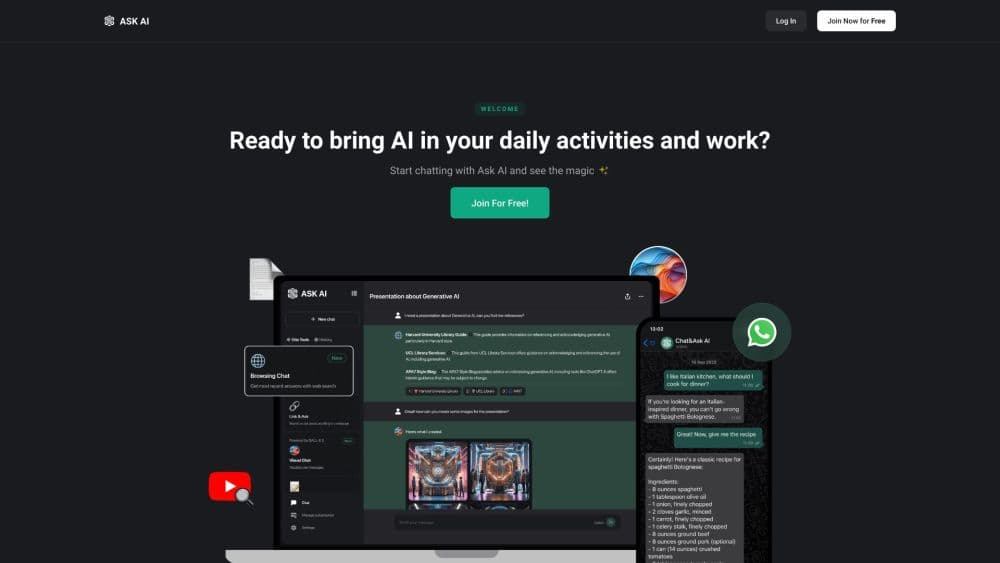
About Chat & Ask AI
What Is Chat & Ask AI
Chat & Ask AI is an AI assistant built by Codeway, a studio that ships dozens of consumer apps. It puts a chat window first, then wraps extra tools around it so you can read a long report, pull facts from a YouTube video, or turn a sentence into a picture without opening another app.
The pitch is simple. You get one place to ask questions and one place to do quick work, and you pick the AI model that fits the job. That matters when you want a fast answer for a casual question but a sharper model for coding or analysis.
The main limit is that the smartest models and the heavy tools sit behind the Pro plan. The free tier is a real starting point, not a full product.
Getting Started
- Sign up with Google, Apple ID, Facebook, or email, then log in.
- Pick a model and start a chat, or open a tool like AI Chat PDF or the image generator.
- Upload a file, paste a link, or type a prompt to get your answer.
- Save prompts to your library, then upgrade to Pro if you need unlimited use and the top models.
Product Information
A quick look at Chat & Ask AI's pricing, supported platforms, and performance.
Best for
The users, tasks, and scenarios where this tool fits best.
Users
- Students
- Professionals
- Researchers
Tasks
- Summarizing long documents
- Extracting facts from videos
- Generating images
- Web research
Scenarios
- Catching up before a meeting
- Late night writing
- Quick fact checks
Key features
Multi-Model Chat
Chat & Ask AI connects to several leading models, including GPT, Claude, DeepSeek, Gemini, Grok, and Llama. You pick one per conversation, so a simple question gets a fast model and a hard one gets a deeper model. The choice is manual, which keeps you in control but asks you to know what each model is good at.
AI Chat PDF
You upload a PDF, Word, or Excel file and ask questions about its contents. The tool pulls answers straight from the document instead of guessing, which saves time on contracts, reports, and study notes. It's one of the few features that works without a long setup.
AI YouTube Summarizer
Paste a YouTube link and get a structured summary with the main points. It helps when a video is long but you only need the argument, not the filler. The summary shows what was said, so you can still jump to the source for detail.
AI Image Generator
Type a description and the app turns it into an image. It's quick for cover art, social posts, or a rough visual before you brief a designer. Quality depends on the model behind it, and you can't fine-tune much beyond the prompt and a few options.
AI Link Analyzer
Drop in any webpage URL and ask questions or request a summary. The tool reads the page and answers from that content, which is handy for competitor sites, long articles, and docs you'd rather not read line by line. It works on any domain.
AI Search Engine
The search engine returns answers with reference links, so you can check where a claim came from. It reads the context of your question rather than matching keywords, which makes results tighter on niche topics. You still want to click through the sources for anything important.
Pros and cons
Pros
- One app covers chat, document analysis, image generation, and web search, so you skip juggling tools.
- Multi-model access lets you switch to a stronger model for hard tasks without a second subscription.
- File and link handling works on PDF, Word, Excel, web pages, and YouTube videos.
- A prompt library saves the instructions you reuse, which cuts setup on repeat tasks.
- Security claims include SSL, GDPR compliance, and ISO standards, which matters for business users.
Cons
- The best models and unlimited use require Pro, so the free plan feels limited once you lean on it.
- Model selection is manual, and new users may not know which one to pick.
- You can't fine-tune image output beyond the prompt, so results vary between tries.
- It's a consumer app first, so there's no clear team workspace or admin layer.
Frequently asked questions
It's a general AI assistant for asking questions, summarizing documents and links, generating images, and searching the web. Most people adopt the Ask AI app as a daily chatbot that also handles files and quick research.
Related content
Explore related tools, skills, and articles for Chat & Ask AI.
Chat & Ask AI Alternatives

Odyssey 3
Odyssey · OtherOdyssey-3 is Odyssey's foundation world model. It simulates physics in real time, turns a prompt into an interactive environment, and adapts to robots, cars and games.

JarvisCore
Prescott Data · Coding · Productivity · OtherJarvisCore is an open source Python runtime where AI agents work as equal peers on an agent mesh, claim tasks from a shared ledger, and reach external services through a zero-trust broker.
Clef
Cloudflare · Business · OtherClef is Cloudflare's open-source decision model for Workers AI. It returns calibrated probabilities for typed questions, not generated text, so agents can classify, route, and act fast.