

Assistante.App Chatbot GPT
Assistante.App · Other · Chatbot
Assistante.App is a French AI chatbot platform that puts GPT chat, image generation, document summaries and voiceover tools inside one web app.
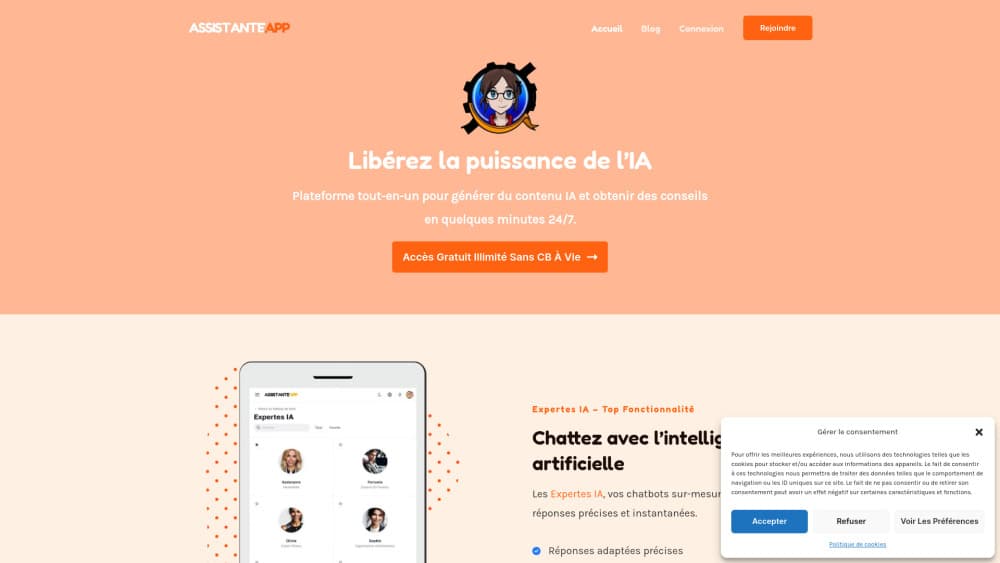
About Assistante.App Chatbot GPT
What Is Assistante.App
Assistante.App is a browser-based AI assistant platform. One login opens nine tools: a GPT chatbot, an image generator, a prompt template library, a document reader, a YouTube to article converter, a voiceover tool, an AI editor, an image recognition tool and a website chatbot. You don't install anything. The dashboard runs in a tab on desktop or phone.
The centerpiece is a set of 14 named AI experts. Each one is tuned for a subject, from a general assistant to a doctor, a dating coach, a life coach and a business adviser. You pick a face, open a chat, and the answers come back in French or English depending on how you write. The site claims 5,000 active users and 4 million words generated per month, and those numbers come from the operator rather than an audit.
The limits matter as much as the features. The interface, help pages and most of the expert personas are built around French speakers, so English content reads as a translation in places. There's no public API, which rules it out as a building block for your own product. Pricing sits behind a login, so you can't compare plans before you sign up. The document and vision tools run on GPT-4 generation models, which is a step behind what the biggest labs ship today.
Getting Started
- Create an account at app.assistante.app with an email address and start the 7 day free trial.
- Pick a tool from the left menu: Expertes IA for chat, Image IA for pictures, Modeles IA for templates, Fichiers IA for uploads.
- For chat, scroll the expert list, open the one that matches your topic, and start a new discussion each time you switch subjects so the context stays clean.
- Write your prompt, refine the reply in the same thread, then copy the text or download the image.
Product Information
A quick look at Assistante.App Chatbot GPT's pricing, supported platforms, and performance.
Best for
The users, tasks, and scenarios where this tool fits best.
Users
- French-speaking freelancers
- Solo business owners
- Students and self-learners
- Social media managers
Tasks
- Drafting product descriptions and ad copy
- Summarizing reports and contracts
- Repurposing video
- Adding narration to slides
Scenarios
- A question at 11 pm when nobody on the team is awake
- One workspace instead of five subscriptions
- Testing AI on real work before paying
Key features
Fourteen Specialized AI Experts
Instead of one blank chat box, Assistante.App gives you named personas with their own tone and scope. A general assistant handles everyday questions, Alice covers health topics, Amelie handles dating advice, Charlotte works on relationships, Chloe on personal goals, and the rest split across business, writing and study. The upside is that you skip the prompt engineering. The catch is that a persona's framing shapes the answer, so a medical question comes back in the voice of a health adviser rather than a neutral model.
Expert Bots You Can Train
You can build your own expert from a short brief: name, role, tone, and the material it should work from. That turns a repeated task, like answering the same five customer questions, into a reusable chat. It's the closest thing here to a small internal assistant, and it works without any code.
Text to Image Generation
The Image IA tool takes a written prompt and returns pictures you can download for posts, thumbnails or mockups. It's a straightforward AI image generator with no layer editing, so plan on finishing the file in another app if you need text on the image or an exact brand color.
A Library of Prompt Templates
Modeles IA stores ready-made prompts grouped by job: emails, social captions, product copy, summaries. You pick one, fill the blanks, and the prompt lands in the chat. For people who freeze at an empty prompt box, this is the fastest route to a usable first draft.
Document Summaries From PDF and CSV
Fichiers IA accepts PDF, CSV, .doc and .docx files and pulls out key points or a full summary. As a document summarizer it earns the subscription for anyone who reads long reports. Very large files and scanned images without a text layer are where it struggles, so check the output against the source before you rely on it.
Video to Article and Text to Voice
Two separate tools sit next to the chat. YouTube IA takes a video link and writes an article draft from the transcript. Voiceover IA reads a script aloud in a synthetic voice. Both are time savers for content teams, and neither replaces a human edit pass.
AI Editor and Website Chatbot
The editor works as a plain AI content generator and rewriter: paste text in and it tightens the wording, and the website tool puts a chatbot on a page to answer visitor questions from its content. That last one is the closest this platform gets to a customer support deployment, and it needs a review of the answers before you point real customers at it.
Pros and cons
Pros
- Nine tools behind one login, which cuts both the bill and the tab clutter for a small team.
- The 14 expert personas remove the blank-page problem for people who don't write prompts for a living.
- Document summaries work on the file types most offices actually use: PDF, Word and CSV.
- The 7 day trial doesn't ask for a card upfront, so you can test it on your own documents.
- The interface stays in plain language, which makes it approachable for staff who aren't technical.
Cons
- No public API, so you can't wire the chatbot into your own app, CRM or support desk.
- Pricing isn't visible until you register, which makes budget planning awkward.
- Most copy, help text and personas assume a French audience, and English output sometimes carries that phrasing.
- The vision and chat tools rely on GPT-4 era models, so expect less capable reasoning than current flagship chatbots.
Frequently asked questions
It's a web workspace for everyday AI tasks: chatting with a GPT chatbot, generating images, summarizing documents, turning videos into articles and producing voiceover. Most users come for the chat and stay for the document tools.
Related content
Explore related tools, skills, and articles for Assistante.App Chatbot GPT.
Assistante.App Chatbot GPT Alternatives

JarvisCore
Prescott Data · Coding · Productivity · OtherJarvisCore is an open source Python runtime where AI agents work as equal peers on an agent mesh, claim tasks from a shared ledger, and reach external services through a zero-trust broker.
Clef
Cloudflare · Business · OtherClef is Cloudflare's open-source decision model for Workers AI. It returns calibrated probabilities for typed questions, not generated text, so agents can classify, route, and act fast.

iFixAi
iFixAi · Business · OtheriFixAi is an open-source auditor for AI agents. It runs your agent through a simulation of your business, grades every reply, and returns an A to F scorecard backed by evidence.