

Astrocartography
AstroCarto · Other
Astrocartography is a free web tool from AstroCarto that turns birth data into an interactive astrocartography map. It draws planetary lines over a world map, then lets you click any location for a combined reading of nearby lines plus Angular Aspect or Paran signals. From there you can check a city, compare two to four candidates, find your best time to move, or build a full personal report for relocation, career, love, and home decisions.
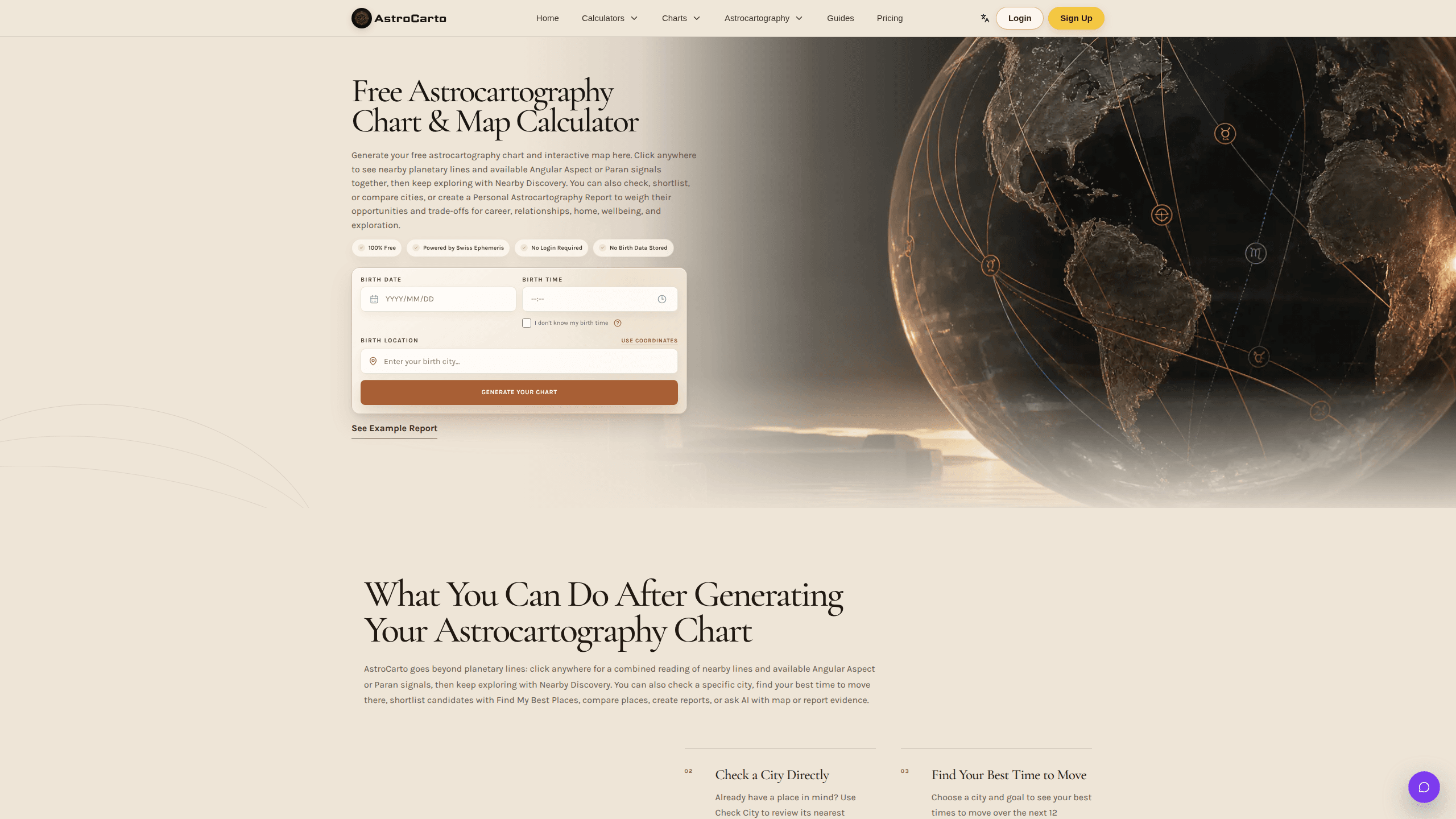
About Astrocartography
What Is Astrocartography
Astrocartography is the practice of mapping where planets sat on the horizon at your exact birth moment. Then you read those lines against real places on Earth. AstroCarto handles the math. You enter a birth date, time, place, and timezone, and it calculates AS, DS, MC, and IC lines for ten planets using Swiss Ephemeris.
The product is built for one job: helping you turn birth data into a readable astrocartography chart that's actually useful for relocation, travel, work, and relationship decisions. Where to live astrology usually stops at a static map. This doesn't. Click anywhere and you get a combined reading of the nearest planetary lines together with any available Angular Aspect or Paran signals. If a spot has weak signals, Nearby Discovery points you somewhere worth looking instead.
The biggest limit is the same one any astrology tool shares. AstroCarto treats astrocartography as decision support, not destiny. The team says so directly. A map can highlight patterns and trade-offs, but it can't weigh visas, cost of living, or family needs for you. You still need to judge the reading against real-world conditions.
Getting Started
- Open astrocarto.net and enter your birth date, time, place, and timezone. No login is required for the core chart and map.
- Click anywhere on the generated map to see the nearest planetary lines and any Angular Aspect or Paran signals.
- Pick a goal, like relocation, career, love, home, or a move-versus-stay question, and use Find My Best Places to preview candidate cities.
- Already have a city in mind? Run Check City, or compare two to four places side by side with Compare Cities.
- Sign in to save places in My Places. A Pro or Ultimate upgrade adds reports, downloads, and AI credits.
Product Information
A quick look at Astrocartography's pricing, supported platforms, and performance.
Best for
The users, tasks, and scenarios where this tool fits best.
Users
- People planning a move
- Astrology hobbyists
- Couples relocating together
Tasks
- Shortlisting relocation cities
- Checking a city you already picked
- Timing a move
Scenarios
- Weighing two to four job offers in different cities
- Deciding whether to stay or go
- Exploring somewhere new before booking a trip
Key features
Interactive Planetary Line Map
The astrocartography map shows where ten planets were rising, setting, overhead, or below at your birth moment. Click anywhere. You get a combined reading of the nearest planetary lines alongside any available Angular Aspect or Paran signals. Map rendering uses Leaflet with OpenStreetMap and CARTO tiles, so you can inspect line geometry directly instead of trusting a static image.
Nearby Discovery
Weak signals used to mean a dead end. Not anymore. When the spot you clicked has little to work with, Nearby Discovery recommends another place worth exploring. It keeps a single click from stinging. It also points you toward coordinates where the astrocartography reading actually says something.
City Check and Comparison
Check City reviews one place you already have in mind, listing up to four closest visible lines with the exact planet and angle, approximate distance in kilometers, and proximity strength. When no line is close, it shows the nearest signals instead of calling the city bad. Compare Cities takes two to four options and one goal, then organizes the leading city, support and caution signals, and the trade-offs it can't overstate.
Best Time to Move
Choose a city and a goal, and the tool shows your best times to move over the next 12 months. The full result breaks out promising periods, caution periods, and exact date windows. Most astrocartography tools skip this. A location can be right while the timing isn't.
Goal-Based Place Finding
Find My Best Places shortlists candidate cities for relocation, career, love, home, balance, or a move-or-stay question. You can search worldwide or focus on North America, Europe, Asia, or Oceania. The result weighs support, caution, fit, and confidence rather than assuming one Venus or Jupiter line is automatically best.
Personal Reports and AI Follow-Ups
Paid plans generate Personal Astrocartography Reports with priority places, life-theme verdicts, trade-offs, an interactive evidence map, and a PDF. Reports are built from your birth data, map, planetary lines, place distances, strength signals, and caution factors, not generic text. You can also reopen a completed report and ask AI follow-up questions with the evidence attached.
Find the Best Places for Two People
Add a second person's birth details and the tool finds or compares cities using both charts. It surfaces where you both benefit, where one person benefits more, and where results genuinely differ. For couples planning a move or a long-distance meeting point, that overlap is the whole question. Miss it and the shared plan falls apart.
Pros and cons
Pros
- The core astrocartography chart and map are free, with no login required for the main flow.
- Clicking any coordinate returns a combined reading of nearby lines plus Angular Aspect or Paran signals, not just a line overlay.
- City tools cover checking one place, comparing two to four, and finding candidates from scratch by goal.
- Two-person mode handles the overlap question that most relocation astrology tools ignore.
- Privacy is stated plainly: birth data isn't stored as a permanent profile in the core chart flow.
Cons
- The full Find My Best Places result, reports, HD map download, and AI features sit behind one-time Pro ($19.9) or Ultimate ($39.9) payments, so the free tier stops before the most useful outputs.
- There's no dedicated mobile app, so the interactive map depends on a browser.
- It's astrology decision support, which means it can highlight patterns and trade-offs but can't confirm whether a place is right for your budget, visa, or family.
Frequently asked questions
Yes. Generating your astrocartography chart and interactive map is free and doesn't require a login. Paid plans add reports, the full Find My Best Places result, HD map download, city comparison depth, and AI credits, but the core map and clicking flow stay free.
Related content
Explore related tools, skills, and articles for Astrocartography.
Astrocartography Alternatives

Odyssey 3
Odyssey · OtherOdyssey-3 is Odyssey's foundation world model. It simulates physics in real time, turns a prompt into an interactive environment, and adapts to robots, cars and games.

JarvisCore
Prescott Data · Coding · Productivity · OtherJarvisCore is an open source Python runtime where AI agents work as equal peers on an agent mesh, claim tasks from a shared ledger, and reach external services through a zero-trust broker.
Clef
Cloudflare · Business · OtherClef is Cloudflare's open-source decision model for Workers AI. It returns calibrated probabilities for typed questions, not generated text, so agents can classify, route, and act fast.