

Audeus Text to Speech
Audeus, LLC · Voice & Language
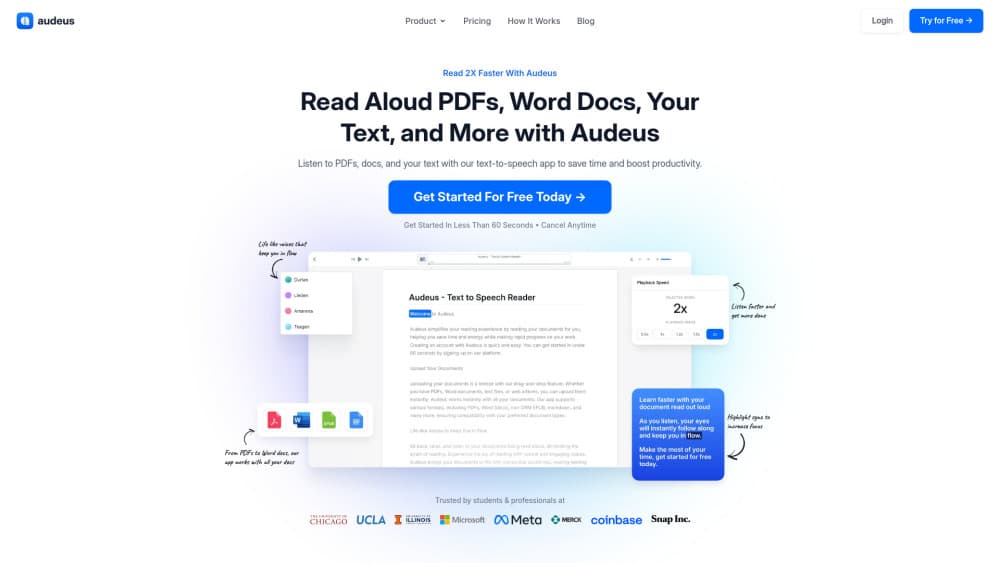
Audeus is a text to speech reader that turns PDFs, Word files, scans, and web articles into natural AI voices, with synced text highlighting and 3.5x playback on web, iOS, and Android.
About Audeus Text to Speech
What Is Audeus Text to Speech
Audeus is a browser and mobile text to speech reader built around one job: getting long documents into your ears without losing your place. You upload a PDF, a Word file, an EPUB, or a web article, pick a voice, and the app reads while the current sentence lights up on screen. Students run textbook chapters through it. People in reading-heavy jobs run reports, contracts, and long email threads. Treat it as an AI document reader for anyone who would rather listen to documents than scroll them.
The pitch is speed. Most adults read at roughly 250 words per minute, and Audeus lets you push playback to 3.5x once your ears adjust. Hearing the words while seeing them also makes it harder to drift off in the middle of paragraph nine.
The limits matter too. Audeus is a reading tool, not a study assistant. It won't summarize a document, answer questions about it, or build flashcards. The free plan keeps standard voices and caps uploads, and the Pro voices sit behind a 3-day trial that rolls into a paid subscription unless you cancel first.
Getting Started
- Sign up at audeus.com with an email address, Google, or Apple. The whole flow takes under a minute.
- Add your source: drag in a PDF, Word doc, or EPUB, paste raw text, or photograph a printed page so the OCR engine can lift the words out.
- Choose a voice and a speed. The player shows an estimated listening time that updates as you change the speed.
- Press play and follow the highlight. Highlight passages, drop a note, or switch on Captions View when you want the text centered on screen.
Product Information
A quick look at Audeus Text to Speech's pricing, supported platforms, and performance.
Best for
The users, tasks, and scenarios where this tool fits best.
Users
- Students
- Readers with dyslexia or heavy eye strain
- Professionals in reading-heavy roles
- Language learners
Tasks
- Getting through long PDFs
- Proofreading your own drafts
- Turning paper into audio
- Catching up on articles
Scenarios
- The commute
- Last-minute exam prep
- Chores and workouts
Key features
Studio-Quality AI Voices in 50+ Languages
The voice list is the first thing you'll judge, and Audeus handles it well. Voices like Arden, Linen, Sage, Quillan, and the British-accented Sandalwood sound like a person reading to you, not a phone menu. Technical terms, acronyms, and long chemical names come out clean. Each voice is tuned for a different pace, so it's worth auditioning three or four before you settle.
Synced Text Highlighting
Every spoken sentence gets highlighted as it plays, and you can change the highlight color to something your eyes tolerate for an hour. The effect is a reading rhythm you can follow with your eyes while your attention stays on the argument. It's the feature that separates Audeus from a plain audio export: you always know where you are.
OCR Text to Speech for Scans and Photos
Screenshots, scanned PDFs, handwriting, book pages, and paper documents all go through the same camera or upload path, and the text comes back as readable audio. Batch scanning handles several pages at once. This is the part that rescues PDFs where the text isn't selectable, which is still common with older textbooks and signed contracts.
Playback Speed up to 3.5x
Speed controls run from a slow crawl for dense legal language up to 3.5x for material you already half know. The audio stays intelligible at the top end, which isn't a given. A listening-time estimate recalculates as you drag the slider, so you can decide whether a document fits in the next 40 minutes.
Library, Annotations, and Cross-Device Resume
Your uploads land in a shared library that follows your account across web, iOS, and Android. Reading position syncs too: start on a phone on the bus, continue on a laptop at your desk. You can highlight any passage, attach notes to an annotation, and mark up charts and figures with shape highlights, which turns passive listening into something closer to active reading.
Browser Extensions and Canva Integration
A Chrome extension and an Edge extension read web pages aloud without copying anything into the app, which is the fastest route for articles and documentation. A Canva integration adds AI voiceover to designs, useful if you make short explainer videos and don't want to record yourself.
Pros and cons
Pros
- Playback holds up at 3.5x, so a 40-page report fits into a lunch break instead of an evening.
- OCR covers scanned pages, handwriting, and screenshots, including PDFs where the text can't be selected.
- Synced highlighting plus annotations keeps you oriented in long documents, which plain audio players can't do.
- The free tier is genuinely usable, and the same library follows you across web, iPhone, and Android.
Cons
- No summaries, no chat with your document, no generated study notes. If you want the gist without reading, this isn't that tool.
- The Pro trial charges automatically after 3 days unless you cancel, which is easy to forget over a weekend.
- No public API, so teams can't wire Audeus into their own document pipelines.
- Free accounts hit upload limits quickly, and a few of the better voices stay locked behind Pro.
Frequently asked questions
Audeus reads documents out loud with AI voices while the text is highlighted on screen. It handles PDFs, Word files, EPUBs, web articles, pasted text, and scans, and it works in a browser, on iOS, and on Android.
Related content
Explore related tools, skills, and articles for Audeus Text to Speech.
Audeus Text to Speech Alternatives

Off the Record
Weird Machines · Voice & Language · ProductivityOff the Record is a macOS app from Weird Machines that reshapes your voice in real time to block AI transcription, so people hear you normally and notetakers get nothing usable.
Cekura Bench
Cekura · Voice & Language · BusinessCekura Bench is a public benchmark that runs speech-to-speech models and deployed voice agents through 82 simulated phone calls, three times each, then publishes pass rates, latency and cost.
Griffin by Tavus
Tavus · Voice & Language · Video · ChatbotGriffin by Tavus is the first Human Interaction Model: a full-duplex, video-to-video system that watches, listens, and answers during a live video call in real time.