

Audio player for ChatGPT
Ian Speckart · Voice & Language
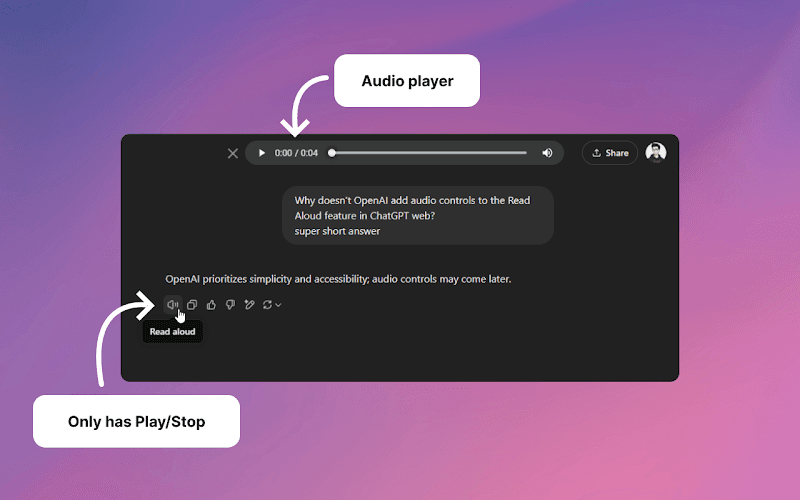
Audio Player for ChatGPT is a free Chrome extension that adds simple controls to ChatGPT's Read Aloud feature: play/pause, a seek bar and a duration display.
About Audio player for ChatGPT
What Is Audio Player for ChatGPT
Audio Player for ChatGPT is a small Chrome extension by developer Ian Speckart that puts real playback controls on ChatGPT's Read Aloud audio. ChatGPT can read its answers out loud, but the built-in player is bare. You can start a clip and stop it, and that's about it. There's no way to drag to a spot mid-sentence, no clear picture of how long the clip runs, and no pause that holds your place.
The extension fills that gap. When Read Aloud starts playing on the active tab, it switches on the browser's native audio controls and drops a player next to ChatGPT's Share button. You get play and pause, a seek bar you can scrub, and a running duration. The whole thing is 19.43 KiB, which is smaller than most single images on a page.
It stays out of the way by design. The extension only acts on the active tab, and only when an audio element is actually playing. It doesn't read your conversations, doesn't send anything out, and the developer states it collects no data. You can also skip the store and paste the same script into Tampermonkey or Violentmonkey if you prefer userscripts.
Getting Started
- Open the extension's page on the Chrome Web Store and click Add to Chrome
- Confirm the permissions prompt, then open or reload ChatGPT in a browser tab
- Start Read Aloud on any answer, and the player appears next to the Share button
- Use play/pause, drag the seek bar and read the duration display to control playback
Product Information
A quick look at Audio player for ChatGPT's pricing, supported platforms, and performance.
Best for
The users, tasks, and scenarios where this tool fits best.
Users
- ChatGPT users who use Read Aloud
- Students and commuters
- Accessibility-first users
- Privacy-conscious users
Tasks
- Re-listening to a long answer
- Pausing mid-explanation
- Checking how long a reply runs
- Skimming multiple answers
Scenarios
- A step-by-step answer you want to follow along
- Listening on a laptop in a shared room
- Studying for an exam
- A slow connection that stalls playback
Key features
Play and Pause Controls
The core fix is a real play/pause button for ChatGPT's audio. Where Read Aloud once left you with a start-and-stop toggle, the extension hands you the browser's own control set, so pausing actually holds your position. That matters most on long answers, where stopping to write a note used to mean starting the clip over.
Scrubbable Seek Bar
The seek bar lets you drag to any point in the clip. You can jump to the part you care about, skip a tangent, or move back a few seconds to catch a sentence you missed. ChatGPT's default player has no equivalent, so any mid-clip navigation meant waiting or restarting.
Duration Display
A running duration shows how far into the audio you are and how much is left. That turns an open-ended listen into something you can plan around. You can decide to sit through a full answer or move on. It's the small readout most audio players take for granted.
Native Browser Audio Controls
Instead of building a custom player, the extension switches on the audio element's native controls and positions them next to ChatGPT's Share button. The result is a familiar interface rather than a new one to learn, and the code stays light. The developer keeps it this thin on purpose, so the script is short enough to paste into a userscript manager.
Runs as an Extension or Userscript
You can install it from the Chrome Web Store, or copy the content script into Tampermonkey or Violentmonkey. The userscript route suits people who already manage scripts that way or want to read the code before running it. Same behavior either way, since both load the same standalone script.
Active-Tab Only, No Data Collection
The extension checks whether the tab is active, then checks for a playing audio element, and only then does anything. It doesn't touch your conversations or send data anywhere, and the store listing states the developer collects no data and doesn't sell it. For an add-on that runs on your chat screen, that restraint is the point.
Pros and cons
Pros
- Adds play/pause, a seek bar and a duration display that ChatGPT's Read Aloud doesn't offer
- Free and open source, with the code public on GitHub for anyone to check
- Tiny footprint at 19.43 KiB, with no noticeable effect on page speed
- Declares no data collection and doesn't sell user data
- Installs as a Chrome extension or as a Tampermonkey/Violentmonkey userscript
- Works with the browser's native controls, so there's nothing new to learn
Cons
- Chrome and Chromium only, so Firefox and Safari users are left out
- In Edge, the duration can stay blank for the first 3 to 7 seconds of a clip
- In Firefox the audio carries about 12 extra seconds of duration, which is why there's no Firefox build yet
- It controls audio only and adds nothing to how ChatGPT generates or captions Read Aloud
Frequently asked questions
It adds playback controls to ChatGPT's Read Aloud feature. When an answer is being read aloud, the extension switches on the browser's native audio controls and shows a player next to the Share button, with play/pause, a seek bar and a duration display.
Related content
Explore related tools, skills, and articles for Audio player for ChatGPT.
Audio player for ChatGPT Alternatives

Prosp
Prosp · Writing · Voice & Language · MarketingProsp is an AI LinkedIn outreach tool built for agencies and sales teams, and it writes the message and the voice note in your own voice for each prospect so they actually reply. You connect your accounts, find leads, and let the AI draft and send personalized messages at scale, all from one inbox. It's built for people running outbound at volume. That's the whole pitch. Every touchpoint still has to feel human.

Wordly AI Translation
Wordly · Voice & Language · ProductivityWordly AI Translation is a real-time AI translation and captioning platform built for meetings, conferences, and events. It delivers live translation, captions, transcripts, and summaries in more than 60 languages, and attendees join by scanning a QR code or opening a link instead of using dedicated headsets. The platform works with Zoom, Microsoft Teams, Google Meet, and Webex, and it's designed for organizations that want multilingual access without hiring human interpreters for every session. Simple as that.
Musicful
Musicful AI · Voice & Language · VideoMusicful is an AI music generator and AI music video maker that turns text to music in minutes. Give it a text prompt, a set of lyrics, or a hummed melody and it returns a finished track with vocals and instruments. It also doubles as an AI song generator, produces music videos from the songs you create, and offers an AI cover tool plus a developer API. The platform runs in a web browser and through an Android app, so you can start a song on desktop and pick it up on your phone.