
audiOS
Luis G. (audioS) · Voice & Language
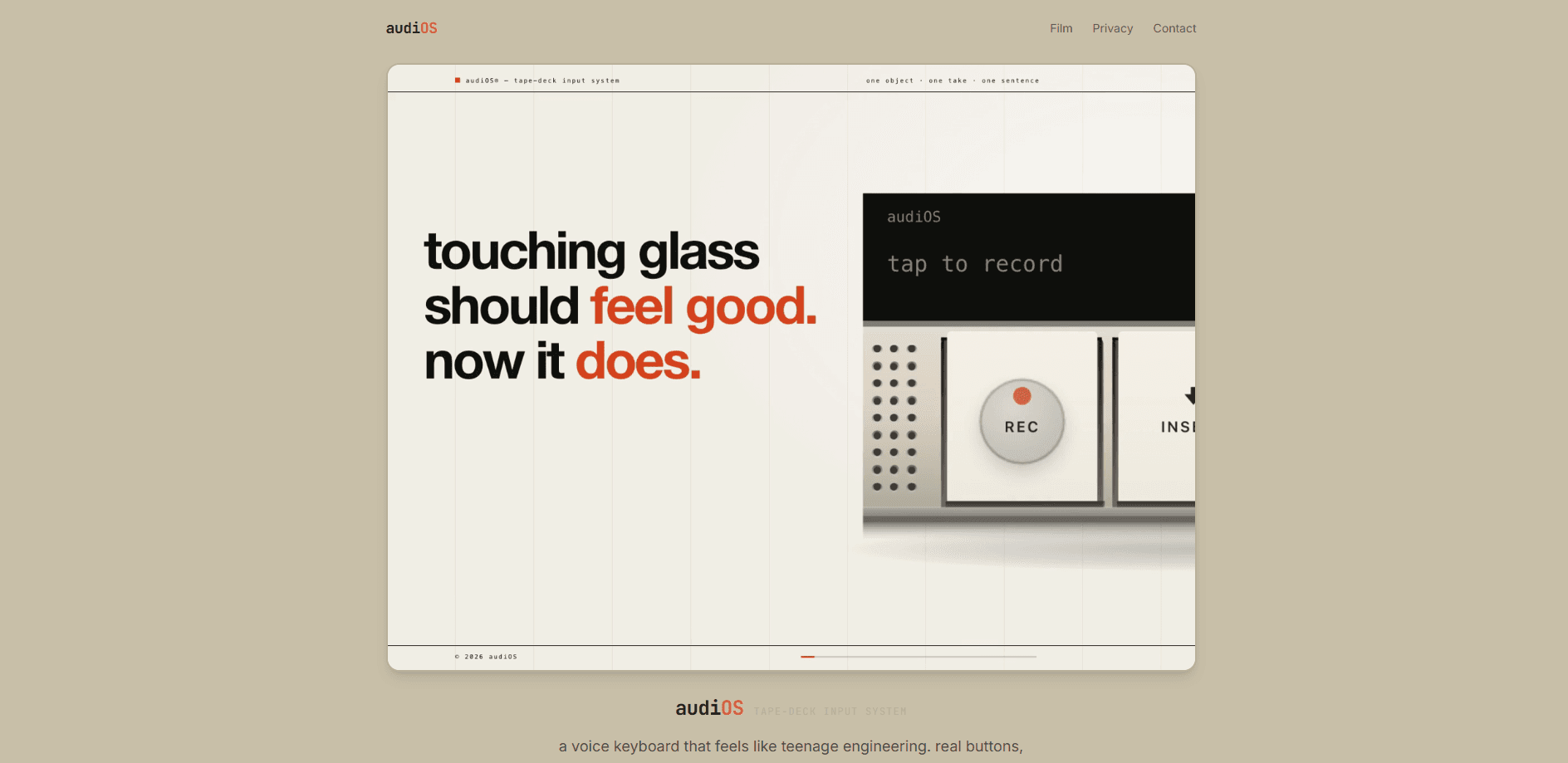
audioS is a voice keyboard for iPhone that swaps the usual glass key grid for a tape-deck control surface. You tap REC to dictate, flick the unsay rocker to undo a mistake, and spin the log wheel to send or save your take. It's a speech to text keyboard that streams live through Groq's Whisper API, and it works in any app where you can type.
About audiOS
What Is audioS
audioS is a third-party iOS keyboard built around a physical-feeling deck of controls rather than rows of keys. Instead of hunting for letters, you speak and watch your words appear in the field you're already using. The design borrows from classic tape recorders: a REC button to start capture, a rocker to unsay the last thing you said, and a log wheel to fire the finished take into your message or note.
The idea solves a familiar annoyance. Typing on a phone is slow. It's also error-prone. Most voice tools hide their controls behind menus, too. As a dictation app, audioS puts three tactile actions front and center, so speaking a text feels less like fiddling with software and more like handling a piece of hardware.
The tradeoff is scope. audioS is iPhone-only and needs iOS 17 or newer, so Android users and anyone clinging to an older iPhone are simply out of luck here. It also sends your audio off the device for transcription through a proxy server to Groq's API. Does that matter? It should if you'd rather keep every recording local. Reading the privacy policy before you install is worth five minutes of your time.
Getting Started
- Install audioS from the App Store on a compatible iPhone.
- Open Settings, then General, then Keyboard, and add audioS as a keyboard with Full Access turned on.
- Open any app, switch to the audioS keyboard, and tap REC to begin a take.
- Speak. The transcript streams in word by word, and you can flick the unsay rocker to drop the last bit.
- Slam the log wheel to send the text or save it to the take log.
Product Information
A quick look at audiOS's pricing, supported platforms, and performance.
Best for
The users, tasks, and scenarios where this tool fits best.
Users
- People who type long messages and emails on iPhone
- Writers and note-takers on the move
- Users who want a tactile dictation feel
- Anyone tired of leaving their app to transcribe voice to text on iOS
Tasks
- Sending texts and DMs hands-free
- Drafting emails and notes
- Quick voice memos you want as text
Scenarios
- Messaging on a busy street or while walking
- Working through a long backlog of replies
- Capturing an idea the moment it lands
Key features
Tape-deck control surface
The keyboard replaces letter keys with three controls modeled on a cassette deck. REC starts and stops a take. The unsay rocker rolls back the last chunk of text. The log wheel sends or saves your words. The result is a dictation setup you can drive entirely by feel, without ever looking down to hunt for a tiny on-screen icon during a conversation.
Live streaming transcription
Words appear as you speak rather than after you stop. You keep your train of thought going, and you catch a bad transcription the moment it shows up. audioS runs the audio through Groq's Whisper API, which handles the heavy speech-to-text work behind the scenes.
The unsay rocker
Mistakes happen when you talk. Flick the rocker and audioS removes the last bit you said, letting you re-say it without deleting character by character. It's a small thing that makes speaking feel less final than typing. That's the whole point.
Take log
The log wheel doesn't just send. It keeps a record of your takes, so a captured thought stays available even after the message goes out. That's handy when you want to reuse a phrase later or double-check what you actually said before someone responds to it.
Works in any text field
Because audioS is a system keyboard, it shows up anywhere you can type: Messages, Mail, Notes, social apps, the whole list. You switch to it like any other keyboard, and there's no copying between apps or jumping into a separate dictation screen every time you want to speak.
Minimal, privacy-aware telemetry
audioS collects anonymous usage signals such as button-press counts, audio duration, and response times. It states plainly that no keystroke content or transcription text is stored. The vendor ID it uses to enforce rate limits isn't tied to your Apple ID.
Pros and cons
Pros
- The deck controls make dictation fast and almost game-like once the muscle memory sets in, and you stop watching your thumbs.
- Live transcription keeps pace with natural speech, so long messages and replies come out in a single pass instead of stalling.
- It works in any app as a standard iOS keyboard, with no per-app setup and no need to leave whatever conversation you're in the middle of.
- Pricing is simple and low: a 14-day trial, then $4.99/mo, and the first 100 users get the whole thing free forever.
- The privacy page spells out exactly what's collected and sent, which is more than many voice tools do.
Cons
- It's iPhone-only and needs iOS 17+, so Android users and anyone on an older iPhone can't run it at all.
- Audio leaves your device and goes through a proxy to Groq for transcription, so it isn't a fully offline tool.
- You must enable Full Access for the keyboard, which some users avoid on privacy grounds.
- New users have a short learning curve before the rocker and wheel feel natural.
Frequently asked questions
audioS is an iPhone voice keyboard that uses tape-deck-style controls instead of letter keys. You speak, it transcribes live, and you send or save the result.
Related content
Explore related tools, skills, and articles for audiOS.
audiOS Alternatives

Foley
Hanamori Labs, LLC · Voice & Language · Productivity · AI AssistantFoley is a voice to-do list that turns a spoken sentence into a filed task, complete with project, date and time, then helps you plan the day around what is already there.

HireKey
HireKey · Voice & Language · Productivity · LeaningHireKey is an AI job search copilot built by a former tech recruiter. It checks role fit, tailors resumes, runs interview practice and tracks every application.

Fluence
Yay Software (Yannick Huchard) · Writing · Voice & Language · ProductivityFluence is an Android app that reads PDFs, EPUBs, Word files and web articles aloud, follows each sentence as it speaks, and answers questions about the text on the phone itself.