
AudioScribe - AI Transcription
AudioScribe Technologies, LLC · Writing · Voice & Language · Other
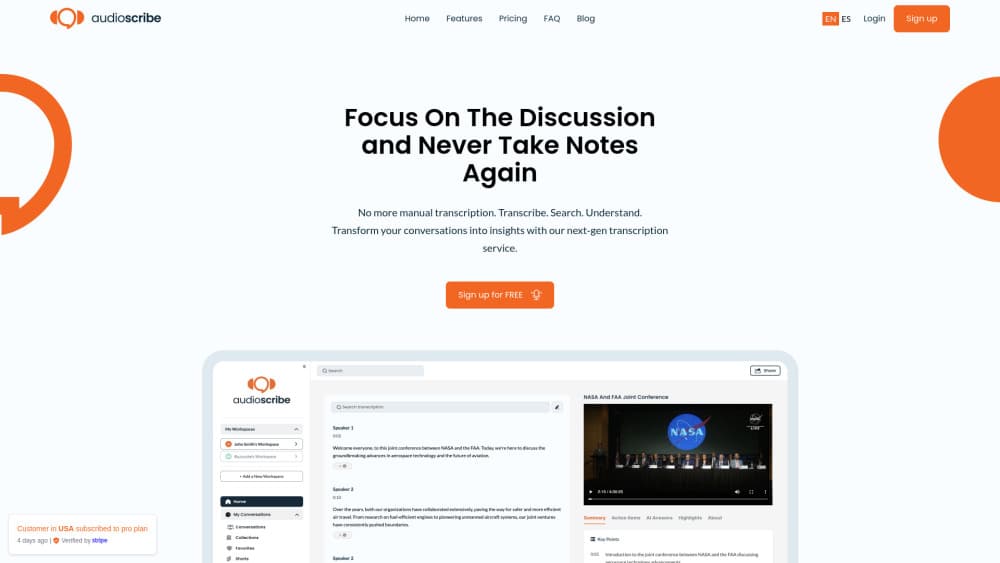
AudioScribe.io is an AI transcription web app built for meeting transcription and long recordings. It turns audio and video into searchable transcripts with speaker identification, AI summaries and chat.
About AudioScribe - AI Transcription
What Is AudioScribe.io
AudioScribe.io is a web app that converts your own recordings into accurate, searchable transcripts. It targets long-form, multi-speaker material: interviews, research sessions, lectures and podcast tapings. Upload a file and you get an audio to text result you can read, search and quote, with speaker labels attached to every line.
The name is worth a warning. Several unrelated products use AudioScribe, including a court-reporting tool at audioscribe.com. This one lives at audioscribe.io and app.audioscribe.io, run by AudioScribe Technologies, LLC since 2024.
What separates it from a plain video transcription tool is what happens after the text lands. Every transcript carries a speaker timeline, and you can rename a speaker across the whole file at once or fix a single word. AI summaries give you the short version, and a built-in chat answers your questions.
The limits matter as much as the features. Free tools on the site cap files at 5 minutes, a free account covers 3 files a day at up to 25 minutes each, and only the $19.99 Standard plan lifts the cap to 10 hours per file. Standard is also where speaker identification and 18-language support sit, so the free tier is a trial rather than a working setup. There is no self-serve API, and enterprise work routes through a sales contact.
Getting Started
- Open the site and use a free tool to test the accuracy on a short clip. No signup is needed, and files run up to 5 minutes.
- Create a free account if the test looks good. That raises the daily allowance to 3 files at up to 25 minutes each.
- Upload your recording, then let the app identify speakers and build the speaker timeline.
- Rename speakers across the file, correct individual words, and read the AI summary to get the short version.
- Ask the built-in chat a question, or use full-index search to jump to the moment something was said, then export to TXT, SRT or VTT.
Product Information
A quick look at AudioScribe - AI Transcription's pricing, supported platforms, and performance.
Best for
The users, tasks, and scenarios where this tool fits best.
Users
- Journalists and researchers
- Students
- Podcasters
- Freelancers and small businesses
Tasks
- Turning a recording into a readable transcript
- Summarizing a long session
- Finding a specific quote
- Asking questions of your archive
- Producing subtitles
Scenarios
- A week of back-to-back interviews
- A semester of lectures
- A podcast episode post-production
- An interview-heavy research project
Key features
Multi-speaker transcription
AudioScribe.io labels who said what and builds a speaker timeline for each recording. You can rename a speaker everywhere in the file at once, or reassign a single line down to a single word. That matters for interviews and panels where mixing up two voices ruins the transcript.
AI summaries
Each transcript comes with a summary that gives you the short version of a long session. It suits catching up on a meeting or lecture you could not attend live, or turning a two-hour recording into something you can scan in a minute.
AI chat and full-index search
A built-in transcript chat answers questions across your transcripts, so you can ask what a speaker said about a topic and get a direct answer. Full-index search works the other way, taking a keyword and returning the exact moment it appears.
Synced video playback
For video files, playback stays in step with the transcript. Click a line and the footage jumps to that point, which helps when you need to verify what was actually said rather than trust the text alone.
Multi-format export
Transcripts export to TXT, SRT and VTT. TXT covers plain reading and editing, while SRT and VTT feed subtitle workflows, so the same transcript serves both your notes and your video captions.
18-language support and speaker identification
On the Standard plan, AudioScribe.io handles 18 languages and identifies speakers within them. That combination suits multilingual interviews and international research where a single-language tool would fall short.
Mobile recording
AudioScribe.io ships iPhone and Android apps alongside the web app. You can record meetings, lectures and calls on a phone, then open and search them from any device you sign into.
Pros and cons
Pros
- Built for long, multi-speaker recordings: speaker identification and a speaker timeline handle interviews and panels that trip up lighter tools.
- Summaries and chat cut review time: you can skip re-listening to a two-hour session to find one answer.
- Synced playback: the transcript and the video stay in step, so checking a quote against the footage takes seconds.
- Mobile plus web: record on a phone and search later from any device you sign into.
- Practical export formats: TXT, SRT and VTT cover both reading and caption workflows.
Cons
- The free tier is a trial, not a setup: 3 files a day at up to 25 minutes each, with speaker identification and 18 languages locked to the paid plan.
- No self-serve API: teams that want to wire transcription into their own software have only an enterprise sales contact to start from.
- Standard is the only self-serve paid tier: $19.99 a month is a flat rate, so light users pay for capacity they may not use.
- 10-hour file ceiling: exceptionally long recordings still have to be split before upload on the Standard plan.
Frequently asked questions
AudioScribe.io turns your audio and video recordings into searchable transcripts. You upload a file and get a speaker-labeled text version with an AI summary, a chat you can question and full-index search, aimed at interviews, lectures, podcasts and research sessions.
Related content
Explore related tools, skills, and articles for AudioScribe - AI Transcription.
AudioScribe - AI Transcription Alternatives

Google EmbeddingGemma 2
Google DeepMind · Writing · Image · CodingGoogle EmbeddingGemma 2 is a 740M-parameter open model that turns text, code, images, audio, and video frames into vectors in one 768-dimension space, running on phones and laptops.

MePersona
MePersona, Inc. · Writing · Productivity · MarketingMePersona is an AI unified inbox for creators. It learns your voice, drafts replies to fan messages from 12 platforms, and sends only what you approve.

Fluence
Yay Software (Yannick Huchard) · Writing · Voice & Language · ProductivityFluence is an Android app that reads PDFs, EPUBs, Word files and web articles aloud, follows each sentence as it speaks, and answers questions about the text on the phone itself.