
AUTO SNS
UniqueGAI LLC · Marketing
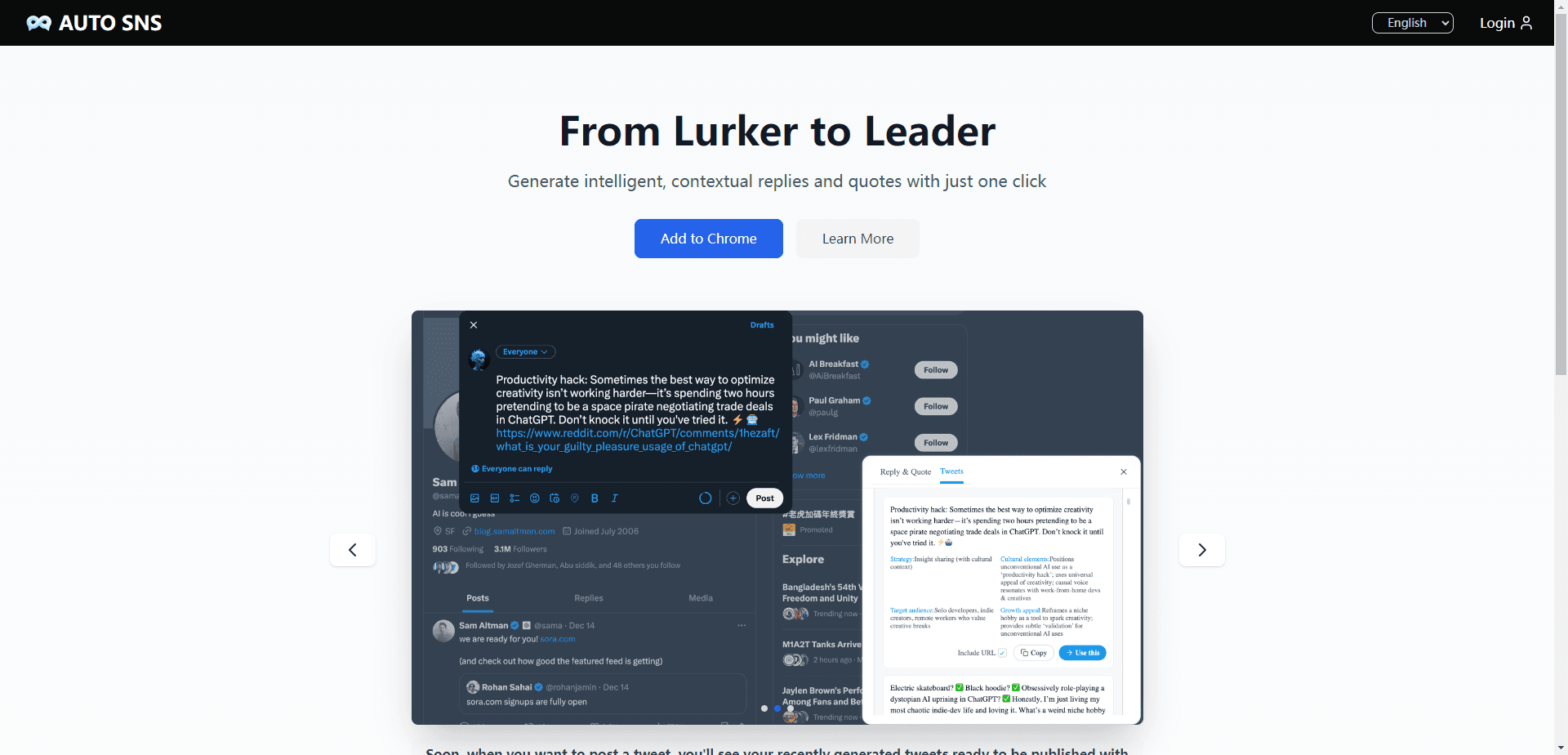
AUTO SNS is a Chrome extension that drafts context-aware replies, quote tweets, and post ideas for X, with tone presets and saved drafts for faster engagement.
About AUTO SNS
What Is AUTO SNS
AUTO SNS is an AI reply generator built for one platform: X, formerly Twitter. You install the extension, open a tweet, and a small panel appears in the bottom right corner of the page. From that panel you generate several reply options, pick a tone, and send the one that fits.
Most twitter reply extension tools ask you to paste a tweet into a separate window. This one works as a chrome extension for twitter, so the post you're reading is the input.
The product comes from UniqueGAI LLC, a small software company based in Boulder, Colorado. The Chrome Web Store lists version 1.0.4, published on December 26, 2024, with a 533 KB download and an interface in English, Chinese, Japanese, and Korean. The official site still calls the service a testing phase release.
Two limits matter before you install it. Everything runs in desktop Chrome, so there's no mobile app and no Safari build. The release cadence has also been quiet, with no update since December 2024 and roughly 51 users at the time of writing. Treat it as a lightweight helper rather than a full social media suite.
Getting Started
- Open the AUTO SNS website and click Add to Chrome, then confirm the install.
- Log in to the X account you plan to use in the same browser profile, so the panel can read the tweets you open.
- Open any tweet and click the AUTO SNS panel in the bottom right corner, or right-click the page to generate a handful of options.
- Pick a tone, edit the draft inside the panel, then post it or save it to your favorites for later.
Product Information
A quick look at AUTO SNS's pricing, supported platforms, and performance.
Best for
The users, tasks, and scenarios where this tool fits best.
Users
- Solo creators who post several times a day
- Social media managers juggling brand accounts
- Founders and indie developers building an audience
- Non-native English speakers
Tasks
- Replying to a busy timeline
- Writing quote tweets
- Finding something to post
- Planning a longer post
Scenarios
- Ten spare minutes between meetings
- Launch week
- Working in a second language
Key features
One-Click Reply Generation
The core move is a right-click. On any page, AUTO SNS offers to generate several tweets or replies from the content in front of you, and the Chrome listing says four reply suggestions arrive within about 10 seconds. There's no prompt box to fill and no tab switching.
Context-Aware Drafts
The extension reads the source tweet and the surrounding thread before writing. That's the difference between a generic "great point" and a reply that engages with the actual argument. Output is generated fresh each time rather than pulled from a template library, according to the vendor.
Tone and Style Controls
You can steer a draft toward witty, professional, polite, or concise before it's written, which matters when the same account answers a customer, a peer, and a critic in one afternoon. Four creation modes cover different post formats, and you can regenerate until a line lands.
Quote Tweet and Thread Planning
Beyond single replies, the site runs a quote tweet generator and tools for tweet ideas and thread outlines. Each one asks for a topic, audience, and goal, then returns angles, hooks, or a tweet-by-tweet structure. Useful for planning a week of posts in one sitting.
In-Feed Panel With Saved Drafts
On X, the creation panel sits in the bottom right corner, so you never leave the timeline to write. Drafts you like can be saved and reused later, which helps when a good line arrives at a bad moment.
A Narrow, Focused X Engagement Tool
Everything here points at one network. That focus keeps the panel simple and the drafts on-topic, and it means the tool never asks you to configure five accounts before the first reply. The trade-off is coverage: this is an X engagement tool, not a scheduler for every network you post to.
Multilingual Output
The interface ships in English, Chinese, Japanese, and Korean, and the generator can produce text in more than one language. For accounts that post to two audiences, you can draft in the language of the thread instead of translating after the fact.
Pros and cons
Pros
- Fast path from reading a tweet to having four usable replies, which removes most of the friction from daily engagement.
- Tone presets and regeneration give you control without writing a prompt.
- The panel stays inside X, so drafting never breaks your browsing flow.
- Quote tweet and thread tools cover the planning side, not just one-off replies.
- Free to install, with no account data sold according to the developer's Chrome Web Store disclosure.
Cons
- Works on X only. Anyone managing LinkedIn, Threads, or Instagram still needs another tool.
- Desktop Chrome only, so you can't answer from your phone.
- No public price list. The listing mentions in-app purchases, but the cost of extra usage isn't stated anywhere on the site.
- Quiet development and a tiny user base mean fewer reviews to trust and no guarantee of long-term support.
Frequently asked questions
It writes replies, quote tweets, and post ideas for X. You open a tweet, generate options, choose a tone, and post the draft you like. The extension handles the writing, not the publishing.
Related content
Explore related tools, skills, and articles for AUTO SNS.
AUTO SNS Alternatives

ngram 2.0
ngram · Video · Marketingngram 2.0 is an AI video generator for teams. It turns a prompt, a screen recording, or a product URL into a narrated explainer, product demo, or AI avatar video, and every scene stays editable.

shippedit.me
Krawlup · Marketing · Businessshippedit.me now redirects to Krawlup, a web platform that audits SEO, AEO and page speed every week, then hands the fixes to AI coding agents over MCP.

MePersona
MePersona, Inc. · Writing · Productivity · MarketingMePersona is an AI unified inbox for creators. It learns your voice, drafts replies to fan messages from 12 platforms, and sends only what you approve.