

Awnsy
Alexey Doroshenko · Voice & Language · Productivity
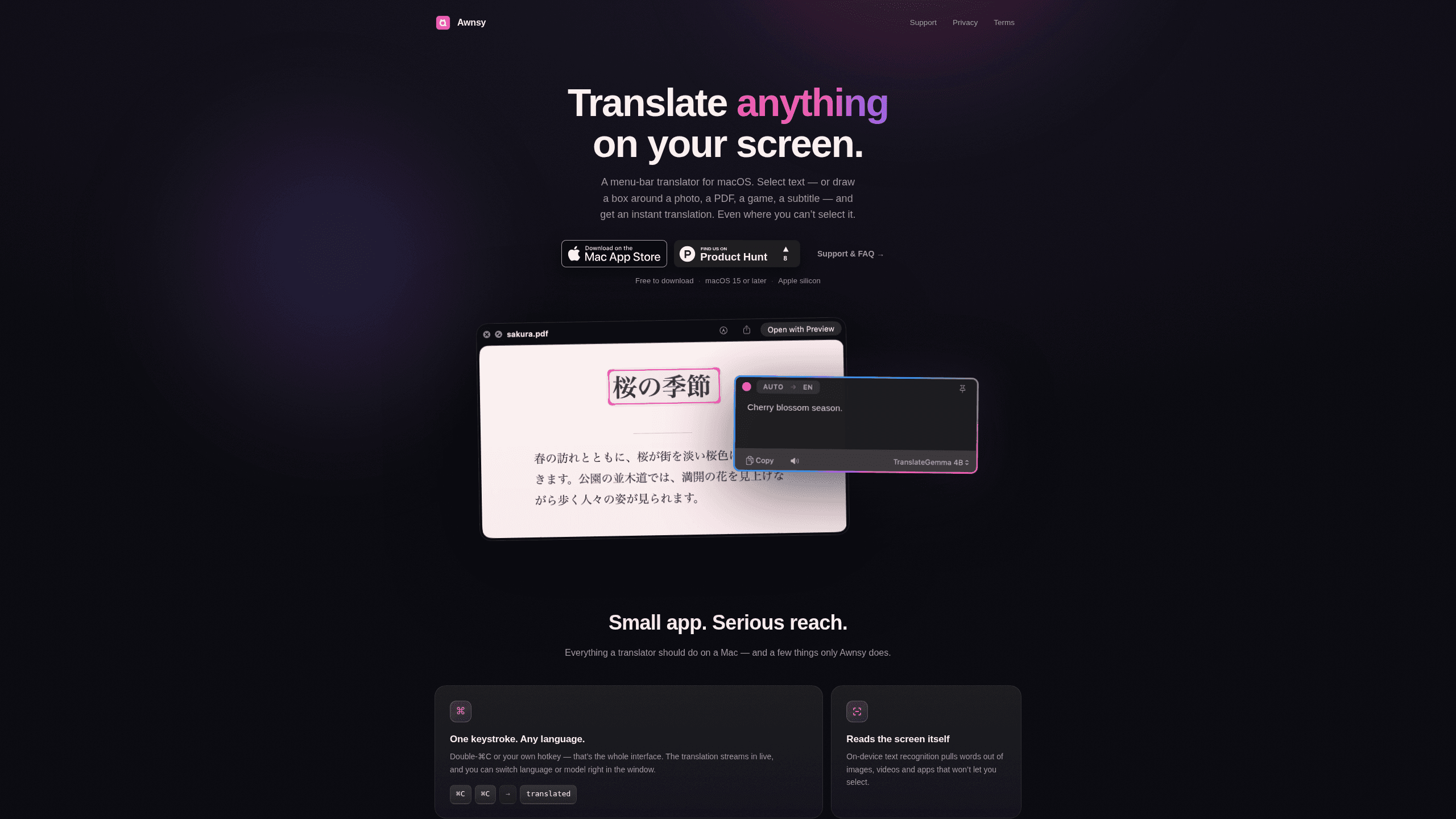
Awnsy is an AI translator for Mac that lives in the menu bar and translates text anywhere on your screen. You can copy a paragraph, press a hotkey, or draw a box around text inside an image, a PDF, a video, or a game, and the result appears in a small floating window. The built-in model runs on your Mac, so this offline translator works with no account and no sign-up. Awnsy Pro adds unlimited screen translation and a custom prompt for cloud models. If you've ever stared at a foreign-language screenshot and wished you could just read it, this Mac translation app is built for exactly that.
About Awnsy
What Is Awnsy
Awnsy solves a specific annoyance: the text you need to read isn't always selectable. A screenshot of a menu, a subtitle burned into a video, a dialog box in an app that blocks copying, a scanned PDF. Standard translate tools fall apart here because they can only work with text you can highlight. Awnsy reads the pixels instead, which makes it a solid macOS translator for the awkward cases other tools skip.
Why does that matter in practice? Think about how often you strain to read text that refuses to cooperate. A game menu in Japanese, a PDF scan from a client, a caption baked into a video. You can't highlight any of it, so copy-and-paste translation is a dead end. Where does a normal tool leave you? Stuck. Awnsy closes that gap, and if reading text out of images is your main need, this is one of the few apps that handles it on the Mac.
Awnsy is a native Swift app for Apple silicon Macs, not an Electron wrapper, and it stays out of your Dock. The on-device model handles translation without sending your text anywhere, which matters if you're working with private documents or contracts. If you want better quality on hard passages, you can plug in your own OpenAI or Anthropic key, and it stays in your Keychain.
The biggest limitation isn't translation quality. It's hardware: Awnsy needs a Mac with Apple silicon (M1 or newer) running macOS 15 or later, because the on-device model depends on Apple silicon and won't run at all on the older Intel machines. Screen recognition also leans on Apple's built-in text recognition, so it covers a solid set of languages but not every one yet. For anything it can't read from the screen, plain text translation still works with every language.
Getting Started
- Download Awnsy Translator from the Mac App Store and open it. It appears as a menu-bar icon, so there's no dock clutter to manage.
- Select some text anywhere and press the default hotkey (⌘⌥T), or double-tap ⌘C, to translate your selection instantly.
- For text you can't select, open Translate Screen Area from the menu bar and drag a box around the words in the image, video, or game.
- Optional: open Settings → Models and paste your own OpenAI or Anthropic key if you want cloud-model quality for tricky passages.
- Upgrade to Awnsy Pro if you need unlimited screen translation or a custom translation prompt.
Product Information
A quick look at Awnsy's pricing, supported platforms, and performance.
Best for
The users, tasks, and scenarios where this tool fits best.
Users
- Mac users who read a lot of foreign-language content
- Apple silicon owners on macOS 15 or later
- Privacy-conscious users
Tasks
- Translating text from images and screenshots
- Reading subtitles and on-screen text in games
- Translating app dialogs that block copying
Scenarios
- Working through a foreign-language PDF report
- Following a livestream or video in another language
- Checking a competitor's app or website UI in a language you don't speak
Key features
Translate Text You Can't Select
The core trick is reading the screen itself. Awnsy uses on-device text recognition to pull words out of images, videos, menus, and apps that block copying, and then it translates whatever it finds, which covers the exact cases where every other translator gives up and leaves you to figure it out by hand. Draw a box around the text and the translation appears in a floating window.
One Keystroke Interface
There's almost no interface to learn. Double-tap ⌘C, or set your own global hotkey, and the translation streams in live. You can swap the target language or the model right in that window without digging into settings. Fast. For people who translate dozens of times a day, that speed matters more than any feature list.
On-Device and Offline by Default
The built-in model runs entirely on your Mac. No account, no API key, no telemetry. This is the part that separates Awnsy from web translators, where your text travels to a server. If you're translating something sensitive, keeping it local is the whole reason to use an app like this.
Bring Your Own AI Model
For top quality on difficult text, you can add your own OpenAI or Anthropic key in Settings → Models. Awnsy stores it in the macOS Keychain, and it's never sent to the developer. This gives you a way to improve output quality without a separate subscription. It does mean paying your model provider directly per use, which is worth knowing before you turn it on.
Lightweight Native Build
Awnsy is written in pure Swift rather than packed into an Electron shell, so it starts fast and stays small. It lives in the menu bar and never touches your Dock. On a laptop where every bit of memory counts, a native build is a real difference.
Awnsy Pro for Screen Translation
Text translation is free and unlimited. Translate Screen Area comes with 10 free runs, and Awnsy Pro unlocks it fully plus a custom translation prompt for cloud models. Pro is sold as a monthly or yearly subscription or a one-time Lifetime purchase, with current prices shown under Settings → Awnsy Pro.
Pros and cons
Pros
- Translates text from images, PDFs, videos, and games that would otherwise be unreadable because they can't be selected.
- On-device model works offline, so your text never leaves your Mac and there's no account to create.
- Menu-bar design keeps the tool out of your way and makes daily translation a two-key action.
- Supports your own OpenAI or Anthropic key for higher-quality output on hard text.
- One-time Lifetime purchase option for people who dislike subscriptions.
Cons
- Requires Apple silicon and macOS 15 or later, so older Intel Macs can't run it at all.
- Screen recognition covers a limited language set, and unsupported languages need plain text translation instead.
- Screen translation is capped at 10 free runs before you need Awnsy Pro.
Frequently asked questions
Yes, mostly. The built-in model runs entirely on your Mac with no account or key required, so standard translation works without an internet connection. If you add your own OpenAI or Anthropic key, those cloud translations obviously need a connection.
Related content
Explore related tools, skills, and articles for Awnsy.
Awnsy Alternatives

Foley
Hanamori Labs, LLC · Voice & Language · Productivity · AI AssistantFoley is a voice to-do list that turns a spoken sentence into a filed task, complete with project, date and time, then helps you plan the day around what is already there.

HireKey
HireKey · Voice & Language · Productivity · LeaningHireKey is an AI job search copilot built by a former tech recruiter. It checks role fit, tailors resumes, runs interview practice and tracks every application.

Fluence
Yay Software (Yannick Huchard) · Writing · Voice & Language · ProductivityFluence is an Android app that reads PDFs, EPUBs, Word files and web articles aloud, follows each sentence as it speaks, and answers questions about the text on the phone itself.