

AWSME.ai
Lightbulb Moment Labs, Inc. · Marketing · Leaning · Business · Other · Chatbot
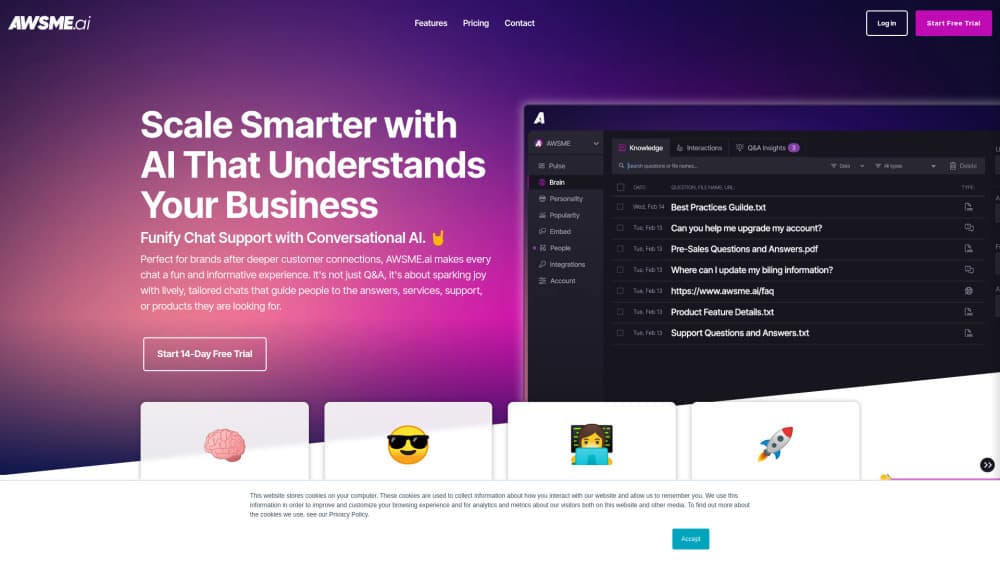
AWSME.ai is a conversational AI chatbot for websites that learns from your FAQs, files, and pages, replies in your brand voice, and routes qualified leads into tools like HubSpot.
About AWSME.ai
What Is AWSME.ai
AWSME.ai is a website chatbot you drop onto a site through a short embed code. It comes from Lightbulb Moment Labs, Inc. and targets small marketing and sales teams that answer the same questions all day. You feed it your own material, and it replies in a voice that sounds like your team rather than a script.
The job it takes over is triage. Most inbound chat is repetitive: pricing, setup, shipping, compatibility. AWSME.ai handles those conversations around the clock, and when a visitor shows buying intent it captures contact details and tags the person by stage for your CRM. That places it in the AI customer support layer first and the sales pipeline second. The company says its widgets lift engagement 42% over button-based chats, a figure that comes from AWSME itself, not from an independent benchmark.
Two limits matter before you sign up. There is no published price list, so you have to talk to sales to learn what a plan costs. And there is no public API documentation, which rules it out if you need to wire the bot into a custom stack yourself.
Getting Started
- Create an account at awsme.ai and open the dashboard.
- Feed the model. Add FAQs by hand, upload PDFs and docs, or point it at your site so it can read existing pages.
- Shape the assistant: pick colors and an avatar, then write tone instructions so replies match how your team talks.
- Generate the embed code and paste it into your site template. The widget goes live without a developer.
- Connect HubSpot or ConvertKit, then review conversation logs and visitor ratings in the dashboard and adjust the training content.
Product Information
A quick look at AWSME.ai's pricing, supported platforms, and performance.
Best for
The users, tasks, and scenarios where this tool fits best.
Users
- Marketing leads at small B2B teams
- Solo founders and lean support teams
- HubSpot or ConvertKit users
Tasks
- Answering repetitive pre-sale questions
- Qualifying and tagging leads
- Turning documentation into answers
- Supporting visitors in several languages
Scenarios
- A SaaS site getting the same five questions every day
- After-hours traffic from other time zones
- Launch week spikes
Key features
Training From Your Own Content
You load knowledge three ways: manual FAQ entries, file uploads such as PDFs, and a link to your website so the bot can crawl your pages. Answers then lean on your material instead of generic model output. The catch is quality in, quality out. Stale docs produce stale replies, so the training set needs an owner.
Embeddable Website Widget
Setup is a code snippet pasted into your site template. Standard CMS setups handle it, and no engineering ticket is required. Because it runs as an overlay, the chat follows visitors across pages instead of sitting on one contact form.
Brand Voice and Personality
Colors, avatar, and written tone instructions are configurable, so the assistant looks and sounds like part of your site. Tone controls need care. Vague instructions such as "be friendly" produce vague replies, while concrete examples of good answers work better.
Rich Media Replies
Answers can carry video, links, images, and GIFs, not text alone. That helps when a visitor wants a demo clip or a pricing link mid-conversation. It also means your best marketing assets surface inside chat instead of sitting three clicks deep in a nav menu.
Lead Capture and CRM Handoff
The chatbot collects contact details during a conversation, tags people by journey stage, and pushes them to HubSpot, ConvertKit, or another connected tool. For sales teams, this is the practical gap between a support bot and a pipeline tool. Which fields get captured depends on how you build the flow.
Feedback and Conversation Analytics
Visitors can rate answers, and the dashboard logs conversations with a quality view so weak spots become visible. This makes chatbot training an ongoing chore rather than a one-time setup. Teams that never read the logs rarely improve the bot.
Pros and cons
Pros
- Setup takes minutes. The embed code and dashboard assume a marketer, not a developer.
- Training accepts three input types, so you can start with FAQs and add documents later.
- Native HubSpot and ConvertKit connections keep lead routing simple.
- Multimedia replies let you surface demo videos and pricing links inside the conversation.
- Conversation logs and visitor ratings give you a feedback loop that budget chatbots often skip.
Cons
- No published pricing. You cannot budget from the website, and comparing options means a sales call.
- No public API documentation, so custom integrations and self-hosted workflows are out.
- Web widget only. There is no mobile app, no Slack or WhatsApp channel, and no voice option.
- The 42% engagement figure comes from the vendor, and no independent comparison backs it up.
Frequently asked questions
It puts an AI chat assistant on your website that answers visitor questions from your own content, then captures leads and passes them to your CRM.
Related content
Explore related tools, skills, and articles for AWSME.ai.
AWSME.ai Alternatives

ngram 2.0
ngram · Video · Marketingngram 2.0 is an AI video generator for teams. It turns a prompt, a screen recording, or a product URL into a narrated explainer, product demo, or AI avatar video, and every scene stays editable.

shippedit.me
Krawlup · Marketing · Businessshippedit.me now redirects to Krawlup, a web platform that audits SEO, AEO and page speed every week, then hands the fixes to AI coding agents over MCP.

MePersona
MePersona, Inc. · Writing · Productivity · MarketingMePersona is an AI unified inbox for creators. It learns your voice, drafts replies to fan messages from 12 platforms, and sends only what you approve.