
BabelShark
BabelShark · Writing
BabelShark is an AI website localization service that turns marked strings on your site or web app into a multilingual website in 170+ languages, with editable translations and per-plan word limits.
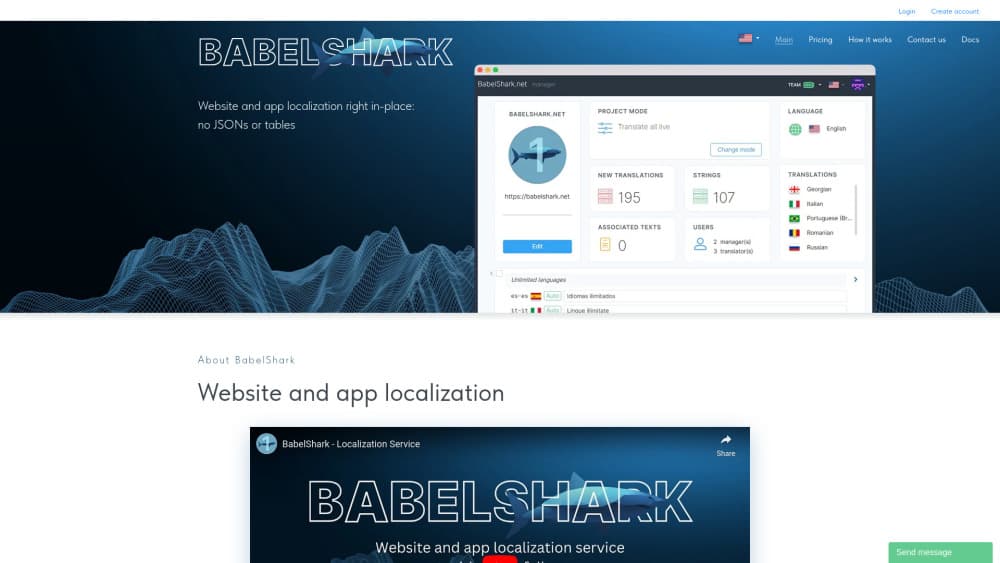
About BabelShark
What Is BabelShark
BabelShark is a localization tool for teams that ship a website or a web-based app and need it in several languages without rebuilding the frontend. You add one JavaScript snippet, mark the strings you want translated with a CSS class, and the service fills them in at runtime. No subdomains, no proxies, no DNS changes.
The trade it offers is simple. You decide what gets translated, and BabelShark handles translation, storage and delivery. That matters on real sites, where blasting a whole page through a website translation service mangles brand names, usernames and product titles. You can also hold output back until a person reviews it.
The constraints show up in the pricing model. Monthly volume is capped by plan, at 10,000 new words on the free tier and 400,000 on Pro. API access only comes with Pro. The vendor still labels the product as launching soon, so treat a few details as provisional.
Getting Started
- Create an account and a project. The free trial turns on the Team plan for your first project without a card.
- Paste the project's JavaScript snippet into your HTML, or into the entry file of a React, Vue or Angular app.
- Add the
__CSS class to the strings you want localized. - Choose target languages and one of the six working modes, then edit or approve the generated text in the dashboard.
Once translations are stored, edits propagate to every visitor. You don't export a JSON file and redeploy.
Product Information
A quick look at BabelShark's pricing, supported platforms, and performance.
Best for
The users, tasks, and scenarios where this tool fits best.
Users
- Startup founders testing a new market
- Small dev teams with no localization manager
- Agencies juggling several client sites
Tasks
- Translating a marketing site into a dozen languages
- Keeping a site and a mobile app in sync
- Reviewing machine output before launch
Scenarios
- Shipping a new landing page every week
- Running a help center in eight languages
- Entering a region where nobody on staff speaks the language
Key features
Snippet-Based Localization
BabelShark works as a JavaScript file of about 128 KB, or 44 KB compressed, that you drop into a page. It scans for elements carrying the __ class and swaps in translated text. Because nothing runs through a subdomain or proxy, your URLs, SEO setup and analytics stay as they are.
Six Working Modes
The dashboard lets you pick how aggressive the localization should be, from translating everything live to collecting strings and translating nothing. Mid-range modes show only approved text, which is the setting most teams end up on before a public launch. Switching modes doesn't require code changes.
Editable Translation Database
Automatic translation runs once per string, then the result is stored. From there you or your team edit any line, and the new version reaches all visitors. The built-in AI proofreader and reverse translation check give you a way to spot a bad string without speaking the language.
Brand and Name Protection
Glossaries and term dictionaries tell BabelShark what to leave alone. Brand names like El Corte Inglés stay intact, usernames like Lina Dragon stay intact, and terms that shouldn't be translated get skipped per language. Teams on Team and Pro can maintain their own term lists.
Visitor Language Analytics
The service reports which languages your visitors actually use and which one they pick in the switcher. That data answers a practical question: which language to add next. It's more useful than guessing from country traffic alone.
Team Workflow and API Access
Team and Pro plans add proofreaders, so several people can work through translations with review rights. Pro also opens the API, which lets you push strings and pull translations from your own build pipeline instead of the dashboard.
Pros and cons
Pros
- Setup takes minutes: one snippet and a CSS class, with no infrastructure changes.
- You control scope, so navigation, prices and legal text don't get translated by accident.
- Edits go live without a redeploy, which suits projects that change daily.
- A real free tier exists, at 10,000 new words and five languages per month.
- The same string store serves websites and web-based mobile apps.
Cons
- The 10,000-word free limit runs out fast on a content-heavy site, so most businesses end up on Team.
- API access is locked to the $90 Pro plan, which prices out small teams that only need the endpoint.
- It only fits web technologies. A native iOS or Android app built in Swift or Kotlin is out of scope.
- The vendor still marks the product as launching soon, so long-term roadmap and support depth are unproven.
Frequently asked questions
It translates the strings you mark on a website or web app and serves the translated version to visitors at runtime. You keep one source language in your code and let the service handle the rest.
Related content
Explore related tools, skills, and articles for BabelShark.
BabelShark Alternatives

Google EmbeddingGemma 2
Google DeepMind · Writing · Image · CodingGoogle EmbeddingGemma 2 is a 740M-parameter open model that turns text, code, images, audio, and video frames into vectors in one 768-dimension space, running on phones and laptops.

MePersona
MePersona, Inc. · Writing · Productivity · MarketingMePersona is an AI unified inbox for creators. It learns your voice, drafts replies to fan messages from 12 platforms, and sends only what you approve.

Fluence
Yay Software (Yannick Huchard) · Writing · Voice & Language · ProductivityFluence is an Android app that reads PDFs, EPUBs, Word files and web articles aloud, follows each sentence as it speaks, and answers questions about the text on the phone itself.