
Belindoc
Belin Doc · Voice & Language · Productivity
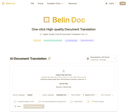
Belindoc is a free AI document translator that takes a PDF, DOCX, EPUB, PPTX, or XLSX file and gives it back in another language with the original layout still in place. It runs on top-tier AI models, including ChatGPT, Claude, Gemini, and DeepSeek, and asks for no account before your first upload. If you've ever translated a report and watched every table collapse into a wall of text, that gap is exactly what this tool targets.

About Belindoc
What Is Belindoc
Belindoc is an online document translation service built around one promise: the translated file should look like the file you sent. It handles the common office and publishing formats, plus scanned documents through OCR, and covers more than 60 languages on both the input and output side. That's the whole idea. Keep the file recognizable.
Most document translators treat layout as a nice-to-have. Belindoc treats it as the product. Tables, headings, footnotes, and images stay where the original put them, which matters a lot if you're translating a contract, a product manual, or a research paper you'll be handing to someone else. Skipped formatting means hours of manual repair, and that's the work this tool tries to remove.
The limits are worth knowing up front. The free tier gives you a set number of pages per cycle rather than truly endless use, heavier jobs run through a queue unless you pay for priority, and there's no public API yet, so you can't drop it into an automated pipeline today. Paid plans exist to raise the page ceiling and open up the stronger models. None of that kills the free version.
Getting Started
- Open belindoc.com in your browser. No registration is needed to run your first translation.
- Drag and drop your file, or pick it from your device. PDF, DOCX, PPTX, XLSX, EPUB, TXT, and image formats such as JPG and PNG are all accepted.
- Set the source and target languages, then choose which AI model handles the job.
- Start the translation and wait for processing. Turn on the email notice if you want to step away from the page.
- Download the translated document, then give the formatting a quick check before you send it anywhere.
Product Information
A quick look at Belindoc's pricing, supported platforms, and performance.
Best for
The users, tasks, and scenarios where this tool fits best.
Users
- Students and researchers
- Cross-border e-commerce sellers
- Small teams handling marketing material
Tasks
- Translating a full PDF report
- Converting an entire book or long EPUB
- Translating scanned documents
Scenarios
- Reading a foreign-language research paper on a deadline
- Localizing a supplier's spec document before a meeting
- Handling a folder of client documents in one sitting
Key features
Format preservation that holds up
The main draw is how faithfully Belindoc keeps your original layout. Tables, columns, images, and paragraph spacing survive the trip, which is the part most free translators get wrong. For documents where presentation carries meaning, that difference decides whether the output is usable.
The choice of multiple AI models
You can pick which model does the work, with options spanning ChatGPT, Claude, Gemini, and DeepSeek. Different models handle different language pairs and writing styles better, so being able to switch is more than a marketing line. The strongest models sit behind the paid tiers.
Broad language coverage
Belindoc reads and writes more than 60 languages, so the usual gaps in document translators, such as less common Asian or European pairs, are largely covered. The language picker handles both directions, so you're not hunting for a separate tool per pair.
Wide file format support
PDF, DOCX, PPTX, XLSX, EPUB, and TXT are all on the list, along with image files like JPG and PNG. That range means you can stay in one AI translation tool across office work, ebooks, and scans instead of switching services by file type. Does the format preservation translation hold up on tables and columns? In most cases, yes. Translated text without the original layout is often useless, and that's the part Belindoc gets right.
OCR and image translation
For scanned PDFs and image-heavy documents, OCR pulls the text out before translation, and there's an option to translate images inside a PDF. This is the feature that makes old scans and photographed contracts usable, not just born-digital files. Scan a signed contract, upload it, and you can translate PDF online files that are pure image.
Privacy-focused handling
Belindoc says it keeps no copy of your source text or translations on its servers. That's a zero-retention stance. That's a real consideration if you're handling contracts or internal material. The company is the source of this claim, so verify it against your own compliance needs.
Pros and cons
Pros
- Layout preservation is well above what most free document translators manage, which saves the cleanup time that usually eats the benefit of translating.
- The free tier is genuinely usable, not a teaser, so you can judge output quality on real files before paying.
- Model selection across ChatGPT, Claude, Gemini, and DeepSeek lets you match the tool to the language pair and document type.
- No account is required to start, which lowers the barrier for a one-off translation.
- OCR support extends the tool to scans and photographed documents that text-only translators can't process.
Cons
- The free plan runs on page credits per cycle rather than truly unlimited use, so heavy users hit the ceiling and either wait for the reset or buy credits.
- There's no public API yet, so you can't plug Belindoc into an automated workflow, and the company only says one is planned.
- Heavier jobs go through a standard queue unless you pay for priority, which can mean real waiting time on large files.
- The zero-retention privacy claim comes from the vendor, so anyone handling regulated or highly sensitive documents should confirm it against their own requirements.
Frequently asked questions
Yes, there's a genuinely free tier. It comes with a monthly page allowance rather than unlimited volume, so light and moderate users pay nothing. Effectively, the document translation tool is free for a normal reading load. If you translate a lot, paid plans raise the page limit and open the stronger models. Simple as that.
Related content
Explore related tools, skills, and articles for Belindoc.
Belindoc Alternatives

Prosp
Prosp · Writing · Voice & Language · MarketingProsp is an AI LinkedIn outreach tool built for agencies and sales teams, and it writes the message and the voice note in your own voice for each prospect so they actually reply. You connect your accounts, find leads, and let the AI draft and send personalized messages at scale, all from one inbox. It's built for people running outbound at volume. That's the whole pitch. Every touchpoint still has to feel human.

Wordly AI Translation
Wordly · Voice & Language · ProductivityWordly AI Translation is a real-time AI translation and captioning platform built for meetings, conferences, and events. It delivers live translation, captions, transcripts, and summaries in more than 60 languages, and attendees join by scanning a QR code or opening a link instead of using dedicated headsets. The platform works with Zoom, Microsoft Teams, Google Meet, and Webex, and it's designed for organizations that want multilingual access without hiring human interpreters for every session. Simple as that.
Musicful
Musicful AI · Voice & Language · VideoMusicful is an AI music generator and AI music video maker that turns text to music in minutes. Give it a text prompt, a set of lyrics, or a hummed melody and it returns a finished track with vocals and instruments. It also doubles as an AI song generator, produces music videos from the songs you create, and offers an AI cover tool plus a developer API. The platform runs in a web browser and through an Android app, so you can start a song on desktop and pick it up on your phone.