

Better Logger
Nedim F. · Coding
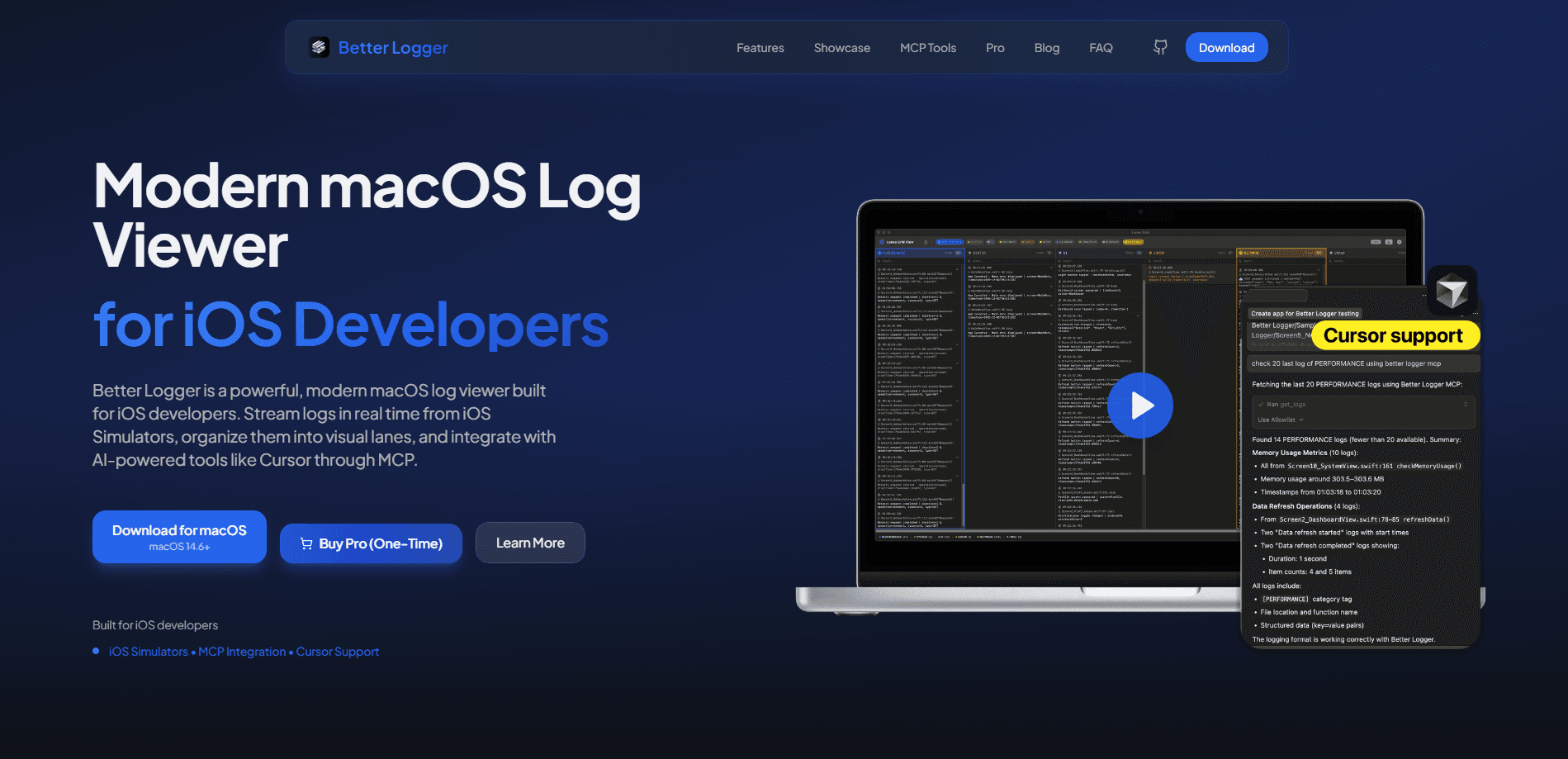
Better Logger is a macOS log viewer built for iOS developers who want to watch what their app is doing without squinting at Xcode's console, and it does that by streaming logs in real time from iOS Simulators. It drops those logs into color-coded lanes so you can mute the noise, and it exposes seven MCP tools that let AI editors like Cursor read and stream the log data on your behalf. There's a free tier and a one-time Pro purchase, so you can test it on real debugging sessions before paying.
About Better Logger
What Is Better Logger
Better Logger is a native macOS app that turns the messy stream of simulator output into something you can actually scan. Instead of a single scrolling wall of text, it separates messages into lanes by category. You toggle each lane on or off. The goal is simple: find the one error that matters without reading past a thousand lines of framework chatter.
It's built with SwiftUI and needs macOS 14.6 or later. The app connects to iOS Simulators, not physical devices. That's the biggest limitation to keep in mind. If you debug mostly on a real iPhone over cable, this won't replace your current setup yet.
The part that sets it apart is MCP (Model Context Protocol) integration, which ships seven tools that MCP-compatible editors can call. That means an AI assistant can list your simulators, pull filtered logs, or start and stop a live stream. It's a neat fit if you already run Cursor and want the agent to see runtime output, not just your source files.
Getting Started
- Download the app for macOS 14.6 or later from betterlogger.app and drag it into your Applications folder.
- Open Better Logger and start an iOS Simulator through Xcode as you normally would.
- Let the app auto-detect the running simulator, then watch logs stream in live.
- Sort the incoming entries into lanes and switch off the categories you don't care about right now.
- For AI help, point Cursor or another MCP client at the built-in tools and query the logs from your editor, which keeps the whole loop inside one window.
Product Information
A quick look at Better Logger's pricing, supported platforms, and performance.
Best for
The users, tasks, and scenarios where this tool fits best.
Users
- iOS developers on Mac
- Indie app builders
- Cursor users
- Teams sharing debug sessions
Tasks
- Tracking a crash
- Watching memory and CPU
- Exporting a session
- AI-assisted debugging
Scenarios
- Late-night bug fixing
- Code review prep
- Onboarding a new teammate
- Testing across several simulators
Key features
Real-Time Log Streaming
Logs appear as your app runs. Catch a problem the moment it shows up, not after the fact. The app auto-detects running simulators, so you skip the usual configuration step, and because detection happens in the background you can watch two or three simulators at once without wiring anything up by hand.
Lane-Based Organization
Better Logger groups log entries into color-coded lanes. You toggle lanes on and off to hide the categories you don't need. A busy console gets far easier to read. It's the feature that changes the daily routine most.
MCP Tools for AI Editors
The app exposes seven MCP log tools, including list_devices, get_logs, start_log_stream, and stop_log_stream. Cursor and other MCP-compatible editors can call them. So an AI assistant can read live logs and work with real runtime data instead of guessing from source code alone, which is the difference between an agent that actually helps and one that only pretends to. That's the part that sells it.
Export in Four Formats
You can save a session as Markdown, JSON, CSV, or plain text. So what? You can paste a clean log into a bug tracker, feed structured data into another tool, or keep a record of a tricky crash.
Memory and CPU Monitor
A Pro feature that tracks memory and CPU usage in real time while your app runs, so you can spot a leak or a performance dip during testing instead of discovering it later when real users start complaining. Watching a graph climb while you exercise a screen often explains a slowdown that logs alone never would.
Advanced Log Parsing and Source Location
The app parses incoming logs and pulls out source locations. A message points you back to the line that produced it. Combined with session management, you can revisit earlier runs instead of re-running the whole scenario. Ever hunted a bug you saw once and never again? Saved sessions fix that.
Pros and cons
Pros
- Free tier is genuinely usable, with 2 lanes, 3 session saves per week, and 3 MCP calls a day.
- Pro is a one-time $9.99 purchase rather than a subscription, and it includes future updates for whichever version you buy.
- MCP integration connects your logs to Cursor and similar editors, a trick that few competing log viewers bother to pull off.
- Auto-detects simulators, so setup stays quick and multi-device monitoring comes at no extra cost.
- Export covers Markdown, JSON, CSV, and text.
Cons
- No support for physical iOS devices, so if your bugs only appear on real hardware you'll still need a second tool for that half of the workflow.
- Requires macOS 14.6 or later, so older Macs can't run it.
- Free tier caps saves at 3 per week and MCP calls at 3 per day, which can feel tight on a busy week.
Frequently asked questions
It's a macOS log viewer for iOS developers. It streams logs from iOS Simulators in real time, sorts them into visual lanes, and connects to AI editors through MCP. The developer describes it as a faster way to see what your app is doing.
Related content
Explore related tools, skills, and articles for Better Logger.
Better Logger Alternatives
Codeflying
Kuafu Technology (Codeflying) · Coding · Marketing · ChatbotCodeflying is an AI app builder that turns a plain-language description into a working website, mobile app, or mini app. It works as a no-code app builder, so you type what you want and a set of AI agents handle requirements, architecture, front-end screens, back-end logic, and deployment. The goal is simple: build an app from a prompt, even with zero coding background. Marketing tools and a customer-facing chat agent come bundled too, so the result is more than a prototype stuck on a hard drive.

Runware
Runware, Inc. · Image · Video · CodingRunware is a generative AI inference platform that gives developers one API for image, video, audio, 3D, and language models. Instead of signing up with a dozen providers, you call a single endpoint, switch models with a one-line string change, and pay only for the requests you send. No servers to run. It's aimed at teams that want to ship AI features fast without building or babysitting their own GPU infrastructure.

Aider
Aider AI LLC · CodingAider is an open-source AI pair programming tool that lives in your terminal. You point it at a local git repo, describe what you want in plain English, and it edits the files, writes the diffs, and commits the changes for you. It connects to Claude, GPT, DeepSeek and Gemini through your own API keys, and it also runs local models through Ollama or any OpenAI-compatible endpoint. Developers who already work at the command line tend to adopt it fast. It stays out of the way. That's the whole appeal.