
Bibby AI
Bibby AI · Writing · Productivity
Bibby AI is a browser-based LaTeX editor and AI co-author built for researchers who'd rather write science than fight syntax. It wraps drafting, citation management, BibTeX validation, journal templates and PDF compilation into one workspace, with a free tier to start and no install required. If you already write papers in LaTeX, this is a writing tool that sits between you and the submission deadline.
About Bibby AI
What Is Bibby AI
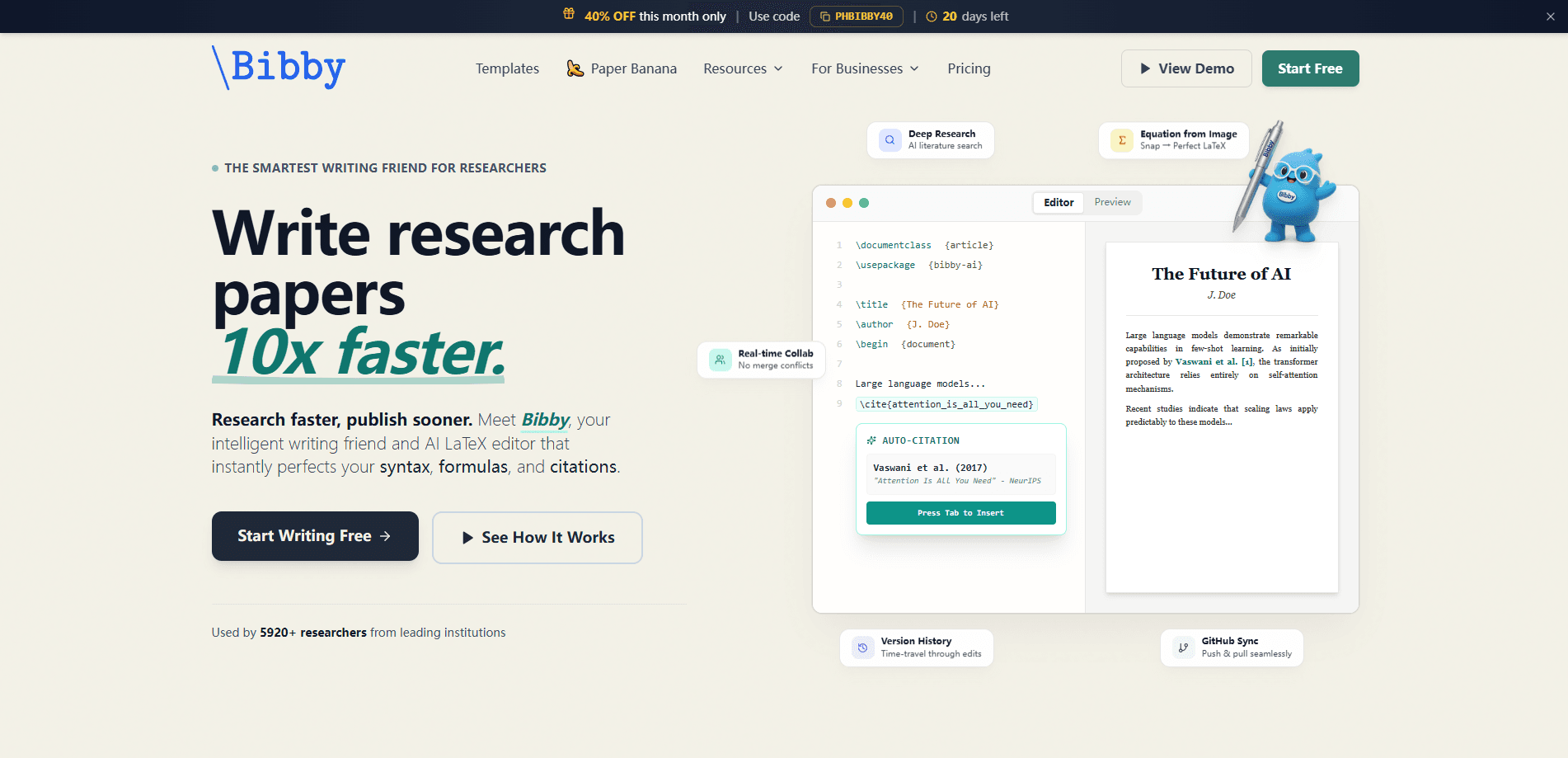
Bibby AI is a free online LaTeX editor aimed at academic writing. It pairs a real-time collaborative editor with an AI assistant that handles the parts researchers usually dread: fixing syntax, inserting citations, formatting equations, and compiling a clean PDF. The pitch is narrowing the hours spent on formatting so more of them go into the research itself.
The draw is the citation workflow. Smart search pulls from Semantic Scholar, CrossRef, PubMed and OpenAlex, writes the BibTeX key and entry for you, and verifies the DOI against Crossref before it lands in your refs.bib. Bibby also validates the bibliography you already have, and the team says it detects more citation errors than Overleaf's built-in checker and OpenAI Prism.
There are limits worth knowing. The strongest AI features, like deep research mode and unlimited figure generation, sit behind the paid tier, and the free plan caps how much you can lean on the assistant. Bibby is also LaTeX-first. If you write in Word or Google Docs, this isn't built for you.
Getting Started
- Sign up at trybibby.com with an email address. No download is needed since everything runs in the browser.
- Create a project or upload an existing one from a .zip, .tar.gz or .gz archive, then pick a venue template if you're starting fresh.
- Draft in the LaTeX editor, or let the AI co-author suggest text, abstracts and tables as you go.
- Search for a source and add it. Bibby writes the BibTeX entry and checks the DOI for you.
- Compile to PDF, review the preview, and share a read-only link with your co-authors.
Product Information
A quick look at Bibby AI's pricing, supported platforms, and performance.
Best for
The users, tasks, and scenarios where this tool fits best.
Users
- PhD students and postdocs
- Journal and conference authors
- Research teams
Tasks
- Fixing LaTeX syntax and broken equations
- Managing a reference list
- Turning a photo of an equation into code
Scenarios
- Last-minute formatting before a submission deadline
- Writing a literature review
- Collaborative revision
Key features
Smart Citation Search and BibTeX Validation
Bibby handles LaTeX citation management inside the editor. It searches Semantic Scholar, CrossRef, PubMed and OpenAlex, then writes the BibTeX key and entry and appends it to your refs.bib. The DOI gets verified against Crossref, so a citation that looks fine but points nowhere gets flagged before you submit.
AI Writing Assistant
An inline assistant offers completions and answers questions in chat, and it can draft an abstract straight from your manuscript. It's also useful at the proofreading stage, where a model reading your prose catches things a spellchecker won't.
Image-to-LaTeX Equation Conversion
Photograph or screenshot a formula and Bibby turns it into LaTeX code, which makes it a handy LaTeX equation editor for anyone who works from printed sources. Copying equations out of a printed paper or a whiteboard photo used to be tedious manual work. Now it's one step.
2,000+ LaTeX Templates
The library covers research papers, theses, resumes and conference formats for venues like NeurIPS, ICML, ICLR, CVPR, ACL, AAAI and ECCV. Starting from the right template means you spend less time matching margin and font rules by hand.
Real-Time PDF Compilation and Preview
The editor compiles to PDF as you work, so you see the formatting take shape without a separate build step. Multi-file projects, a file tree and version history keep bigger documents from becoming a mess. No build server needed.
Privacy-First Research Workflow
Bibby says research data stays on its own infrastructure rather than going to third-party AI servers. For institutions with strict rules about where manuscripts live, that matters more than any single feature.
Pros and cons
Pros
- Free plan with no installation, so you can test the online LaTeX editor on a real manuscript before paying.
- Citation search spans Semantic Scholar, CrossRef, PubMed and OpenAlex and verifies DOIs, which reduces bibliography errors.
- 2,000+ templates covering major conference and journal formats save setup time.
- Browser-based collaboration with read-only share links is easier than emailing project files.
- Photo-to-LaTeX conversion is a genuinely useful shortcut for working from printed sources.
Cons
- It's a LaTeX editor, so writers who work in Word or Google Docs won't get much out of it.
- The deeper AI tools, including deep research mode, sit behind the paid tier, so free users hit limits quickly on heavy tasks.
- It's a newer tool than Overleaf, so institutional support and third-party integrations are thinner.
- I couldn't confirm a public API, so teams planning custom integrations should check with Bibby directly first.
Frequently asked questions
There's a free plan that covers the core online LaTeX editor, templates and basic citation search, with no install required. The most demanding AI features sit behind the paid tier, and the exact free limits aren't spelled out publicly.
Related content
Explore related tools, skills, and articles for Bibby AI.
Bibby AI Alternatives

Google EmbeddingGemma 2
Google DeepMind · Writing · Image · CodingGoogle EmbeddingGemma 2 is a 740M-parameter open model that turns text, code, images, audio, and video frames into vectors in one 768-dimension space, running on phones and laptops.

MePersona
MePersona, Inc. · Writing · Productivity · MarketingMePersona is an AI unified inbox for creators. It learns your voice, drafts replies to fan messages from 12 platforms, and sends only what you approve.

Fluence
Yay Software (Yannick Huchard) · Writing · Voice & Language · ProductivityFluence is an Android app that reads PDFs, EPUBs, Word files and web articles aloud, follows each sentence as it speaks, and answers questions about the text on the phone itself.