

Biblical AI
SoftVR s.r.o. · Leaning · AI Assistant · Chatbot
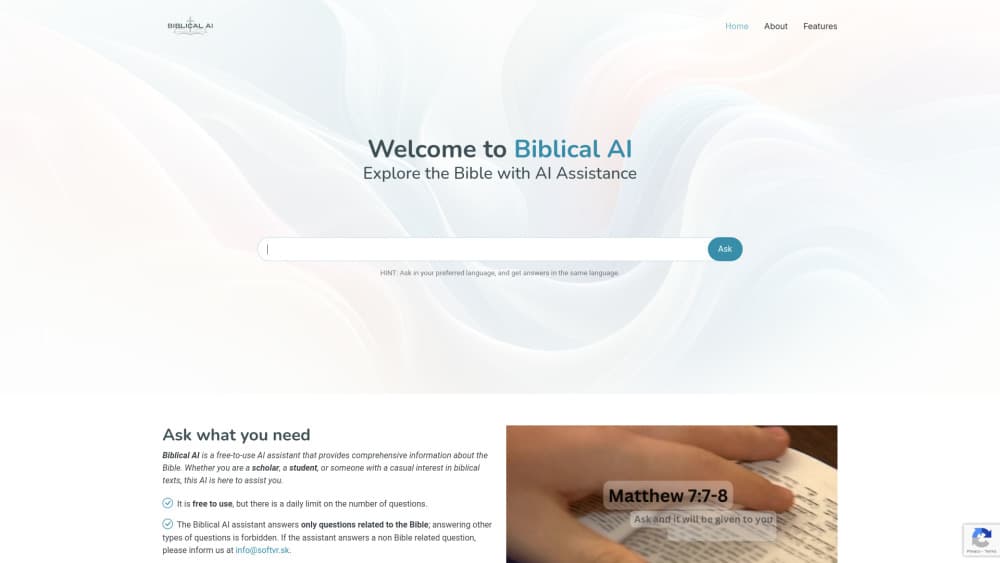
Biblical AI is a free Bible study assistant that answers questions about Scripture, explains passages inside its online reader, and pairs AI answers with theologian-reviewed Q&A.
About Biblical AI
What Is Biblical AI
Biblical AI is a free assistant built for one subject: the Bible. SoftVR s.r.o. runs it as a website and an Android app, and it handles the questions people usually bring to a commentary or a pastor. Ask what a passage means, how a theme develops across books, or what historical setting shaped a chapter, and you get a written answer in plain language.
The knowledge base pulls from several Bible translations and theological texts, and the answering engine comes from SmartiePal. That mix matters because a general chatbot tends to drift. This one stays on Scripture, and the team says it blocks questions that have nothing to do with the Bible.
The tool has limits worth knowing before you rely on it. Free use comes with a daily cap on how many questions you can send, and the cap is not published anywhere. Answers are generated, so a fine point of doctrine can still come out wrong. The reviewed Dialogues section is a separate, slower product with human editing behind it.
Getting Started
- Open biblical-ai.com in a browser or install the Android app from Google Play.
- Type a question into the chat box on the home page and send it.
- Or open Read Bible, highlight a verse, and press Explain with AI for commentary on that passage.
- Browse Verses and Dialogues when you want curated material instead of a live answer.
Product Information
A quick look at Biblical AI's pricing, supported platforms, and performance.
Best for
The users, tasks, and scenarios where this tool fits best.
Users
- Theology students and seminarians
- Small group leaders and catechists
- Curious readers with no formal training
Tasks
- Understanding a difficult passage
- Tracing a theme through Scripture
- Preparing a lesson or homily
- Finding verses for a situation
Scenarios
- A daily reading habit
- A question that comes up mid conversation
- Weekly small group prep
Key features
Questions Answered in Plain Language
The home page chat takes a full sentence, not a search string. You can ask why a prophet refused a command or what a parable meant to its first audience, and the reply comes back as short paragraphs rather than a wall of citations. Follow up in the same thread when the first answer is too general.
Online Bible Reader with Explain with AI
The reader holds the full text and lets you select any passage. One click sends the selection to the assistant, which returns commentary on meaning, context, and wording. This is the fastest way to explain Bible verses without leaving the page you are reading.
Dialogues Q&A Reviewed by Theologians
Dialogues collects real questions about faith and theology, answers them with AI, then has professional theologians review and refine the text. Each entry is dated, so you can see how recently it was published. Treat this section as the more reliable layer, since a person signed off on the wording.
Exercises in Gospel Discernment
These are short guided reflections with a clear focus, a gentle structure, and concrete actions. They suit people starting out in prayer or small communities working through a theme together. Volume II is already live, which suggests the team keeps adding sets.
Verses Grouped by Topic
The Verses library is a hand picked set of Bible verses by topic, sorted under tags like faith, forgiveness, prayer, and judging. Each entry shows the reference, so you can move from a topic list to the surrounding chapter in the reader. Handy when you need three or four passages on one subject in a hurry.
Free Access with a Daily Question Limit
You pay nothing to use the assistant or the reader. The tradeoff is a cap on questions per day that the site does not quantify. Heavy users will hit it during long study sessions, and the only workaround is to wait for the reset or lean on the static libraries.
Pros and cons
Pros
- No cost and no account wall for the assistant, the reader, or the verse library.
- The scope is narrow on purpose, so answers stay on Scripture instead of wandering into general chat.
- Selecting text in the reader and pressing one button is quicker than retyping a verse into a separate chatbot.
- Dialogues gives you AI speed with human theological review on top.
- The Android app makes the same material available offline from a laptop.
Cons
- The daily question limit is undocumented, so you can't plan a long session around it.
- No iOS app and no public API, which rules out iPhone users and anyone wanting to build on top of it.
- Generated answers can still misstate a doctrinal detail, and nothing in the chat flags uncertainty.
- The interface ships in English only, and the roadmap lists other languages as future work.
Frequently asked questions
Yes. The assistant, the Bible reader, the Dialogues archive, and the Verses library all cost nothing. The site funds itself through donations and puts a daily limit on how many questions the assistant will answer.
Related content
Explore related tools, skills, and articles for Biblical AI.
Biblical AI Alternatives
Kaggle AI
Google · Coding · LeaningKaggle AI is a community platform where people build, test, and compare machine learning models against shared data. It combines data science competitions, tens of thousands of public datasets, and free cloud notebooks with GPU and TPU access, so anyone with a browser can train a model without buying hardware. Google owns the platform, and joining costs nothing.

Bunch
Bunch AI · Leaning · BusinessBunch is an AI leadership coaching app that turns a few spare minutes a day into real management practice. It hands you one short, personalized tip each day, tracks how you respond, and lets you compare notes with peers inside private groups. The pitch is simple: you lead better by practicing a little, often, instead of sitting through a weekend seminar. Think of it as a leadership training app you actually open.

AI Mock Interview
SQLPad · Coding · LeaningAI Mock Interview is a practice tool built into SQLPad that simulates real job interviews and gives you instant feedback on both what you say and how you say it. You pick a role template or upload a job description, answer questions out loud in real time, and then review a transcript with notes on structure, clarity, and grammar. It's aimed at data professionals prepping for SQL, Python, data engineering, machine learning, and system design roles, and it works entirely in the browser. No install needed.