

Blokay
Blokay LLC · Marketing
Blokay connects to your SQL database and turns queries into views, forms and back-office dashboards your ops, finance and support teams can run themselves. $25 per user, plus usage.
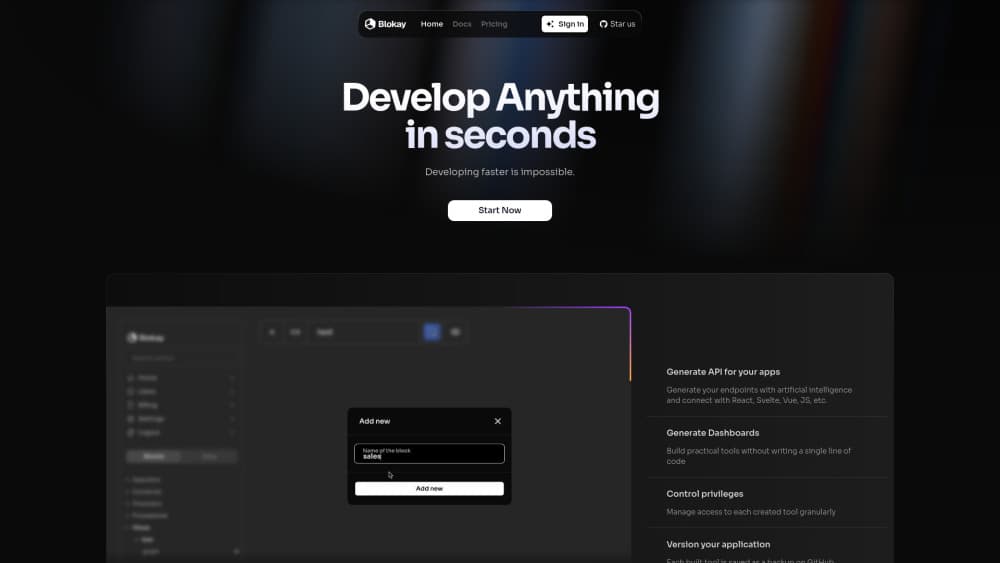
About Blokay
What Is Blokay
Blokay is a web app for building internal tools on top of a database you already run. You connect PostgreSQL, MySQL, SQL Server, MariaDB, Oracle or SQLite, write or describe a query, and get a working view with tables, filters and buttons that change records. The team that needs the report stops filing tickets, and the engineer stops exporting CSVs at the end of every week.
The problem it targets is queue time. A back-office screen for pending orders is often two days of work for someone who already has a sprint booked, so it never gets built and the work lands in a spreadsheet instead. Blokay compresses that into a query plus a few clicks. Describing the view in plain words also works: the AI agent reads the schema, writes the SQL, assembles the component and hands back something shareable.
Three limits matter before you sign up. It's built around relational databases, so warehouses and document stores aren't in the list. Someone on your side needs to understand the schema well enough to judge whether a generated query returns the right rows. And the pricing is metered, which means a chatty team that runs heavy queries pays more than a flat seat price suggests.
Getting Started
- Create a workspace at app.blokay.com and pick a name for it. Each workspace holds its own datasources, views and users.
- Connect a datasource with host, port, database and credentials, or open an SSH tunnel if the database isn't reachable from the internet. Test it against a staging copy first.
- Open the Explorer, write a SELECT statement or ask the AI for the view you want, then check the rows it returns.
- Convert the query to a view in one click, then set filters, column formats and actions like "Mark shipped" that write back to the record.
- Invite the people who need it and assign roles. Users without edit rights see only the views you give them, and their SQL stays read-only.
Product Information
A quick look at Blokay's pricing, supported platforms, and performance.
Best for
The users, tasks, and scenarios where this tool fits best.
Users
- Operations teams
- Finance analysts
- Support leads
Tasks
- Turning an existing SQL query into a shared tool
- Letting non-technical staff update records
- Scheduling recurring jobs
- Embedding a customer-facing view
Scenarios
- Replacing the weekly report request
- Opening database access without handing out passwords
- Testing an AI-built view before production
Key features
Query to view in one click
The Explorer is where most work starts. You write a SELECT statement, run it, and convert the result to a view with one click. Blokay builds the table, keeps the filters and turns hardcoded values such as a status or a city into controls the reader can change. The query stays behind the view, so nobody downstream edits SQL to get a different slice.
AI agent that builds on your schema
Describe what you need in plain language and the agent reads your tables, writes the query, assembles the component and leaves it ready to share. It runs against your database with the permissions of whoever asks, so a read-only user can't get a write action out of it. The prompt bar also suggests starting points like pending orders by city or a sales by month chart.
Database manager in the browser
Tables, columns, relations and sample rows are browsable without installing a client. You can run SQL from the same screen, and people who only query get read-only access by default. Private datasources stay hidden from users who shouldn't see them, the AI included.
Roles, permissions and private datasources
Three roles cover most teams: admin, editor and user, with finer permissions set per person. Each user sees only the views assigned to them, and each datasource can be hidden from specific people. The sandbox and SSH tunnel options let you test against staging or reach a private database without exposing it to the internet.
Scheduled jobs with execution history
Any view or block can run on a schedule, from every fifteen minutes to a weekly report on Monday morning. Runs show up in the history with what happened and how long it took, which is the difference between a job you trust and one you check by hand. Alerts can go out when a threshold breaks, such as three products below minimum stock.
Views you can embed in your own product
Every view is a web component. Drop it into HTML, React, Vue, Next.js, Angular or Svelte and your customers see their data with their own session, without you building a separate back office. That covers the case where an internal tool turns out to be a customer feature.
Pros and cons
Pros
- Six database engines are supported out of the box, including PostgreSQL, MySQL, SQL Server, MariaDB, Oracle and SQLite, so there's no migration or replica to maintain first.
- Nothing is gated by plan. AI, permissions, automations, unlimited views and unlimited datasources come with every workspace, and the bill follows usage.
- Credentials stay on the server and read-only users can't change data, which makes it easier to justify giving a wider group database access.
- Every view is backed up to your own GitHub repository, so the code behind a tool is versioned and portable.
- The MCP server lets Claude, ChatGPT, Cursor or Claude Code act as you, querying read-only and running blocks within your role.
Cons
- Someone has to understand the schema. The AI writes plausible SQL, and only a person who knows the tables can tell a correct result from a convincing one, so a team with no data literacy will struggle at setup.
- Metered pricing is harder to forecast than a seat price. Executions, CPU hours, crons and data in and out each add to the bill, and a query that scans a large table repeatedly costs real money.
- There's no free plan or trial. You start on a paid workspace at $25 per user, so testing the product properly means committing before you know whether it fits.
- It's web only and built for relational data. There's no mobile app, no direct support for warehouses or NoSQL stores, and embedding still assumes a developer to place the component.
Frequently asked questions
Blokay builds internal tools on top of a database you already have: order queues, stock reports, finance dashboards and forms that update records. The output is a view your team opens in the browser, not a separate application you maintain.
Related content
Explore related tools, skills, and articles for Blokay.
Blokay Alternatives

ngram 2.0
ngram · Video · Marketingngram 2.0 is an AI video generator for teams. It turns a prompt, a screen recording, or a product URL into a narrated explainer, product demo, or AI avatar video, and every scene stays editable.

shippedit.me
Krawlup · Marketing · Businessshippedit.me now redirects to Krawlup, a web platform that audits SEO, AEO and page speed every week, then hands the fixes to AI coding agents over MCP.

MePersona
MePersona, Inc. · Writing · Productivity · MarketingMePersona is an AI unified inbox for creators. It learns your voice, drafts replies to fan messages from 12 platforms, and sends only what you approve.