

BookGraph
BookGraph · Leaning
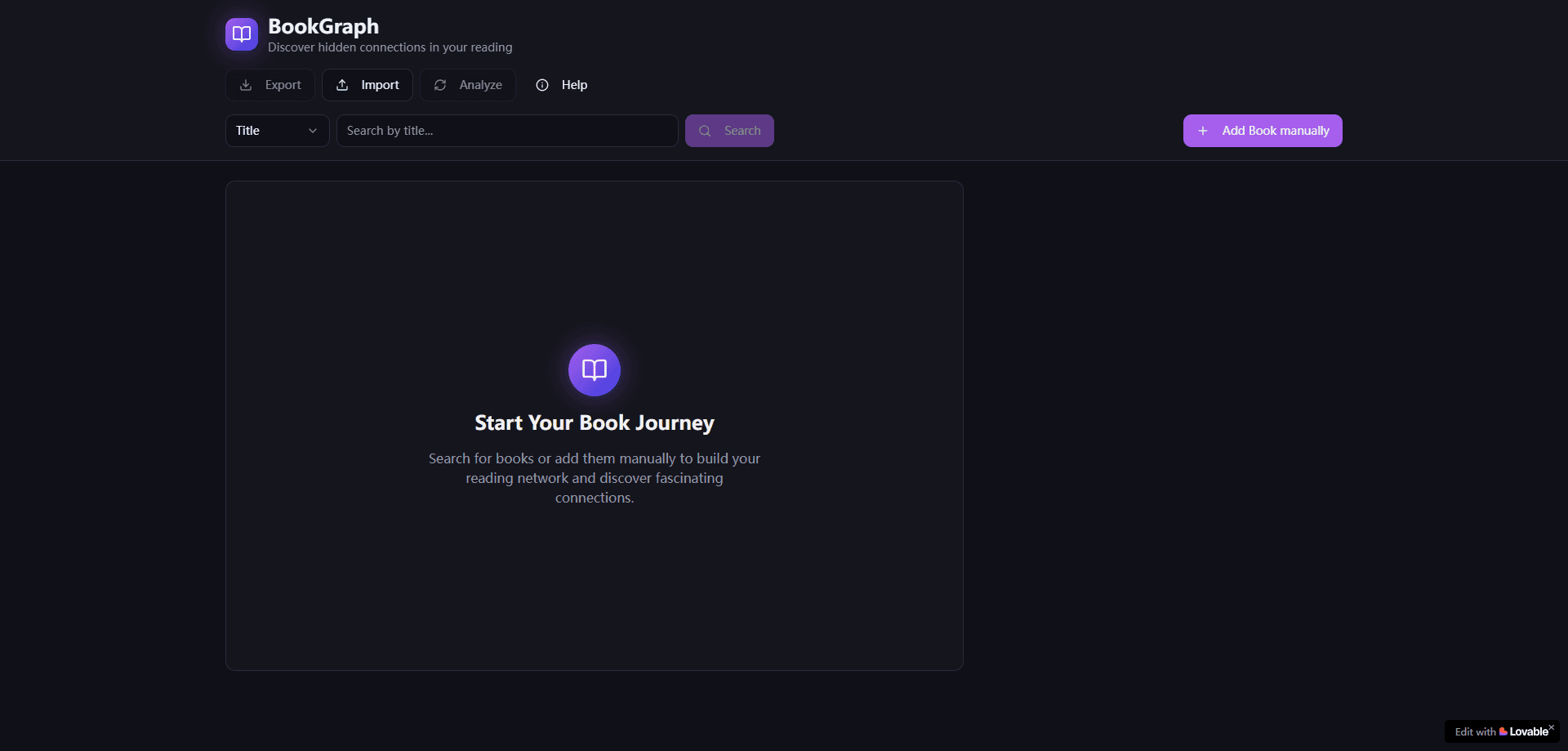
BookGraph is a free browser-based app that turns your reading list into a visual map of how your books connect. Think of it as a book connection visualizer. You search for titles by name, author, or ISBN, and the tool pulls descriptions and subjects out of public databases, traces the themes they share, and then lays everything out as one interactive knowledge graph. It suits readers who want a reading network map across what they've read, and who'd rather pick their next book from those patterns than from a bestseller list.
About BookGraph
What Is BookGraph
BookGraph is an interactive web tool that helps you visualize book connections across your whole collection. Instead of sorting your shelf by genre or author, it reads the themes inside each title and draws lines between the ones that share ideas, so you can spot clusters you never noticed.
The main problem it tackles is scattered reading. Most people finish a book, add it to Goodreads, and never see how it relates to the twenty others sitting next to it. BookGraph turns that flat list into a connected network, which helps both with picking the next read and with understanding what your own taste actually looks like.
The big limit is data. BookGraph leans on public book metadata and a text analysis method called TextRank, so the connections are only as good as the descriptions available. Obscure or self-published titles with thin listings may land on the graph with weak or missing links. It's also a read-only visualizer at heart, so it won't replace your library manager.
Getting Started
- Open bookgraph.lovable.app in your browser and launch the app; no account is needed to start.
- Search for a book by title, author, or ISBN, then add it to your collection.
- Import an existing library from Goodreads or Babelio with a CSV file if you already track your reads elsewhere.
- Run the analysis so BookGraph retrieves metadata and works out the semantic links between your titles.
- Explore the graph by dragging, zooming, and panning, then export your collection as JSON to save it.
Product Information
A quick look at BookGraph's pricing, supported platforms, and performance.
Best for
The users, tasks, and scenarios where this tool fits best.
Users
- Avid readers
- Book club members
- Students and researchers
Tasks
- Mapping your reading network
- Finding your next read
- Spotting overlooked themes
Scenarios
- Cleaning up years of scattered reads
- Planning a themed reading month
- Prepping a recommendation
Key features
Interactive knowledge graph
The core view is a responsive D3 graph where every book is a node and every shared theme is an edge. You can drag nodes, zoom in on dense clusters, and pan across the whole map. A big library stays readable. That's the point.
Intelligent search
BookGraph searches by title, author, or ISBN across an enriched book database. Type a partial title and it suggests matches with their metadata attached. Adding a book takes a few seconds.
Automatic metadata enrichment
Once a book is in your collection, the app pulls descriptions, subjects, and other metadata from multiple public sources. That data is what feeds the semantic analysis, so richer listings produce sharper connections.
Semantic analysis with TextRank
The app runs TextRank over book descriptions to work out which titles share meaning, not just keywords. It's the engine behind the links you see, and it's the reason a literary novel and a history book can end up connected. Keyword matching alone would never catch that.
CSV import from Goodreads and Babelio
You can bring an existing library in through a CSV export from Goodreads or Babelio, with automatic enrichment applied to each imported title. It's the fastest way to get a large collection onto the graph. No manual entry needed.
JSON export and import
Your whole collection, along with its structure, saves to a JSON file you can reload later. That doubles as a backup and as a way to move your graph between browsers, which matters when you've spent an hour importing and tuning a large library and don't want to lose that work.
Pros and cons
Pros
- Free to use with no account required to start exploring.
- Visual approach makes cross-genre connections obvious in a way a list never does.
- Goodreads and Babelio import means you don't rebuild your library by hand.
- JSON export gives you a portable backup of your collection.
- Search by title, author, or ISBN covers most ways you'd look up a book.
Cons
- Connections depend on public metadata, so obscure titles often show weak or no links. If your shelf is full of niche reads, the graph may look thin.
- There's no mobile app, so you're tied to a browser. Reading a dense graph on a phone screen is cramped.
- It won't manage your library the way Goodreads does. There's no reading progress, reviews, or ratings.
Frequently asked questions
Yes. BookGraph is a free web app, and there's no paid tier listed. You can search, import, analyze, and export without paying.
Related content
Explore related tools, skills, and articles for BookGraph.
BookGraph Alternatives

Kaggle AI
Google · Coding · LeaningKaggle AI is a community platform where people build, test, and compare machine learning models against shared data. It combines data science competitions, tens of thousands of public datasets, and free cloud notebooks with GPU and TPU access, so anyone with a browser can train a model without buying hardware. Google owns the platform, and joining costs nothing.

Bunch
Bunch AI · Leaning · BusinessBunch is an AI leadership coaching app that turns a few spare minutes a day into real management practice. It hands you one short, personalized tip each day, tracks how you respond, and lets you compare notes with peers inside private groups. The pitch is simple: you lead better by practicing a little, often, instead of sitting through a weekend seminar. Think of it as a leadership training app you actually open.

AI Mock Interview
SQLPad · Coding · LeaningAI Mock Interview is a practice tool built into SQLPad that simulates real job interviews and gives you instant feedback on both what you say and how you say it. You pick a role template or upload a job description, answer questions out loud in real time, and then review a transcript with notes on structure, clarity, and grammar. It's aimed at data professionals prepping for SQL, Python, data engineering, machine learning, and system design roles, and it works entirely in the browser. No install needed.