

Botacts
Botacts · Other · Chatbot
Botacts is a free AI bot directory of assistants you can actually reach without installing an app. It organizes 248 bots by the channels they answer on, including phone, SMS, WhatsApp, Telegram, and email, and by what they do, such as travel planning, inbox help, or music identification. Think of it as a phonebook for AI. You look up a bot, read a short description, and contact it on the channel you already use.
About Botacts
What Is Botacts
Botacts collects AI assistants and bots in one searchable place, with a strong focus on the ones you can contact directly through a phone number or a messaging app rather than a lengthy signup form. Its makers describe it as the "phonebook of AIs," and the list lines up with that idea. Each entry shows a short summary, the contact methods available, and a rating. That way you judge a bot before reaching out.
The main problem it solves is discovery. This AI assistants directory does the legwork. New AI assistants launch constantly, and most live inside a specific app or a single chat platform. Without a directory, you'd never know a useful travel bot exists on WhatsApp or that a health history assistant answers phone calls. Botacts puts those options side by side.
The catch is scope. It's a listing site. Not a tool you use directly. It doesn't run any of the bots, verify every claim they make, or manage billing. You'll still visit each bot's own site or chat to actually use it, and quality varies widely across the list. Some entries have no reviews at all.
Getting Started
- Open botacts.com in any browser. There's no account needed for browsing.
- Browse by channel (Phone, SMS, WhatsApp, Telegram, Email) or by label such as Productivity, Health, or Travel.
- Click a bot to see its summary, contact details, and any user ratings.
- Reach the bot on its listed channel, or follow the link to its own site to sign up.
- Optionally join the newsletter to get notified when new bots are added.
Product Information
A quick look at Botacts's pricing, supported platforms, and performance.
Best for
The users, tasks, and scenarios where this tool fits best.
Users
- People who want an AI assistant without installing another app
- Beginners who treat a chatbot directory like a search engine
- Travelers and commuters
- Small business owners checking out AI options
Tasks
- Finding a bot for a specific job
- Comparing contact methods
- Vetting a bot before use
Scenarios
- Testing a voice AI for the first time
- Quick research on a niche tool
- Keeping up with new releases
Key features
Channel-Based Browsing
Botacts sorts its listings by how you contact each bot. Phone, SMS, WhatsApp, Telegram, and email are all tracked separately, and the site reports the live counts for each one right on the browse page. WhatsApp leads with over 100 entries, Telegram follows with 85, and phone-based bots number 26. That split matters because it tells you straight away which bots fit your habits.
Label Filtering Across 25 Categories
Every bot carries one or more labels, covering areas like Productivity, Health, Travel, and Finance, and the site spells out how many entries sit under each one. The label counts are shown up front, so Productivity (55) and Health (46) are the heavy categories. You can skim a category before deciding if the niche is worth your time. No need to scroll a flat list.
Curated Featured Picks
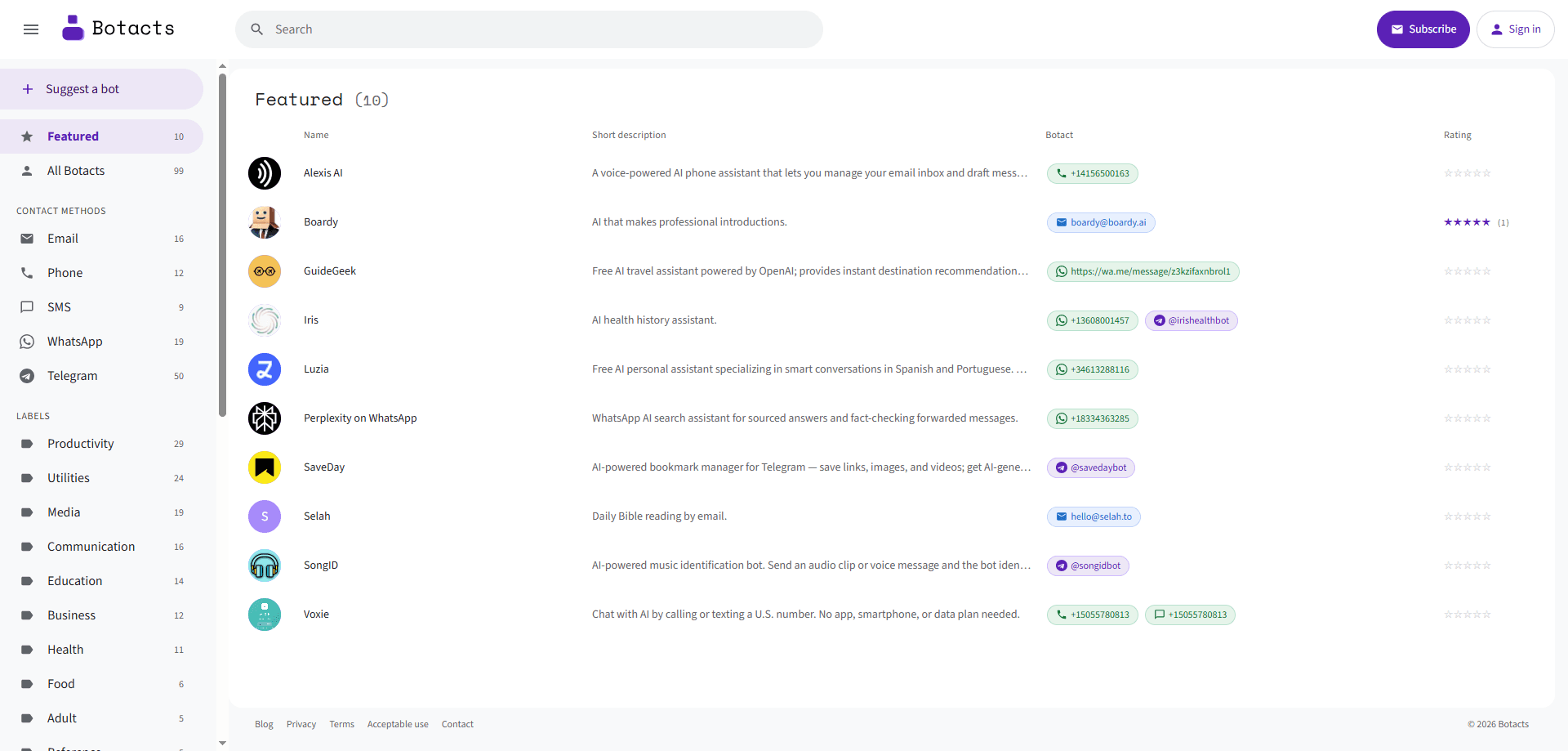
The homepage highlights a small set of bots instead of dumping the full catalog on you. Recent features include Perplexity on WhatsApp, the travel assistant GuideGeek, and SaveDay, a Telegram bookmark manager. Not sure where to start? The featured row gives newcomers a first step, so you don't have to guess a search term.
Contact Details Without an App
Many listings point to a phone number or a chat handle rather than a download. That's the point for services like Voxie, which works over a US number with no app, smartphone, or data plan required. For anyone without space for another install, this is the fastest route to a working assistant.
Ratings and Short Summaries
Each entry carries a brief description and a star rating. Listings like Boardy show real user feedback. Plenty sit at zero reviews. The summaries stay short and factual, and they tell you what the bot does in a sentence or two. That's enough to decide whether to look closer.
Newsletter for New Bots
You can subscribe to get notified when bots are added. Those AI assistants appear fast. A digest is more practical than rechecking the directory. It's free, and it doubles as a way to catch new contact methods as messaging platforms expand.
Suggest-a-Bot Submission
There's a submission path for recommending a bot that isn't listed yet. That keeps the catalog growing from the community rather than a single editorial team, which helps niche and regional bots get found.
Pros and cons
Pros
- Free to browse, with no account required for the core directory.
- Focuses on bots you can reach by phone or messaging app, not just web-only tools.
- Channel and label filters make a 248-entry catalog quick to scan.
- Short summaries and ratings help you filter candidates before contacting anyone.
- Newsletter keeps you current without manual repeat visits.
Cons
- It's a directory only, so you can't chat with or run bots directly on the site.
- Coverage skews toward phone and messaging bots, so pure web assistants are underrepresented.
- Many listings have no reviews, which means ratings aren't a reliable quality signal yet.
- Details can go stale when a bot changes its number or shuts down, so double-check before relying on it.
Frequently asked questions
Botacts is a directory that lists AI bots and assistants, with a focus on ones you can contact by phone number or through messaging apps like WhatsApp and Telegram. You browse the list, read summaries, and then contact each bot on its own channel.
Related content
Explore related tools, skills, and articles for Botacts.
Botacts Alternatives

Odyssey 3
Odyssey · OtherOdyssey-3 is Odyssey's foundation world model. It simulates physics in real time, turns a prompt into an interactive environment, and adapts to robots, cars and games.

JarvisCore
Prescott Data · Coding · Productivity · OtherJarvisCore is an open source Python runtime where AI agents work as equal peers on an agent mesh, claim tasks from a shared ledger, and reach external services through a zero-trust broker.
Clef
Cloudflare · Business · OtherClef is Cloudflare's open-source decision model for Workers AI. It returns calibrated probabilities for typed questions, not generated text, so agents can classify, route, and act fast.