

BotBus
Chengdu Tuyang Tusen Technology Co., Ltd. · Coding · Productivity
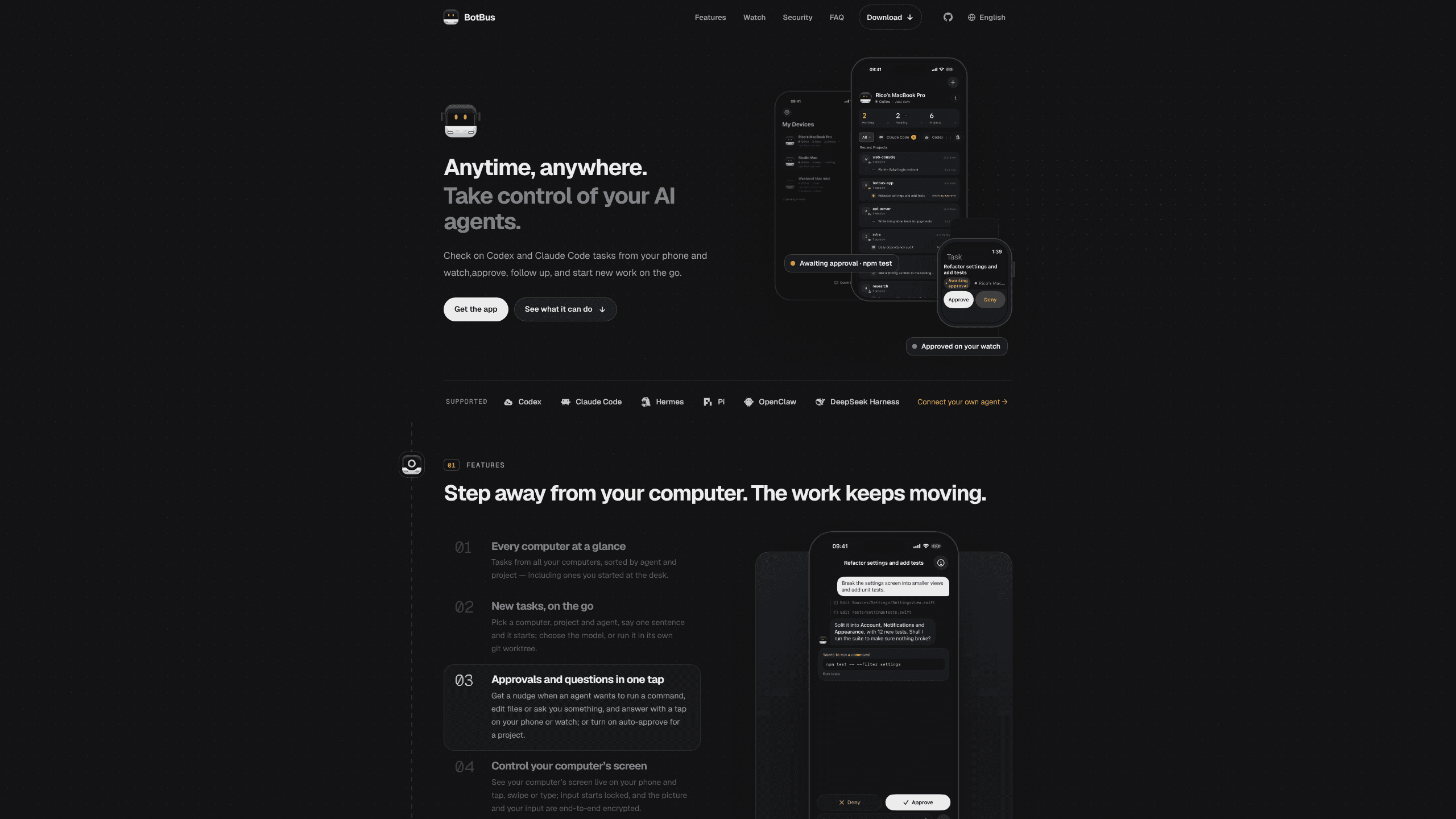
BotBus lets you control AI coding agents from your phone and watch: approve commands, start tasks and read results while the code stays on your desktop.
About BotBus
What Is BotBus
BotBus is a remote control for the AI coding agents that run on your own machine. A desktop app sits in the menu bar on Mac or the tray on Windows, finds agents such as Codex and Claude Code, and pairs with your phone through a QR code. The code stays on your computer. Only the task state travels, which is what makes it practical to monitor coding agents remotely.
The product targets a narrow gap: the minutes when an agent stops and waits. Agents pause to ask whether they may run a command or edit a file, and those pauses rarely land while you're at the keyboard. BotBus pushes the question to your phone or watch. One tap settles it and the run continues.
Control has limits. Screen control is Mac only for now, any action needs the target computer online, and some tasks arrive as read-only views. You also need recent systems: macOS 26, iOS 26, or Android 8.0 and later.
Getting Started
- Install the desktop app on the computer that runs your agents, then leave it running in the background.
- Open the BotBus menu, choose Pair a Phone, and scan the QR code with the mobile app.
- Pick a computer, project and agent on the phone, then describe the task in one sentence.
- Approve the agent's requests from the notification, and open the task later to read the output or collect the files.
Product Information
A quick look at BotBus's pricing, supported platforms, and performance.
Best for
The users, tasks, and scenarios where this tool fits best.
Users
- Solo developers
- Developers juggling several machines
- Team leads who review work
Tasks
- Approving a shell command or file edit
- Starting a small fix while out
- Checking a long refactor
- Reviewing a dev server
Scenarios
- A commute with a build running
- Meetings that run long
- Multi-machine setups
Key features
Agent discovery with no setup
Install BotBus on the computer and it lists the agents already there. Codex, Claude Code, Hermes, Pi, OpenClaw and DeepSeek Harness are built in, and agents from the ACP registry such as Gemini CLI, OpenCode, Qwen Code and Cursor appear on their own. Anything that speaks ACP can be connected through the developer docs.
Every computer in one list
Tasks sit under the computer, agent and project they belong to, and the list also holds the ones you started at the desk. Several machines and several phones can pair with each other, and each task keeps its place in the list.
Starting work from the phone
Pick a machine, a project and an agent, then type or dictate one sentence. The app lets you choose the model, change reasoning effort, or run the job in a fresh git worktree so it stays clear of your working copy.
Approvals that fit in a tap
When an agent wants to run a command, edit files or ask a question, AI agent approvals show up on your phone or watch. Projects you trust can be set to auto-approve. Interrupt and follow-up controls sit on the same screen.
Live screen control
On Mac, the desktop can be mirrored to the phone, and you can tap, swipe or type into it. Input starts locked, so a stray tap doesn't land in your editor, and both the stream and your input are encrypted on the way out.
Results and previews on the go
Screenshots, files and videos come back attached to the task. Images and PDFs mentioned in the chat open with a tap, and a dev server your agent started can be previewed in the phone browser without walking back to the desk.
Encryption that keeps the server out
Chats, tasks and screenshots are encrypted with AES-256-GCM on the device before they leave it. The key travels in the pairing QR code and lives in each device's keychain, so the relay only moves ciphertext it can't read. Pairings idle for 30 days are cleared.
Pros and cons
Pros
- Free on every platform, with installers for Mac, Linux and Windows plus apps for iOS, Android and Apple Watch.
- Built-in support for Codex and Claude Code, and any agent that speaks ACP can join, so a mixed toolchain fits in one app.
- End-to-end encrypted chats, tasks and screenshots with keys held on your devices; the relay never receives plaintext.
- Approvals, new tasks and follow-ups work from a watch, which covers the moments when reaching for a phone is awkward.
Cons
- Screen control is Mac only, so Windows and Linux users get task control without the live desktop view.
- Approving, starting or interrupting a task requires the target computer to be online, which rules out a machine that went to sleep.
- Some tasks appear as read-only views, and the app doesn't always explain why.
- iOS 26 and macOS 26 are recent releases, so older hardware is left out.
Frequently asked questions
BotBus is an app for controlling the AI coding agents on your computer from a phone or watch. A desktop app discovers local agents, and the mobile app shows their tasks, approvals and output.
Related content
Explore related tools, skills, and articles for BotBus.
BotBus Alternatives

Base Code
Base44 (Wix) · Coding · ProductivityBase Code is a shared cloud development environment from Base44. Teammates describe changes to an existing GitHub codebase in chat, preview them live and send them back as pull requests.

Google EmbeddingGemma 2
Google DeepMind · Writing · Image · CodingGoogle EmbeddingGemma 2 is a 740M-parameter open model that turns text, code, images, audio, and video frames into vectors in one 768-dimension space, running on phones and laptops.

GitGlow
GitGlow · Coding · ProductivityGitGlow is a local-first desktop Git client that lets independent developers review their own code and their AI agents' changes in one place before shipping.