
Brandblast
Brandblast · Marketing
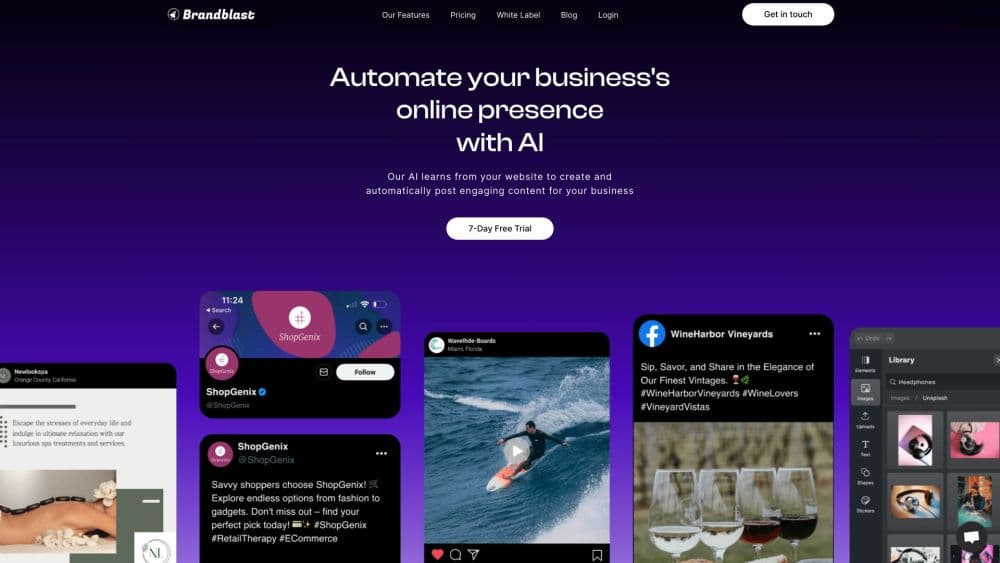
Brandblast is AI content automation for HighLevel agencies. It writes on-brand social posts and ad creatives, then schedules and publishes them across client accounts.
About Brandblast
What Is Brandblast
Brandblast is an AI content automation tool built for agencies that run client social media on GoHighLevel. You connect a brand, and the platform studies its website and existing profiles to work out tone, colors, and topics. From there it drafts AI social media posts, carousels, reels, and ad creatives without a designer in the loop.
The product exists to kill fulfillment hours. Instead of building graphics one client at a time in Canva, an agency generates a month of content in one sitting, reviews it, and lets autopost scheduling handle delivery. Brandblast calls itself a GoHighLevel content engine, and the label fits: posts flow into HighLevel's Social Planner, and agencies can resell the tool through HighLevel's rebilling and wallet features.
Three limits shape who gets value here. Pricing runs on credits, so heavy video use eats an allowance quickly. The tightest workflow assumes a HighLevel account, and other stacks lose the planner sync and client rebilling. Brand voice output also needs a real source to learn from, which means a brand with a thin website and dormant profiles will get generic copy until someone feeds it better inputs.
Getting Started
- Create a Brandblast account and pick a plan. The Starter tier covers one brand, which is enough to test output quality before moving client work over.
- Add a brand by entering its website and connecting existing social profiles, or fill in a short form when the client has no site.
- Check the brand context Brandblast built. Tone, audience, and visual direction are editable, and fixing them here saves cleanup later.
- Generate content in the editor. Pick post types, carousels, reels, or ad creatives, then edit copy and imagery before anything goes out.
- Connect the client's social accounts and switch on autopost, or send the batch to HighLevel's Social Planner for review and scheduling.
Product Information
A quick look at Brandblast's pricing, supported platforms, and performance.
Best for
The users, tasks, and scenarios where this tool fits best.
Users
- Marketing agencies on GoHighLevel
- Solo agency owners and freelancers
- Small brands without an in-house designer
- White label resellers
Tasks
- Filling a month of client social calendars
- Producing ad creatives for paid campaigns
- Making short-form video without creators
- Keeping brand voice consistent across sub-accounts
Scenarios
- Onboarding a new client in week one
- Running social fulfillment at ten to fifty accounts
- Selling content as a lead magnet
Key features
Brand Voice Capture
Brandblast learns a client's tone from the website and existing social profiles, then applies it to every post it writes. You can adjust the result by hand, which matters for regulated industries where a generated claim can't go out unchecked. The difference from a blank prompt is consistency: the same brand context feeds every format, from a single image post to a carousel.
Automated Post Creation
The content engine produces a month of posts in minutes, covering single images, multi-slide carousels, and educational reels. Each item comes with copy and a visual, so the review step is editing rather than building from scratch. Agencies that used to bill design hours per client can move that time to strategy or new business.
AI Ad Creatives
Ads are generated separately from organic posts, with copy and visuals aimed at paid placements. You describe the offer and the audience, and the tool returns creatives you can test. It won't replace a media buyer, but it removes the usual wait for a designer to turn a brief into three variants.
Autopost Scheduling
Once a batch is approved, autopost scheduling publishes it to connected accounts on a calendar. Clients see a steady feed without anyone remembering to post. You can still review and reorder items before they go live, and published history stays visible per brand.
AI Avatars and Template Editor
The avatar tool creates talking-head videos for ads and social posts, either from a cloned presenter or from a stock avatar. A template editor handles images and video edits for people without design software. Output looks polished enough for feed content. Heavily branded campaigns still benefit from a human pass.
HighLevel Sync, White Label, and Rebilling
Posts sync into HighLevel's Social Planner, where an agency can review, schedule, and publish in the workflow it already uses. On higher plans, the dashboard and client-facing pieces carry your own brand, and HighLevel's wallet and rebilling features let you mark up credits and bill automatically. That combination is why the tool fits agencies better than standalone schedulers.
Pros and cons
Pros
- A month of client content takes minutes to generate, which is the single biggest time saving for a fulfillment team.
- The HighLevel integration covers planning and rebilling, so you're not pasting links between two dashboards.
- White label plus per-client rebilling makes the tool resellable without building your own platform.
- AI avatars and templates handle short video, a format most small agencies can't produce cheaply.
- Credit pricing scales from a single brand to twenty without a separate enterprise contract.
Cons
- Credits are the real budget. The Starter plan's 12,000 annual credits work out to roughly 1,200 videos or 12,000 images, so a video-heavy client can burn through an allowance faster than expected.
- Generated copy still needs a human read. Niche industries, legal claims, and local slang are where brand voice drifts.
- The best workflow assumes GoHighLevel. On another CRM you lose Social Planner sync and rebilling, which removes much of the advantage.
- No public API is documented, so custom integrations stay limited to the Enterprise plan's custom work.
Frequently asked questions
Brandblast creates and publishes social media content for agencies and brands. It generates posts, carousels, reels, and ad creatives in a client's brand voice, then schedules them to connected accounts or hands them to HighLevel's Social Planner.
Related content
Explore related tools, skills, and articles for Brandblast.
Brandblast Alternatives

ngram 2.0
ngram · Video · Marketingngram 2.0 is an AI video generator for teams. It turns a prompt, a screen recording, or a product URL into a narrated explainer, product demo, or AI avatar video, and every scene stays editable.

shippedit.me
Krawlup · Marketing · Businessshippedit.me now redirects to Krawlup, a web platform that audits SEO, AEO and page speed every week, then hands the fixes to AI coding agents over MCP.

MePersona
MePersona, Inc. · Writing · Productivity · MarketingMePersona is an AI unified inbox for creators. It learns your voice, drafts replies to fan messages from 12 platforms, and sends only what you approve.