

Briefy
Xmind Ltd. · Writing · Leaning
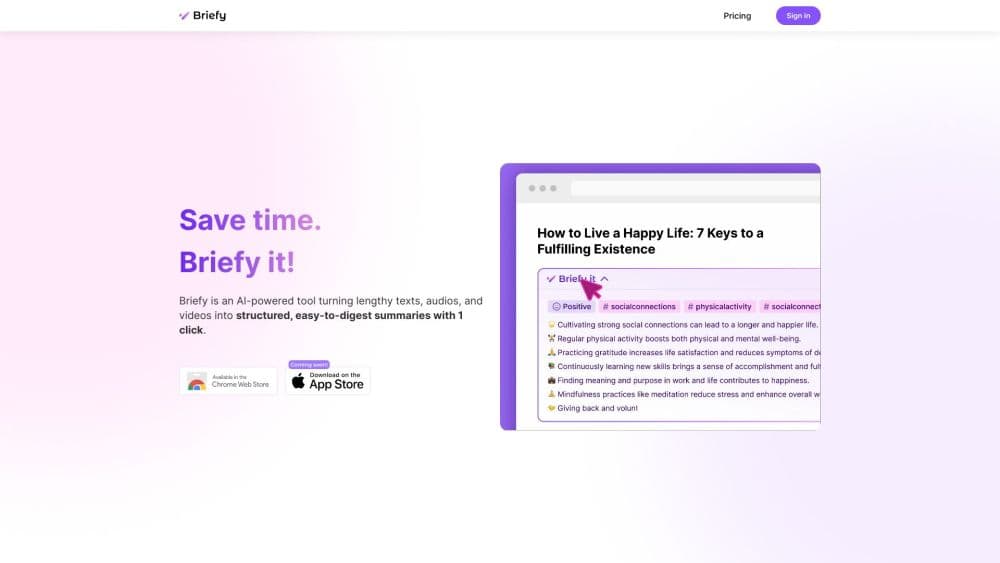
Briefy is an AI summarizer from Xmind that turns webpages, YouTube videos, PDFs, and long documents into structured briefs with overview, table, mindmap, and timeline views.
About Briefy
What Is Briefy
Briefy is a reading and research assistant built by Xmind Ltd., the company behind the mind mapping app Xmind. It works as a Chrome extension, a Safari extension, a Gmail add-on, and a web app. You open a page, a video, a PDF, or an email thread and click one button. Briefy reads the source and returns a structured summary instead of a wall of text. That makes it an AI summary tool for people who read more than they can remember.
The product's main idea is that a summary should match the way you plan to use it. A student revising for an exam may want a timeline, a consultant skimming a report may want a table, and a writer collecting ideas may want a mindmap. Briefy generates all four views from the same source and keeps each brief in a knowledge base so you can search, reopen, ask questions, and share it later.
One important caveat sits above everything else. Briefy's own site says the service will close on November 30, 2026, and that new subscriptions and credit purchases are no longer available. Existing users are told to download their files and saved content before that date. The tool still works for current accounts, but anyone starting fresh should treat it as a short term option rather than a long term home for research.
Getting Started
- Install the Chrome or Safari extension, or open the web app, and create an account with an email address.
- Open an article, a YouTube video, a PDF, or a Gmail thread, then click the Briefy button on the page.
- Pick a view: overview for a quick read, table for comparisons, mindmap for structure, or timeline for events and processes.
- Save the brief to your knowledge base, then ask follow-up questions, translate passages, or export the result before the service closes.
Product Information
A quick look at Briefy's pricing, supported platforms, and performance.
Best for
The users, tasks, and scenarios where this tool fits best.
Users
- Students and academics
- Professionals who read for work
- Content creators
- Lifelong readers
Tasks
- Summarizing a research paper
- Skimming a long video or podcast
- Clearing an inbox
- Building a personal research library
Scenarios
- Exam week
- Market research
- Pre meeting prep
- Language practice
Key features
One Click Structured Summaries
The core action is a single button on the page you are reading. Briefy extracts the main claims and returns them as organized sections rather than a dense paragraph. That structure matters when you need to compare sources or hand a summary to someone else.
Four Summary Views
Every brief can appear as an overview, a table, a mindmap, or a timeline. The overview suits quick reading, the table suits comparisons, the mindmap shows how ideas connect, and the timeline works well for news, history, and step by step processes. You can switch views without reprocessing the source.
Searchable AI Knowledge Base
Saved briefs go into a knowledge base that supports keyword search and natural language questions. You can ask what a set of documents says about one topic and get an answer with links back to the source. Sharing a brief with a teammate takes one link.
Chat With Content
Each summary has a chat panel tied to the original source. You can ask for a definition, request an example, or check whether a specific claim appears in the text. Answers stay grounded in the document, which makes the feature useful for fact checking rather than open ended brainstorming.
Multi Modal Input
Briefy accepts webpages, YouTube videos, PDFs, audio files, and video files, and it can summarize super long text up to 2 million words on paid plans. The PDF summarizer covers reports, papers, and ebooks, while the media summarizer handles recordings and podcasts.
Gmail Copilot And Multilingual Output
The Gmail extension skims long threads and helps compose a reply without leaving the inbox. Briefy can also write summaries in a language you choose and translate passages inline, which helps when your sources and your readers don't share a language.
Pros and cons
Pros
- Four output views from one source, so the same brief works for reading, comparing, and presenting.
- The knowledge base turns scattered reading into a searchable library with source links.
- A free tier with 30 credits a month lets you test the workflow without a card.
- Chrome, Safari, iOS, iPadOS, macOS, and Gmail coverage keeps the tool close to where you read.
- Chat with content stays tied to the document, which cuts down on invented answers.
Cons
- The service closes on November 30, 2026, and new subscriptions are already closed. Anything you save needs to be exported before then.
- Credits run out faster than expected on long PDFs and videos, and extra credits can no longer be purchased.
- Some advanced options, including media file summaries, are still marked coming soon on parts of the pricing page.
- The product has no public API, so teams can't wire Briefy into their own tools or automate summaries at scale.
Frequently asked questions
Briefy summarizes long content such as articles, YouTube videos, PDFs, and email threads, then saves the result to a knowledge base. It is built for reading faster and keeping what you read in one searchable place.
Related content
Explore related tools, skills, and articles for Briefy.
Briefy Alternatives

Google EmbeddingGemma 2
Google DeepMind · Writing · Image · CodingGoogle EmbeddingGemma 2 is a 740M-parameter open model that turns text, code, images, audio, and video frames into vectors in one 768-dimension space, running on phones and laptops.

MePersona
MePersona, Inc. · Writing · Productivity · MarketingMePersona is an AI unified inbox for creators. It learns your voice, drafts replies to fan messages from 12 platforms, and sends only what you approve.

Fluence
Yay Software (Yannick Huchard) · Writing · Voice & Language · ProductivityFluence is an Android app that reads PDFs, EPUBs, Word files and web articles aloud, follows each sentence as it speaks, and answers questions about the text on the phone itself.