

Browse AI
Browse AI · Coding
Browse AI is a no-code web scraper and website monitoring platform that turns almost any web page into a structured dataset or a callable API. You train an AI agent, called a robot, by clicking through the elements you want, and it repeats that task on a schedule. It suits teams that need product prices, listings, or competitor pages tracked without maintaining scraping scripts.
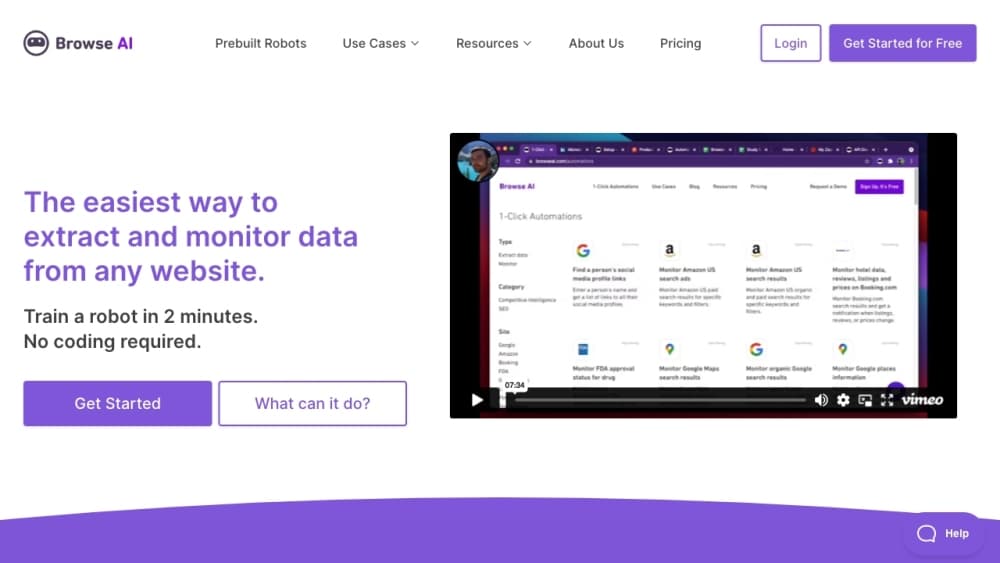
About Browse AI
What Is Browse AI
Browse AI is a data extraction service from a Vancouver-based company of the same name. Point it at a page, click the fields you care about, and it saves the selection as a robot you can rerun on demand. The company puts its supported coverage at 98% of websites, which includes the JavaScript-heavy and dynamically loaded pages that trip up simpler scrapers.
The platform does two jobs. Extraction pulls a structured table out of a page, like every product on a category listing with its price, stock status, and rating. It's an automated data extraction tool at heart. Monitoring is the second job. Same extraction, on a repeat schedule, with an alert when something shifts. The alert shows the field and the old and new value, so you get "price dropped from $1,299 to $1,149" rather than a vague note that the page moved.
The catch is the pricing model. Browse AI bills on credits, and one credit covers 10 rows of extracted data or a single screenshot. Easy at small scale. Painful at volume. A 50-product page costs 5 credits, but pulling the detail page for each product adds 50. Monitor those 50 pages every three days and you're at roughly 500 credits a month. Sites behind aggressive bot protection run on premium proxies and cost 2 to 10 credits per run as a minimum. Heavy, frequent use gets expensive in a hurry.
Getting Started
- Sign up for a free account at browse.ai. No credit card is needed for the free tier.
- Install the Chrome browser extension and follow the on-screen prompts to connect it to your account.
- Open the page you want to scrape and record a task. Click the elements to capture, or start from a prebuilt robot for popular sites.
- Name the robot and choose where the data lands. Google Sheets, Airtable, Excel, Zapier, Make, webhooks, and a REST API are all options.
- Switch on monitoring and set a frequency, from hourly on paid plans down to five-minute checks on Personal and above.
Product Information
A quick look at Browse AI's pricing, supported platforms, and performance.
Best for
The users, tasks, and scenarios where this tool fits best.
Users
- E-commerce and pricing analysts
- Sales and market research teams
- Non-technical operators
Tasks
- Tracking competitor prices and stock
- Scraping directories and search results
- Capturing data behind a login or form
Scenarios
- Running a daily price watch on a handful of products
- Building a data feed for a dashboard or app
- Researching a market before launch
Key features
No-Code Robot Training
The core of the product is a click-and-extract recorder. You walk through the actions you'd do by hand, and Browse AI learns the layout, the site's security setup, and the structure of the content. No CSS selectors. No proxies to configure. No Python or JavaScript. The tradeoff is precision: a hand-written script can target exactly what you want, while the AI agent sometimes needs a retrain when a page changes.
Website Monitoring and Change Detection
Monitors rerun an extraction on a schedule and report what actually changed, field by field. A price monitor shows the old and new number, an availability check flips between in stock and out of stock, and a listing watch flags new or removed entries. The frequency floor is hourly on Free and drops to five minutes on Personal and Professional. That granularity matters if you're tracking flash sales or fast-moving inventory.
Adapting to Site Redesigns
Traditional scrapers break when a site updates its layout, because the CSS selectors they depend on disappear. Browse AI trains an agent on the page instead, so it absorbs most redesigns on its own and only alerts you when the change is drastic. That cuts maintenance. It doesn't erase it. Reviewers on G2 and Capterra still name breakage on layout changes as the most common complaint, so budget time for retraining the trickiest robots.
Website to API
Any trained robot can be called as a REST endpoint. You pass a URL, a search term, or another parameter you defined during training, and it returns structured JSON with the fields you named. The result is a web scraping API built without writing a line of code. The difference from most web scraping tools is the output shape. Where a generic scraper hands back raw HTML or markdown for you to parse, Browse AI returns only the fields you asked for, already named and typed.
Spreadsheet and App Integrations
Data can flow straight into Google Sheets, Airtable, Excel, or Amazon S3, or trigger work in Zapier, Make, and Pabbly Connect. The vendor lists 7,000+ apps across those automation platforms, which covers most common destinations. Webhooks push results the moment a task finishes, so you don't have to poll.
Bot Evasion and Proxy Management
Rotating residential proxies, automated captcha solving, and human-like navigation are built in, which is how Browse AI reaches sites that block ordinary scrapers. Browse AI doesn't charge for proxy configuration separately; instead, sites that need premium proxies are marked as premium and cost 2 to 10 credits per run. If your targets are heavily defended, that surcharge is the real cost to plan around. So what does that look like in practice? A run that costs one credit on an ordinary page can cost ten on one behind a serious anti-bot wall, and that difference shows up immediately in your monthly bill.
Prebuilt Robots
For popular sites and common jobs, Browse AI ships ready-made robots you can run without recording anything. New ones land every week, and they skip the browser extension entirely. Starting from a template is faster than training from scratch, but the prebuilt library only covers the sites the vendor has chosen to support.
When Should You Skip It?
If you need a handful of pages scraped once, a browser bookmark and ten minutes of copy-pasting will beat a subscription. Browse AI earns its place when the same extraction runs again and again. That's the line worth drawing before you compare plans.
Pros and cons
Pros
- Setup is genuinely fast. A simple robot takes about five minutes, and non-technical users get a working scraper on the first try.
- Monitoring beats screenshot-based tools because it reports the exact field that changed instead of a generic "page updated" alert.
- Built-in proxies, captcha solving, and retries remove the infrastructure work that makes DIY scraping painful.
- Integrations cover the usual destinations, and the REST API turns any robot into a reusable endpoint.
Cons
- Robots are only as reliable as the target site. Push a heavily protected page at one and it may stall.
- Credits drain faster than the headline price suggests once you scrape detail pages or monitor at high frequency.
- Robots still need retraining after major site redesigns, so the "no maintenance" pitch holds only up to a point.
- Premium sites with strong bot protection cost 2 to 10 credits per run, which can double or triple an extraction's cost.
- Unused credits reset at the end of each billing cycle and don't roll over, so you can't bank them for a busy month.
Frequently asked questions
Browse AI extracts structured data from websites and watches pages for changes, all without code. Common jobs include scraping product catalogs and prices, pulling leads from directories, collecting search results, and monitoring competitor pages for updates.
Related content
Explore related tools, skills, and articles for Browse AI.
Browse AI Alternatives
Forefront
Forefront · CodingForefront is a web platform for building with open-source AI. It lets you fine-tune leading open-source language models on your own data, evaluate how they perform, and run them through an API or export them to host yourself. Developers who want the convenience of a closed-source platform but insist on owning their models and data are the target audience here.

Startkit
StartKit.AI · CodingStartkit is a boilerplate for building AI SaaS and AI wrapper products. Think of it as an AI startup boilerplate with the boring parts already wired up: authentication, Stripe and Lemon Squeezy payments, usage limits, transactional email, and an AI API starter that talks to OpenAI, Anthropic, Groq, or Llama. You clone the repo, set your price, and start on the part of your product that people actually pay for. It's Next.js under React and Tailwind, so most of the boilerplate code already feels familiar.
Testim
Tricentis · CodingTestim is an AI-powered test automation platform for building and running end-to-end tests across web, mobile, and Salesforce applications. It leans on machine learning to keep tests stable when an interface changes, so teams spend less time fixing broken selectors. Not bad for an automated testing tool you can start using today. You create tests by recording actions in a browser, then optionally add JavaScript when you need more control. It's a solid pick for busy QA teams.