

Bruto
Jimy K4 · Coding · Productivity
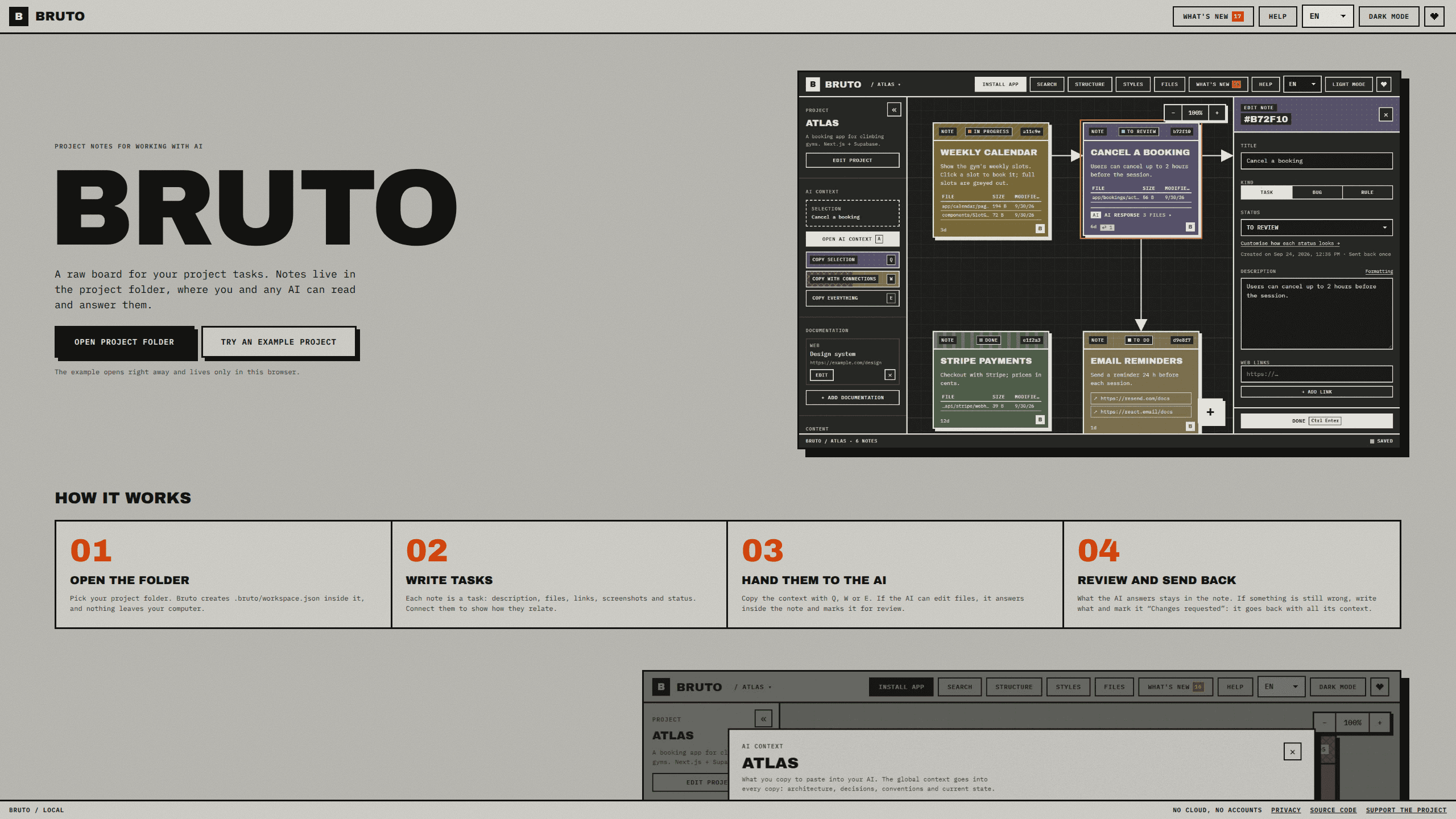
Bruto is a local task board that keeps each project's notes in .bruto/workspace.json, so you and any AI assistant work from the same tasks, context and review trail.
About Bruto
What Is Bruto
Most AI coding sessions end when the chat window closes. You explain the stack, the broken screen, the file that matters, and a week later the model starts from zero again. Bruto moves the task list into the project itself: a workspace file at .bruto/workspace.json, with a board as its view. You and the AI read the same notes. It works as a local-first task board because the file is the source of truth, not a service.
Each note is a task with a status, a description, attached files, links and screenshots. You drag them across a canvas, draw arrows between related work, and edit several at once. A note can also block or wait on a note in another project, which is how a front end, an API and a database stay in step when they live in separate folders.
Agents get two ways in. If yours speaks MCP, the bruto-mcp server lists, reads and answers notes with tools, without hand editing the JSON. If it only reads files, one line in AGENTS.md or CLAUDE.md is enough. That is the whole pitch of a task board for AI coding: the model reads the plan where the code already lives.
The limits follow from the design. Bruto is a static page with no server and no account, so opening a folder depends on the File System Access API: a Chromium browser on a desktop. Firefox, Safari and phones can't open local folders. Sharing with other people means committing the project to git, because there is no cloud workspace.
Getting Started
- Open jimy-k4.github.io/bruto in Chrome, Edge, Brave or Opera on a computer, and press Install app if you want it in its own window.
- Pick your project folder. Bruto creates .bruto/workspace.json inside it, and nothing leaves your machine.
- Write the first tasks with a description, files, links, screenshots and a status. Draw arrows where one task depends on another.
- Press Q, W or E to copy context for a model, check the token count in the preview, then paste it into Claude, ChatGPT, Gemini or DeepSeek.
- For file-editing agents, add the MCP server or point AGENTS.md at the board, and let them answer inside the note and mark it for review.
Product Information
A quick look at Bruto's pricing, supported platforms, and performance.
Best for
The users, tasks, and scenarios where this tool fits best.
Users
- Solo developers building a side project with an AI assistant
- Small product teams with separate front end, API and database repositories
- Developers who just joined a codebase
Tasks
- Writing a bug report an AI can act on
- Reviewing AI output and sending it back
- Planning work across repositories
- Keeping standing rules in front of the model
Scenarios
- A long-running project where chat history has already been lost more than once.
- Client work that can't pass through a third-party SaaS board, such as code under a confidentiality clause.
- A stack spread over several folders, where the front end, API and database each need their own board but share dependencies.
Key features
Notes that live with the code
The workspace file sits in the project folder and travels with it, so a clone or a branch switch brings the tasks along. That habit of keeping project notes in repo files is the reason the board stays useful after a chat is gone. Notes carry status, description, files, links and screenshots, and you can drag them, connect them with arrows and edit many at once. Markdown is supported, with a formatting cheat sheet next to the editor.
Context copy with a token preview
Q copies the selected notes, W adds everything they point to, and E copies the whole project. The output is clean Markdown with short instructions for the model, and a preview shows exactly what will be pasted plus an estimate of its token count. A global context block carries your stack and standing decisions into every copy.
Structure view and stack lenses
The structure view draws folders as blocks sized by file count, marks the ones your notes point at, and lists links to files that no longer exist. When Bruto recognizes the stack, a lens redraws the project as pages and components for React, Vue, Svelte or Next.js, as resources and endpoints for NestJS, FastAPI or Spring, and as tables with keys for PostgreSQL, Prisma or Oracle PL/SQL.
Links between projects
A note can block, be blocked by or relate to a note in another project. The other project appears on the board as a read-only ghost zone with the chain of notes that leads to the linked one, and a click opens it in place. This is the part that makes the board useful for a product split into front end, API and data work.
Agents on the board over MCP
The bruto-mcp server gives Claude Code and other MCP clients tools to list notes, read one, mark the note they are working on and answer it. Agents move a note up to the DEV environment stamp, while PRE and PRO stay in your hands. Rule notes travel with each request, so the agent applies the same constraints on every task.
Saves that merge instead of overwrite
Every save reads the file first and merges changes made elsewhere, note by note and field by field. If you and an agent edit the same field at the same moment, your value stays, you get a notice with the option to take theirs, and the audit log records it. A broken file is never overwritten, and a backup is kept each time a project opens.
Pros and cons
Pros
- Tasks live in the repository, so the board survives chat resets, model switches and machine changes.
- The Q, W and E context copy with a token estimate removes most of the manual prompt assembly.
- Structure views and lenses turn an unfamiliar codebase into pages, endpoints or tables you can point at in a note.
- The MCP server makes it a real AI agent task board rather than a static checklist, and the merge logic protects your edits.
- Free, MIT licensed, installable as an offline app, with keyboard shortcuts for every action.
Cons
- Opening folders needs Chrome, Edge, Brave or Opera on a desktop, so Firefox, Safari and mobile users are out.
- There is no account or cloud sync, which means no shared team workspace and no backup unless the project is in git.
- Chat-only assistants still depend on manual copy and paste, and the answer loop only closes when the agent can edit files.
- Screenshots and images are stored in the project folder, so a heavily illustrated board adds files to your repository and noise to diffs.
Frequently asked questions
Yes. Bruto is free and open source under the MIT license, with no ads, no accounts and no paid tier. Donations through Ko-fi are optional.
Related content
Explore related tools, skills, and articles for Bruto.
Bruto Alternatives

Base Code
Base44 (Wix) · Coding · ProductivityBase Code is a shared cloud development environment from Base44. Teammates describe changes to an existing GitHub codebase in chat, preview them live and send them back as pull requests.

Google EmbeddingGemma 2
Google DeepMind · Writing · Image · CodingGoogle EmbeddingGemma 2 is a 740M-parameter open model that turns text, code, images, audio, and video frames into vectors in one 768-dimension space, running on phones and laptops.

GitGlow
GitGlow · Coding · ProductivityGitGlow is a local-first desktop Git client that lets independent developers review their own code and their AI agents' changes in one place before shipping.