

BuilderKit
1811 Labs · Coding
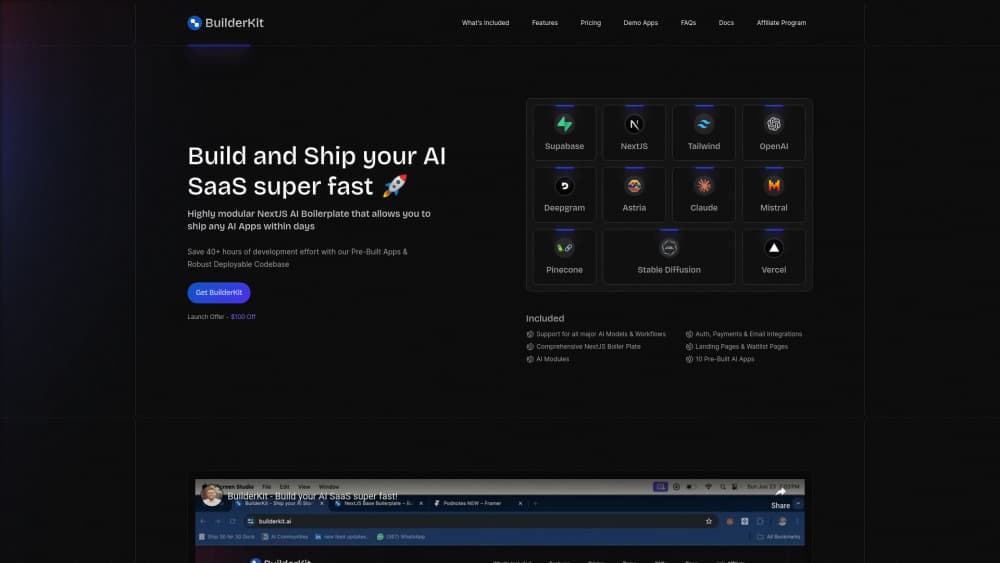
BuilderKit is a Next.js AI SaaS boilerplate. You buy the repo once and get auth, Stripe payments, AI modules, and 17 demo apps, so a paid AI product can go live in days instead of months.
About BuilderKit
What Is BuilderKit
BuilderKit is a code starter kit for people building AI products. You pay once, get access to a private GitHub repository, and clone a working Next.js app instead of starting from an empty folder. The repo is written in TypeScript and covers the parts most founders rebuild from scratch: sign in, subscription billing, database tables, email, and a handful of AI features.
The stack is plain and well documented: Next.js for the app, Tailwind CSS with shadcn components for the interface, and Supabase for Postgres, authentication, and row level security. Deployment targets Vercel, and the landing page promises no API timeouts on long AI requests. That promise matters, because a chat completion can run longer than a default serverless timeout.
The limits are worth stating up front. BuilderKit is not a no-code builder. You need to read React and Next.js code, run a few terminal commands, and connect your own API keys for OpenAI, Anthropic, or whichever model you pick. There is no free trial and no refund, so the purchase is a bet on the documentation being clear enough to follow. In our reading, it is, provided you already know your way around a Next.js project.
Getting Started
- Buy a plan on builderkit.ai. Checkout applies the current coupon, and you pick Landing Pages, Starter, or Pro depending on how much code you want.
- Accept the GitHub invite that arrives by email, then clone the repo and run the install command.
- Create a Supabase project, copy the URL and keys into the environment file, and run the included SQL to set up tables, policies, and storage buckets.
- Add model keys for the AI modules you plan to use, plus Stripe or Lemon Squeezy keys if you want to charge from day one.
- Deploy to Vercel, connect the domain, and delete the demo apps you don't need. The admin dashboard is where you check token usage per user.
Product Information
A quick look at BuilderKit's pricing, supported platforms, and performance.
Best for
The users, tasks, and scenarios where this tool fits best.
Users
- React and Next.js developers
- Indie founders who can code
- Small teams testing an AI product idea
Tasks
- Standing up Google sign in, magic links, and Stripe subscriptions
- Adding a chat, text generation, image generation, or speech module
- Launching a waitlist and marketing pages before the product exists
- Building a client prototype on a fixed deadline
Scenarios
- A weekend MVP with a real checkout
- Validating an AI feature before committing to a build
- Agency or freelance work
Key features
A Next.js Codebase You Own
You get the source, not a hosted account. The repo runs on Next.js with TypeScript, Tailwind, and shadcn components, and it includes server side rendering, edge functions, file uploads, and typed API routes. Because nothing is locked behind a platform, you can refactor any part of it, move it to another host later, or hand it to a client. The tradeoff is that maintenance is yours, including dependency updates.
Five AI Modules With Model Choice
The AI layer is split into chat, text generation, image generation, speech to text, and text to speech. The chat module ships with adapters for OpenAI, Claude, Mistral, Llama, and DeepSeek, so switching a model is mostly an environment variable plus a small config change. Transcription runs through Whisper or Deepgram, and image generation supports Stable Diffusion and Astria models. Each module streams responses, which keeps a long answer from looking frozen.
Auth, Payments, and Email Already Connected
Supabase handles Google sign in, magic links, email login, and session storage, and the protected page wrappers come prewritten. Payments run through Stripe or Lemon Squeezy payment links, with subscription management added in the March 2025 update: monthly or annual billing, credit balances per plan, and a customer portal. Transactional email connects to Loops or Resend, and a Crisp chat widget is available for support.
17 Pre-Built Demo Apps
The Pro plan ships 17 demo apps, including a multi-model ChatGPT clone, chat with PDF, chat with YouTube, an image generator, an interior design tool, a QR generator, headshot training, and a YouTube content repurposer. Each one is a working reference, which is more useful than a feature list: you see how streaming, file upload, and credit checks fit together in a real route. The Starter plan cuts this to five apps.
Admin Dashboard and Token Tracking
A built-in admin panel lists users, their plans, and their token consumption, and it lets you change a plan by hand. For an AI product, usage is the cost center, so having per-user counters from day one saves you from writing your own metering. The same panel shows realtime usage updates, which helps when a single heavy user is burning through your margin.
Landing Pages, Waitlist, and SEO Setup
The kit includes 13 to 15 landing page sections, waitlist templates, meta and OpenGraph tags, automated sitemap generation, and privacy policy and terms pages with prompts. That covers the unglamorous work between having an app and having something to submit to Product Hunt. The SEO pieces are standard Next.js metadata rather than a special system, which means they behave the way you expect.
Pros and cons
Pros
- One payment, no subscription, and the license covers unlimited commercial apps you build yourself.
- Auth, billing, email, and an admin panel arrive connected, which removes the slowest part of a solo build.
- The 17 demo apps are working code, so you can trace streaming, uploads, and credit checks in context.
- Model adapters cover OpenAI, Claude, Mistral, Llama, and DeepSeek, which keeps you from locking into one vendor.
- Documentation, video tutorials, and a changelog are included, and the March 2025 subscription update shows the repo still moves.
Cons
- You need working knowledge of React and Next.js. Non-developers will stall at the first environment variable.
- No free trial and no refunds, so you commit before you see the code. Read the docs first.
- The $99 Landing Pages plan is templates only. It does not include the app boilerplate, and that distinction is easy to miss.
- Support is email and Discord rather than a managed service, so a broken dependency is your problem to fix.
Frequently asked questions
BuilderKit is a paid code template for building AI SaaS products on Next.js. A single purchase gives you a private GitHub repo with authentication, subscription payments, AI modules, an admin dashboard, and a set of demo apps.
Related content
Explore related tools, skills, and articles for BuilderKit.
BuilderKit Alternatives

Base Code
Base44 (Wix) · Coding · ProductivityBase Code is a shared cloud development environment from Base44. Teammates describe changes to an existing GitHub codebase in chat, preview them live and send them back as pull requests.

Google EmbeddingGemma 2
Google DeepMind · Writing · Image · CodingGoogle EmbeddingGemma 2 is a 740M-parameter open model that turns text, code, images, audio, and video frames into vectors in one 768-dimension space, running on phones and laptops.

GitGlow
GitGlow · Coding · ProductivityGitGlow is a local-first desktop Git client that lets independent developers review their own code and their AI agents' changes in one place before shipping.