

Bunsho
Bunsho (Koundinya G) · Writing · Productivity
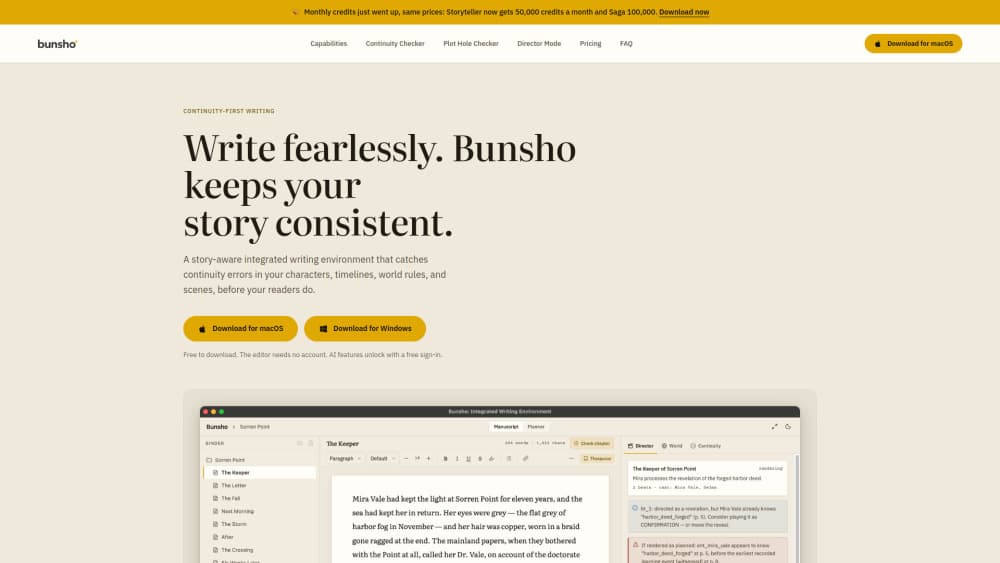
Bunsho is novel writing software for macOS and Windows that tracks characters, places, and world rules from your prose, then checks chapters for continuity errors when you ask.
About Bunsho
What Is Bunsho
Bunsho is fiction writing software built for book-length work, made by Koundinya G, a novelist who got tired of tracking his own story in spreadsheets and sticky notes. It's a novel writing app for Mac and Windows, and it keeps your manuscript as plain files in a folder you choose, so the book stays readable without the app.
The gap it fills is memory. Most AI tools for writers help you rewrite a paragraph. Bunsho remembers what your book has already established: a character's age, who knows a secret, where an object was last seen, what a rule of your world allows. Ask for a check and it reads the chapter against those facts, quoting both sentences behind every finding.
Checks are deliberate. Nothing runs while you type. A free sign-in comes with 10,000 starter credits, and paid plans add monthly allowances for chapter checks, full reviews, and directed scenes. Three limits matter up front: continuity checking works inside one manuscript today, the app is desktop only, and the version number still starts at 0.1.
Getting Started
- Download Bunsho for macOS or Windows from bunsho.io. The editor needs no account and no card.
- Open the sample story to see a finished finding before you import anything of your own, or start a new book and pick the folder where the project will live.
- Write in the page view, or bring a draft in from Word, Markdown, plain text, or Fountain. The World tab fills itself as your chapters establish characters, places, and objects.
- Sign in when you want AI work. Run Check this chapter, Review changes, or Run full review, read the cost first, and open each finding to compare the two passages it cites.
Product Information
A quick look at Bunsho's pricing, supported platforms, and performance.
Best for
The users, tasks, and scenarios where this tool fits best.
Users
- Novelists drafting a first book
- Plotters who outline before drafting
- Discovery writers
- Writers revising a finished draft
Tasks
- Checking one chapter before moving on
- Auditing a draft before it goes to an editor
- Drafting a scene from a short direction
- Keeping a story bible without maintaining one
Scenarios
- A draft month with a daily word target
- Coming back to a manuscript after a long break
- A standalone novel with a large cast
Key features
Continuity checks that cite both passages
Every finding quotes the sentence that set a fact and the sentence that broke it, with chapter and paragraph coordinates. There's no score and no grade. Bunsho reports what contradicts what, and you decide whether it's a mistake or a deliberate unreliability. The same memory powers the plot hole checker for cause-and-effect breaks.
A story bible that fills itself
The World tab reads characters, places, objects, relationships, and world rules out of your chapters, and each entry links back to the line that established it. You can also add entries by hand, correct an eye color, or pin a rule, and Bunsho treats your version as canon when it checks. That removes the upkeep that makes most story bible tools go stale.
Director Mode drafts a beat sheet first
You tag characters with @ and describe what happens next. A beat sheet comes back before any prose exists, and a preflight pass flags directions that contradict what a character already knows. Approve the beats and one voice renders the scene as suggested blocks you can accept, re-render, or throw away.
A binder and page built for book length
Chapters and scenes sit in a binder beside the page, ready to reorder, split, or merge. Focus mode hides the rest, the page comes in paper or dark themes, and your typing is never metered or interrupted by a suggestion.
Planner cards, goals, and streaks
Chapter cards record what each chapter is meant to do, in Grid or Tracks view. A daily goal, a streak across all your books, and a finish date with the pace it requires sit on every plan, including the free one.
Local files with standard import and export
A project is a folder of plain files you can open in any editor, back up your way, and keep after you stop paying. Import covers .docx, Markdown, .txt, and Fountain. Export covers .docx, Markdown, and Fountain on every plan, with an optional title page.
Pros and cons
Pros
- The editor is free, needs no account, and never meters typing, so you can write a whole book before paying anything.
- Findings show evidence rather than a verdict, which makes them quick to verify and easy to dismiss when the contradiction is intentional.
- The manuscript stays as plain files on your machine. Only the pages you send for a check leave the device, and they aren't stored or used for training. Unlike an AI writing app that asks for the whole book up front, Bunsho keeps no server copy.
- AI costs appear in plain numbers before each action, so a chapter check or a rendered scene never arrives as a surprise on a bill.
- Screenplay projects use the six standard elements, with Fountain import and export, alongside the novel tools.
Cons
- Cross-book series canon isn't available yet. Writers planning a trilogy still check each manuscript on its own.
- There's no iOS, Android, or browser version, so drafting happens on a Mac or Windows desktop.
- After the 10,000 starter credits, regular checking needs Storyteller at $15/mo or Saga at $29/mo. Quill at $8/mo has no AI at all.
- The app is at version 0.1.x and publishes no API, which rules out custom scripts or connecting it to other writing tools.
Frequently asked questions
Yes. The editor, binder, World tab, and Planner work without an account or a card, and one project is included on the free tier. AI features run on credits, and a free sign-in grants 10,000 starter credits to try a chapter check and Director Mode.
Related content
Explore related tools, skills, and articles for Bunsho.
Bunsho Alternatives

Google EmbeddingGemma 2
Google DeepMind · Writing · Image · CodingGoogle EmbeddingGemma 2 is a 740M-parameter open model that turns text, code, images, audio, and video frames into vectors in one 768-dimension space, running on phones and laptops.

MePersona
MePersona, Inc. · Writing · Productivity · MarketingMePersona is an AI unified inbox for creators. It learns your voice, drafts replies to fan messages from 12 platforms, and sends only what you approve.

Fluence
Yay Software (Yannick Huchard) · Writing · Voice & Language · ProductivityFluence is an Android app that reads PDFs, EPUBs, Word files and web articles aloud, follows each sentence as it speaks, and answers questions about the text on the phone itself.