

Buzz
AskBuzz · Other
Buzz is an AI marketing analytics agent that connects to your Meta Ads account and lets you ask questions about campaign performance in plain language. It's built for performance marketers who want answers to ad-hoc questions and instant reports without exporting spreadsheets or hopping between dashboards. The product is currently in early access.
About Buzz
What Is Buzz
Buzz is an AI agent for performance marketing data. Connect your advertising account and it reads your campaign numbers the way a ChatGPT-style interface reads text, then answers questions, builds reports, and points out which creatives and audiences are actually earning money. The promise is simple: stop pasting exported data into spreadsheets and start asking for what you want.
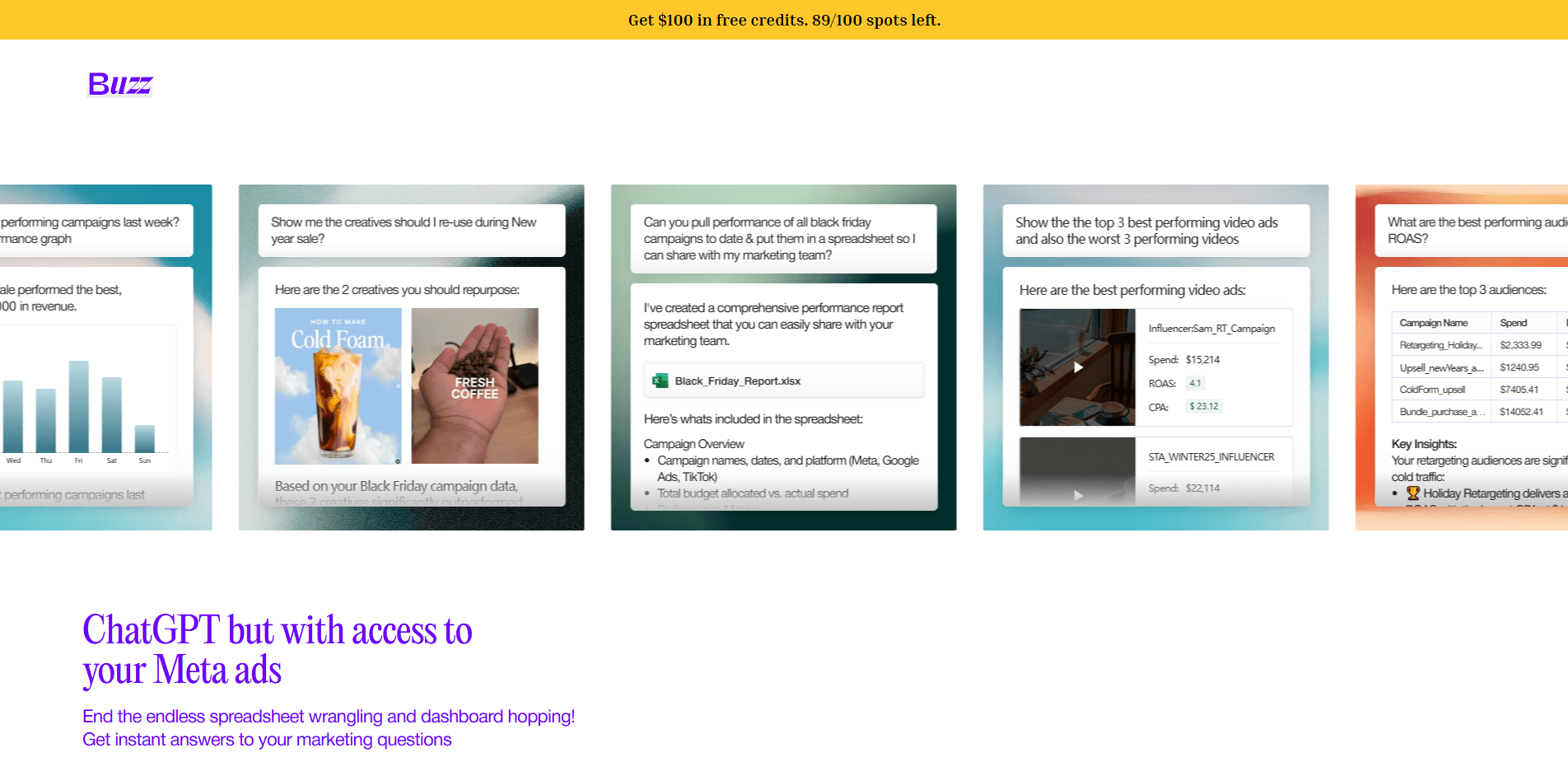
It's aimed at people who run paid campaigns day to day. The homepage frames it as "ChatGPT but with access to your Meta ads." The sample conversations show that in practice: a marketer asks which campaigns performed best last week, gets a daily performance graph, and asks which creatives to reuse for an upcoming sale. Answers come with the reasoning behind them, like a creative's click-through rate sitting 68% above the account average.
The biggest limitation right now is timing. Buzz isn't a finished, widely available product. The whole site funnels into a single "Get Early Access" button, so you can't just sign up and start using it today. If you need a mature analytics platform with published pricing tiers, Buzz isn't there yet.
Getting Started
- Go to askbuzz.ai and request early access through the signup form.
- Once you're in, connect your Meta Ads Manager account and grant Buzz permission to read your campaign data.
- Open the chat window and type a question in plain language, such as which campaigns performed best last week.
- Review the generated report or graph, then ask follow-up questions to dig into creatives, audiences, or spend.
- Export the results as a spreadsheet when you need to share them with your team.
Product Information
A quick look at Buzz's pricing, supported platforms, and performance.
Best for
The users, tasks, and scenarios where this tool fits best.
Users
- Performance marketers
- Small marketing teams
- Agency account managers
Tasks
- Finding winning campaigns
- Picking creatives to reuse
- Building quick spreadsheets
- Comparing audiences
Scenarios
- Weekly performance reviews
- Holiday campaign planning
- Ad-hoc questions from a client
Key features
Chat With Your Ad Data
The core of Buzz is a conversational interface over your advertising numbers. You type a question the way you'd ask a colleague, and it returns an answer drawn from your connected account. Sample queries on the site include asking which campaigns performed best last week or which creatives to reuse for an upcoming sale. It's a familiar chat experience, just pointed at your marketing data instead of general knowledge.
Automatic Report Building
Instead of assembling a report by hand, you describe the report you want and Buzz produces it. The homepage shows it generating a spreadsheet with a campaign overview, spend versus budget, impressions, clicks, click-through rate, cost per click, conversions, and cost per acquisition. That's the kind of recurring report most marketers rebuild from scratch every week.
Meta Ads Integration
Buzz connects directly to Meta Ads Manager, so the numbers come from your live account rather than a manual export. Access requires your permission, and the privacy policy lists Meta Ads Manager as an official integration. The site's sample reports also reference Google Ads and TikTok data. Meta is the integration the homepage leads with.
Creative and Audience Insights
Buzz goes beyond raw metrics to surface what's working. In its examples it flags which creatives outperformed the rest of the account, notes a creative's click-through rate against the account average, and ranks audiences by return on ad spend. It frames these as recommendations, such as telling you to repurpose two specific creatives for a New Year sale.
Spreadsheet Support
Buzz works with spreadsheets, both as the format it generates and as the way many marketers still organize results. When a chat answer isn't enough, you can get the underlying data as a file with named tabs and metrics. That keeps Buzz compatible with the reporting habits teams already have.
Pros and cons
Pros
- Asks and answers in plain language, so you don't need to know a query language or dashboard layout to get numbers
- Builds reports and spreadsheets on request, cutting the manual export-and-paste work that eats marketing hours
- Surfaces creatives and audiences worth reusing, not just raw metrics
- Connects directly to Meta Ads Manager, so answers reflect your live account data
- Reasons about performance the way an analyst would, comparing metrics like click-through rate to account averages
Cons
- Currently behind an early access waitlist, so you can't sign up and use it immediately
- No published pricing or free plan details, which makes it hard to budget for or evaluate against alternatives
- Meta is the headline integration, so marketers who run most of their spend on other platforms may find limited coverage
- Answers depend on connected account data, so incorrect or incomplete ad data will produce misleading results
Frequently asked questions
Buzz is an AI ad agent that answers questions about your marketing data. You connect your Meta Ads account, then ask things like which campaigns performed best or which creatives to reuse, and it replies with answers, graphs, and reports. Think of it as a marketing data chatbot pointed at your ad account.
Related content
Explore related tools, skills, and articles for Buzz.
Buzz Alternatives
BinkBink
BinkBink · OtherBinkBink is a free online game platform and AI game maker that lets anyone turn a short text description into a playable browser game. You can jump into hundreds of community-made games. Or describe your own idea and play it in seconds, then share it with friends. Want to create your own game? You don't need to code. No engine setup, no download, no hassle.

Audiogen
Audiogen Inc. · OtherAudiogen is an AI music generator built by Audiogen Inc., a small research team that spent about 2.5 years training its own generative music model and designing a web interface around it. Instead of a plain text box, this AI music tool turns the timeline into a beginner-friendly Generative Audio Workstation, or GAW, where inpainting, extending, remixing and stem editing work more like painting on a canvas. The product is still in beta, so access runs through a waitlist or an invite. Paid plans aren't published yet.

Aiml API
AIMLAPI OÜ · OtherAiml API is a unified AI model API that puts more than 1000 models from OpenAI, Google, Anthropic, and others behind one endpoint and one bill. You write code against a single OpenAI-compatible schema, then switch between chat, image, video, and audio models by changing a model string. It suits developers and small teams who want multi-model access without juggling a dozen separate provider accounts, and it removes the usual billing headache that comes with testing several vendors. One key covers it all.