

BypassAI
BypassAI · Writing · AI Detection
BypassAI is a web AI humanizer and detector that rewrites chatbot drafts into natural text and checks them for AI traces. Students and content teams use it for a clean second draft.
About BypassAI
What Is BypassAI
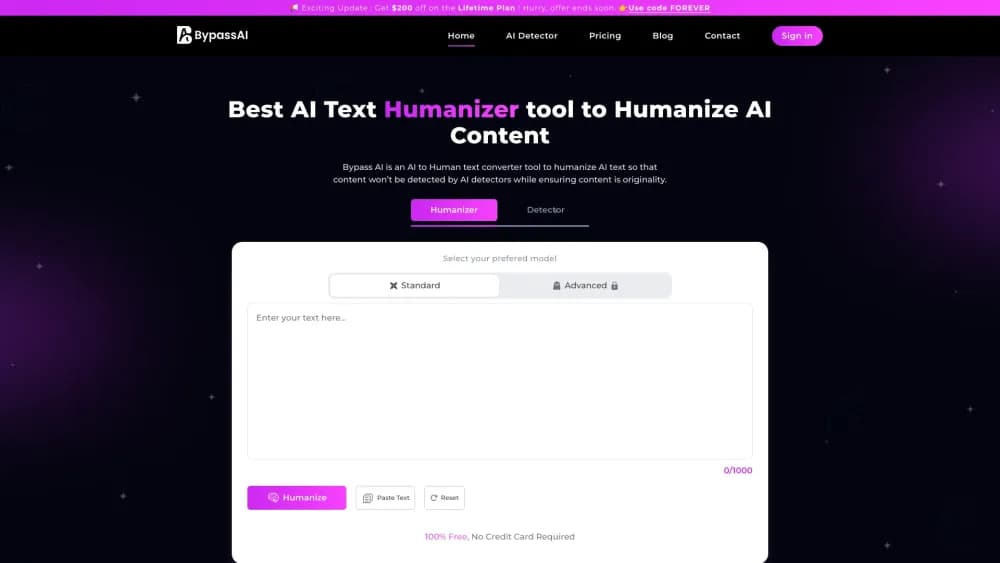
BypassAI is a browser tool built around one job: take a draft written by ChatGPT, Gemini, Copilot or another model and rewrite it so it reads like a person typed it. You paste the text or upload a file, pick a setting, and the tool returns a new version with different sentence lengths, word choices and rhythm.
Three tools sit under one login. The humanizer does the rewriting. An AI detector gives the text a score and labels it as machine or human written. An AI plagiarism checker looks for overlap with published sources. That bundle is aimed at people who have to hand in or publish the text, not just tidy it up for themselves. BypassAI sells the package as an AI detection remover, and the detector is there to show whether the rewrite worked.
The pitch lands hardest in academic and content work: essays, reports, blog posts and marketing copy. Two limits matter before you pay. Every quality number on the site is the vendor's own claim, and detector models change from month to month. The rewrite can also mangle meaning on dense or technical passages, so the output needs a human read every time.
Getting Started
- Open bypassai.io and sign up with an email address.
- Paste your draft into the editor or upload the document, then check the word count against your plan's per-run cap.
- Set the humanizer options, including the advanced mode if your plan includes it.
- Run the humanizer, then pass the result to the detector and plagiarism checker.
- Compare the output with your original, repair anything that lost meaning, and copy or download the final text.
Product Information
A quick look at BypassAI's pricing, supported platforms, and performance.
Best for
The users, tasks, and scenarios where this tool fits best.
Users
- Students
- Bloggers and content marketers
- Freelance writers
- Non-native English speakers
Tasks
- Humanizing a chatbot draft
- Checking a draft before submission
- Cleaning up marketing copy
- Rewriting application materials
Scenarios
- Finishing an essay that started with AI help
- Publishing AI-assisted blog posts
- Sending client work drafted with a chatbot
- Polishing a second-language draft
Key features
AI Text Humanizer
The core tool rewrites pasted or uploaded text and returns a version with new sentence structure, synonyms and rhythm. It works on drafts from any chatbot, so you aren't locked into one model. The output keeps your argument in place while changing how it reads, which is the whole point of an AI text rewriter. Most people come to it to humanize AI text before a deadline, so speed matters as much as the wording.
Built-In AI Detector
A separate detector scores text and labels it as AI or human generated. The vendor puts its accuracy at around 98 percent, a figure you should test on your own writing rather than take at face value. Running your draft through it before and after a rewrite shows whether the humanizer moved the number at all. The point is to see whether a rewrite can bypass AI detectors you already worry about, such as GPTZero.
AI Plagiarism Checker
The plagiarism checker compares your text against published material and reports matching sections. On the higher plans it covers a monthly word pool, which suits people who submit several documents a month. Having detection and originality checks in the same window saves the usual copy-paste trip between tools.
Advanced Rewrite Controls
The editor includes an advanced mode alongside the basic settings. Advanced mode pushes harder on sentence restructuring, which helps with text that still reads flat after a first pass. Simple jobs like a short email can stay on the lighter setting so the wording doesn't drift too far from your voice.
Word-Based Plans With a Free Allowance
Every plan is measured in words rather than characters or credits. The free tier gives you a small allowance per run to test the humanizer and detector before you pay. Paid tiers raise the monthly pool and the maximum words per submission, which is the number that decides whether a long thesis fits in one pass.
Student-Oriented Workspace
The product is positioned around academic writing, with sample runs and a student community on Discord. That focus shows in the workflow: paste a document, check it, fix the weak spots, submit. It won't format citations or check facts, so it covers the wording problem only.
Pros and cons
Pros
- Humanizer, detector and plagiarism checker sit in one workspace, so you don't juggle three tabs.
- Free allowance lets you judge output quality before committing to a subscription.
- Advanced mode gives a clear step up in rewriting depth when the first pass isn't enough.
- Word-based quotas are easy to plan around, and the entry plan covers a few short documents a month.
- Handles drafts from ChatGPT, Gemini and Copilot without asking which model wrote them.
Cons
- Accuracy figures come from the vendor, and independent detector tests don't always agree.
- User reports on Trustpilot describe garbled output on complex passages, so dense text needs a careful edit.
- The monthly word pool and the per-run cap are separate limits, and long documents can burn through a plan fast.
- Buyers of the one-time lifetime tier have complained that monthly caps still apply, which makes the offer hard to trust.
Frequently asked questions
It rewrites AI-generated text so it reads more like human writing, then scores the result with a built-in detector and checks it for plagiarism. Think of it as a second draft tool, not a writing assistant that produces content from a prompt.
Related content
Explore related tools, skills, and articles for BypassAI.
BypassAI Alternatives

Google EmbeddingGemma 2
Google DeepMind · Writing · Image · CodingGoogle EmbeddingGemma 2 is a 740M-parameter open model that turns text, code, images, audio, and video frames into vectors in one 768-dimension space, running on phones and laptops.

MePersona
MePersona, Inc. · Writing · Productivity · MarketingMePersona is an AI unified inbox for creators. It learns your voice, drafts replies to fan messages from 12 platforms, and sends only what you approve.

Fluence
Yay Software (Yannick Huchard) · Writing · Voice & Language · ProductivityFluence is an Android app that reads PDFs, EPUBs, Word files and web articles aloud, follows each sentence as it speaks, and answers questions about the text on the phone itself.