

Byrdhouse
Byrdhouse · Writing · Voice & Language
Byrdhouse, now Langfinity, is an AI interpreter for meetings and events, handling live translation for meetings in 50+ languages as voice or captions, inside Teams, Zoom and Meet.
About Byrdhouse
What Is Byrdhouse
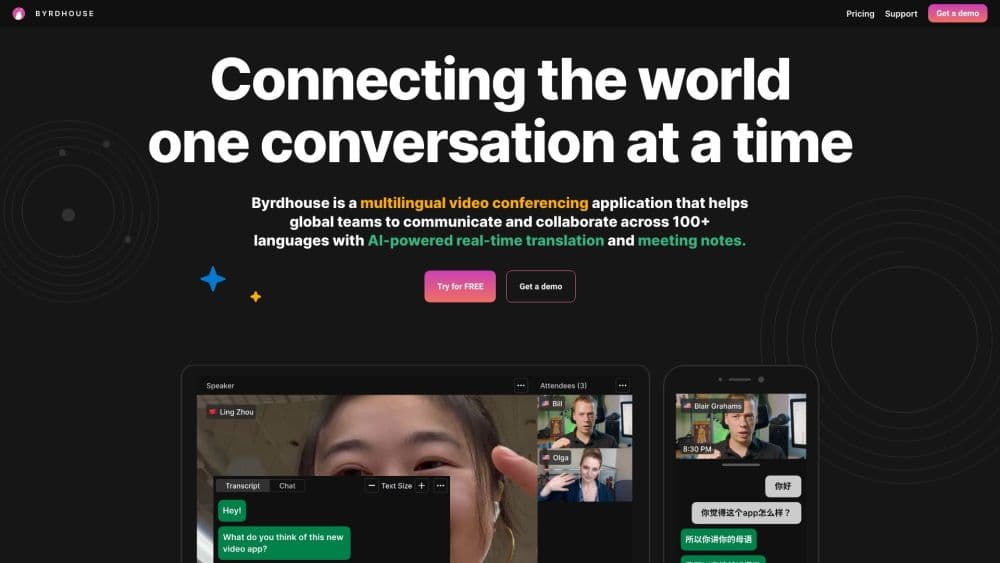
Byrdhouse is an AI meeting translator you bring into a call. The company now sells the product as Langfinity, and the old byrdhouse.com address is gone, so the live site sits at byrdhouseapp.com and langfinity.ai. Under either name the job is the same: let people in the same room or on the same call speak their own language and still follow each other.
The mechanics are simple enough to run without training. The AI listens to the speaker, translates, and plays the result back in a natural voice, or shows it as captions, with the voice-to-text path landing under 300 milliseconds and voice-to-voice taking 1 to 3 seconds. Each attendee picks their own language on their own phone or laptop, so one Spanish speaker, one French speaker and one Japanese speaker can all hold the same conversation. According to the company, baseline models clear 85% translation accuracy on popular language pairs, and industry fine-tuning pushes that higher.
Two things limit it. Every participant needs a device and an internet connection, because the translation happens in the cloud rather than on a local box. And the product is priced for organizations, with annual commitments starting at 20 hours of translation, so a one-off 20-minute call is better served by the free trial than by a paid plan. If you run multilingual meetings often enough to justify a subscription, the setup cost is low. If you need it twice a year, the free trial is the honest answer.
Getting Started
- Open byrdhouseapp.com or langfinity.ai and start a free trial, which covers 20 minutes of translation.
- Pick how you'll join: a Langfinity room for an in-person event, or the Teams or Zoom integration for an online call.
- Choose the languages for the session. Each participant selects their own on their device instead of you assigning pairs.
- Add your glossary terms before the meeting starts. Company names, product names and internal acronyms go here, and they're the fastest accuracy win available.
- Share the link or QR code with attendees, then start talking at a normal pace.
Product Information
A quick look at Byrdhouse's pricing, supported platforms, and performance.
Best for
The users, tasks, and scenarios where this tool fits best.
Users
- Global teams running weekly cross-border calls
- Event organizers with mixed-language audiences
- Customer support and contact centers
- Churches, clinics and public institutions
Tasks
- Running a board meeting with two or three languages in the room
- Training a distributed workforce
- Producing multilingual records
- Handling a live webinar Q&A
Scenarios
- An in-person conference where half the room travels in from abroad
- A recurring sales call with a client overseas
- A weekly engineering stand-up with offshore developers
Key features
Real-Time Voice-to-Voice Translation
Speech goes in and comes back in another language, in a natural voice that keeps tone and pacing. The company puts voice output at 1 to 3 seconds behind the speaker, and voice-to-text captions at under 300 milliseconds. That gap decides where each mode fits: captions for fast discussion, voice for presentations and anything an audience is listening to rather than reading.
Multi-Way Translation
Most interpreters handle one direction at a time. Langfinity lets attendees speak and listen in different languages at once, so a session with Spanish, French and Mandarin speakers doesn't need three separate setups. Each person selects a language on their own device, and the AI translates both the speech and the captions for everyone in the room.
Custom Voice Avatars
You can choose from a set of AI voices instead of hearing a single flat synthetic tone. The point is tone and expression, which carry meaning that a literal translation can lose. For a sermon, a training session or a sales pitch, where the delivery is closer to event interpretation than to a call, a voice that sounds like a person rather than a text reader keeps attention on the content.
Glossary and Industry Fine-Tuning
You add the words that matter to your organization, such as product names, internal acronyms and proper nouns, and the model is adjusted for your domain. Generic translation tools tend to mangle the exact terms a business cares most about. This is the feature that separates a usable tool from a demo, and it's the one worth testing hardest during the trial.
Meeting Platform Integrations
For Microsoft Teams, you add the app from the Apps menu, sign in with SSO, and invite the AI interpreter into the meeting. Zoom, Google Meet and other platforms are supported as well, and no dedicated hardware is required: a USB microphone into a laptop covers a small room. For in-person events, attendees join by link or QR code instead.
Multilingual Recordings and Transcripts
Sessions can be recorded and transcribed in each language used, and they're saved for later reference. That turns a meeting into a searchable archive without a second tool, which matters when the same discussion has to be reviewed by people who weren't there or who need it in another language.
Pros and cons
Pros
- Multi-way translation lets several languages run in the same session, which single-direction interpreters can't do.
- The setup is light. Attendees use a link or QR code and their own phone, so there's no booth, headset fleet or receiver handout.
- Teams integration is a built-in app rather than a workaround, so scheduling, SSO and the meeting flow stay where they already are.
- Per-user volume, speed and text size means an attendee can make the translation comfortable without affecting anyone else.
- The 20-minute free trial is long enough to test your own glossary and industry terms before committing to an annual contract.
Cons
- Pricing is quote-based with annual hour minimums, so you can't see a monthly number before talking to sales. That's hard to budget for, and it rules out casual use.
- Voice-to-voice runs 1 to 3 seconds behind, which is fine for a presentation and awkward in a rapid argument.
- Participants need their own device and a solid connection. A room with weak Wi-Fi will struggle, and there's no offline mode.
- Accuracy on niche vocabulary depends on the glossary work you do upfront. Skip it and abbreviations and brand names come back wrong.
Frequently asked questions
Byrdhouse translates speech in real time during meetings and events. You bring it into a Teams, Zoom or Google Meet call, or into an in-person session, and participants hear or read the conversation in their own language. The product is now sold under the name Langfinity.
Related content
Explore related tools, skills, and articles for Byrdhouse.
Byrdhouse Alternatives

Google EmbeddingGemma 2
Google DeepMind · Writing · Image · CodingGoogle EmbeddingGemma 2 is a 740M-parameter open model that turns text, code, images, audio, and video frames into vectors in one 768-dimension space, running on phones and laptops.

MePersona
MePersona, Inc. · Writing · Productivity · MarketingMePersona is an AI unified inbox for creators. It learns your voice, drafts replies to fan messages from 12 platforms, and sends only what you approve.

Fluence
Yay Software (Yannick Huchard) · Writing · Voice & Language · ProductivityFluence is an Android app that reads PDFs, EPUBs, Word files and web articles aloud, follows each sentence as it speaks, and answers questions about the text on the phone itself.