

CannyPen
CannyPen · Writing · AI Detection
CannyPen is a web based AI content generator that pairs 70+ writing templates with an AI voiceover studio, speech to text transcription, and image tools in one dashboard.
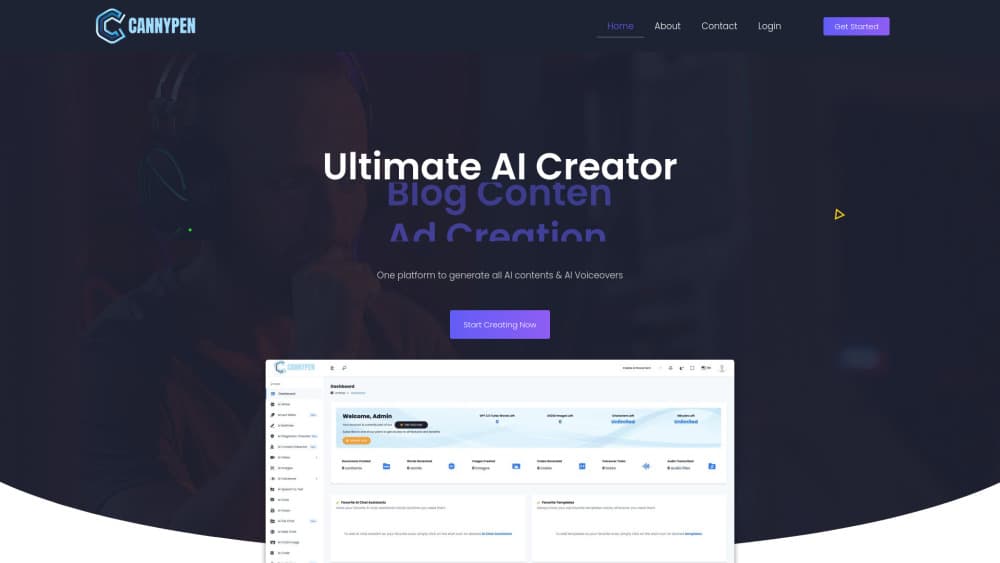
About CannyPen
What Is CannyPen
CannyPen is a browser based AI writing assistant and content studio from the team at cannypen.com. It puts a template driven writer, a long form editor, a rewriter, chat assistants, an AI voiceover generator, transcription, image generation and a code helper behind one login. The pitch is breadth. One subscription replaces the writing tool, the text to speech service and the transcription app that a small team usually pays for separately.
The product is built for people who publish on a schedule: marketers writing ads and landing pages, bloggers, podcasters, freelancers, and students working in a second language. The template shelf covers ad creation, blog content, hero sections, essays, resumes, job descriptions, emails and social posts. Text output runs in 54+ languages, and both paid plans list unlimited characters and unlimited minutes, so a busy month doesn't cost more than a quiet one.
Three limits matter before you pay. There's no free plan, and signup moves straight from account details to plan selection and payment. Images, video, voice cloning and the sound studio sit behind the Premium plan. The product is web only, with no mobile app and no public API, so nothing plugs into your own CMS or publishing pipeline. Drafts also need a human pass. The company's own FAQ tells users to review and customize what the AI writes.
Getting Started
- Create an account at app.cannypen.com with your name, email and country, then choose Pro or Premium.
- Pick a template from the tool list, or open the editor and start from a blank document.
- Describe the job: product, audience, tone, length and any keywords you need covered.
- Generate the draft, then use the smart editor and rewriter to shorten sections or change the angle.
- For audio, paste the script into the voiceover studio, choose a voice, adjust pacing with SSML tags, and export the file.
Product Information
A quick look at CannyPen's pricing, supported platforms, and performance.
Best for
The users, tasks, and scenarios where this tool fits best.
Users
- Content marketers at small companies
- Bloggers and freelance writers
- Podcast and video teams
Tasks
- Writing ad variants and landing page copy
- Turning a script into narration
- Transcribing interviews
- Checking a draft before it goes out
Scenarios
- A product launch week with thirty ad variants and four landing pages
- Repurposing one podcast episode
- A non native speaker polishing a report
Key features
Template Library For 70+ Writing Tasks
The template shelf is the front door. Each card asks for a short brief and returns a formatted draft for a specific job, such as a Facebook ad, a blog outline, a product description, a cover letter or a job posting. Templates are the fastest route for repeatable work, and the custom template option lets a team save its own structure with fixed prompts and fields. Output quality tracks the brief, so a one line prompt gives you a one note result.
Smart Editor And Rewriter
The AI copywriting tool side of CannyPen lives in the editor. You can highlight a paragraph and ask for a shorter version, a friendlier tone or a different structure, and the rewriter works on that selection instead of regenerating the whole page. This is where most of the real editing happens. First drafts from any AI content generator need trimming, and selection level rewrites keep the parts that already work.
AI Voiceover Studio
The voice library lists 540+ neural voices across 144+ languages and dialects, and a single request can mix up to 20 voices for dialogue or multi speaker narration. SSML tags and tone controls handle pauses, emphasis and pacing, which matters for training videos and ads where flat delivery is obvious. Premium adds voice cloning and the sound studio, so a branded narrator can be reused across a series.
Speech To Text And Translation
Audio files can be transcribed in several formats and several languages, and the transcript can be translated into English in the same workspace. For interview based work this removes a separate transcription subscription. Accuracy depends on recording quality, so a clean microphone and one speaker at a time still matter more than any setting in the app.
Brand Voice And Custom Templates
Brand voice settings push generated copy toward a consistent tone, and custom templates lock the shape of recurring deliverables such as weekly newsletters or case studies. Project management keeps those assets grouped by client or campaign. It's a light layer rather than a full content operations system, and teams with a strict approval chain will still run reviews elsewhere.
Built In Content Checks
Two checks ship with the writing tools. The AI content detector estimates how much of a passage looks machine generated, and the AI plagiarism checker looks for text that matches existing sources. Neither replaces a careful read, and detector scores are estimates rather than proof. Used together with the rewriter, they give a writer a quick way to spot the paragraphs that need the most work.
Pros and cons
Pros
- Unlimited characters and minutes on both plans, so heavy months don't trigger overage charges or credit math.
- Writing, voiceover, transcription and image tools share one login and one bill, which removes three or four separate subscriptions.
- The voiceover side is deeper than most writing tools: 540+ voices, 144+ languages, multi voice mixing and SSML control.
- Custom templates and brand voice settings make repeatable output easier for a team with fixed formats.
- Two factor authentication and 24/7 support are included on every plan.
Cons
- No free plan or trial. You pick a plan and pay before you can test the output on your own brief.
- Images, video, voice cloning and the sound studio are Premium only, so the $29 plan is text and audio work alone.
- No public API and no integrations, which rules it out for teams that want to push drafts into a CMS automatically.
- Browser only, with no mobile app, so recording and editing on a phone means using the web version.
Frequently asked questions
CannyPen is used to produce written and spoken content in one place: blog posts, ads, emails, product descriptions, voiceovers, transcripts, images and code snippets. Most users start with the writing templates and add the audio tools once they see how the voice library sounds.
Related content
Explore related tools, skills, and articles for CannyPen.
CannyPen Alternatives

Google EmbeddingGemma 2
Google DeepMind · Writing · Image · CodingGoogle EmbeddingGemma 2 is a 740M-parameter open model that turns text, code, images, audio, and video frames into vectors in one 768-dimension space, running on phones and laptops.

MePersona
MePersona, Inc. · Writing · Productivity · MarketingMePersona is an AI unified inbox for creators. It learns your voice, drafts replies to fan messages from 12 platforms, and sends only what you approve.

Fluence
Yay Software (Yannick Huchard) · Writing · Voice & Language · ProductivityFluence is an Android app that reads PDFs, EPUBs, Word files and web articles aloud, follows each sentence as it speaks, and answers questions about the text on the phone itself.