

CanopyAI
CanopyAI · Other
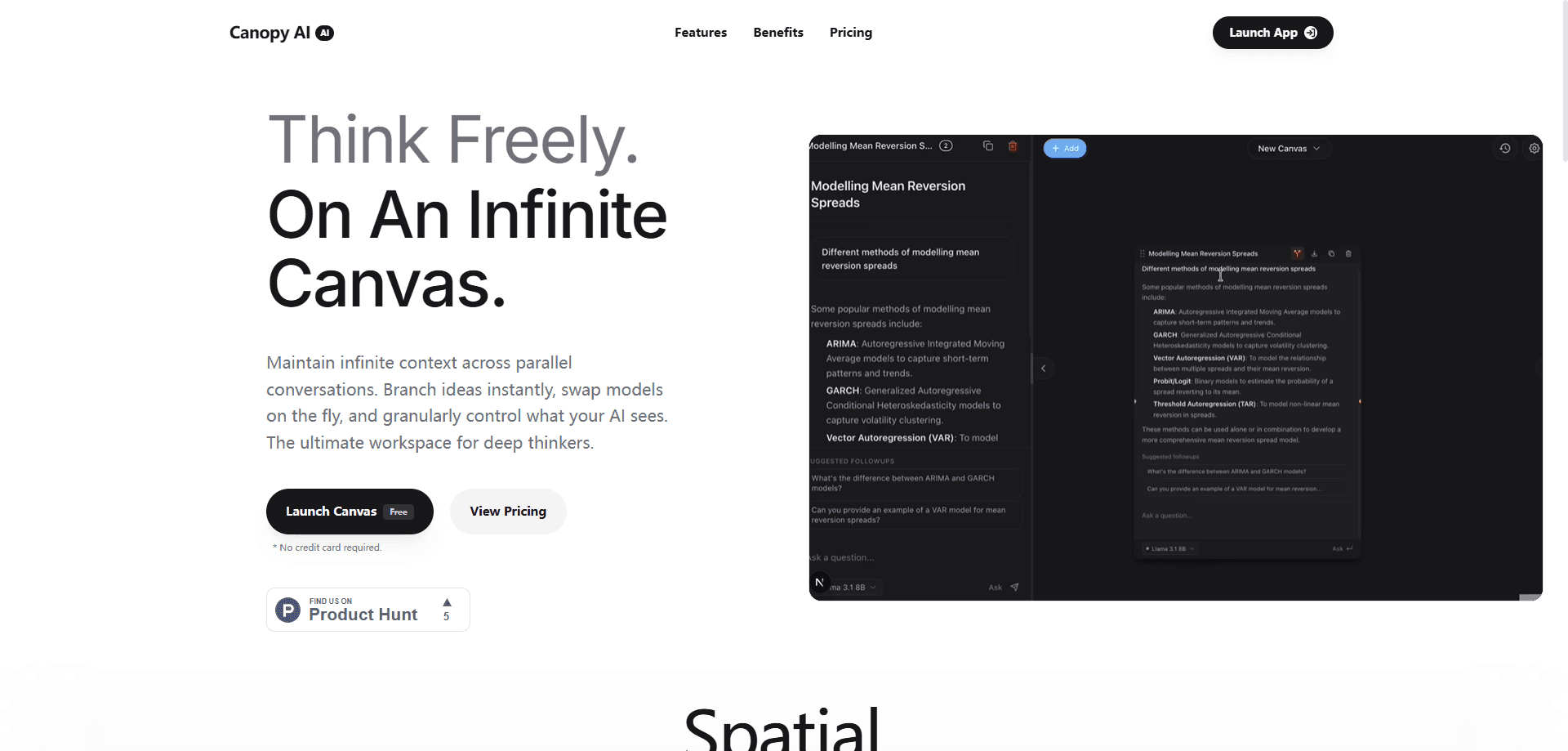
CanopyAI is a multi-model AI chat workspace built for people who run more than one conversation at a time. Instead of stacking chats in a sidebar, it spreads them across a zoomable canvas where you can fork any thread, keep context intact, and switch between AI models mid-thought. The pitch is simple. Deep thinkers and power AI users shouldn't lose their train of thought just because they opened a new prompt. Good AI context management shouldn't feel like a chore.
About CanopyAI
What Is CanopyAI
CanopyAI is a browser-based workspace that turns AI chat into a spatial, branching process. Each conversation lives as a node on an infinite canvas, and you can fork a node to explore a new direction without abandoning the original thread. Parallel conversations stay connected to what came before. You decide exactly which slice of context each AI model gets to see.
The main problem it solves is context loss. Most AI chat tools force you into a single linear thread. Start a second one and the first goes cold. CanopyAI keeps every branch alive and reachable, which matters once a project runs past a few prompts. It also lets you swap AI models on the fly, so you can compare answers from different models on the same question without re-pasting anything.
The biggest limit: CanopyAI is a web app with no mobile build and no public API. It won't slot into an existing automation pipeline. It's a workspace you visit, not a service you wire into other software.
Getting Started
- Open canopyai.tech and click Launch Canvas. No credit card is required to start.
- Create a canvas and drop in your first prompt to make a root conversation node.
- Fork that node when you want to chase a new idea, keeping the original context parked in place.
- Pick which AI model handles each branch, then adjust what context each one sees.
- Export your work when the canvas is done, or keep branching to refine the answer.
Product Information
A quick look at CanopyAI's pricing, supported platforms, and performance.
Best for
The users, tasks, and scenarios where this tool fits best.
Users
- Deep thinkers and researchers
- Writers and content strategists
- Developers comparing models
Tasks
- Multi-branch brainstorming
- Model comparison on a single question
- Context control per conversation
- Long-running project work
Scenarios
- Early-stage project research
- Content planning sessions
- Study and note-taking
Key features
Infinite Branching Canvas
The canvas is the whole point. Every conversation is a node, and forking a node creates a new branch that inherits the context you choose. Zoom out and you see a dozen threads at once. Zoom in and you work on one. A sprawling project feels like a single map, not a chat log.
Parallel Conversations With Shared Context
Running several conversations at once usually means losing the thread between them. CanopyAI keeps them in the same workspace, so a question in one branch can build on an answer from another. Sound useful? For anyone juggling a research question and a draft at the same time, it's the difference between two disconnected chats and one coherent project. No copy-pasting between windows.
On-the-Fly Model Switching
You can change which AI model answers a given branch without starting over. That's handy when a model gets stuck, or when you want a second opinion on the same prompt. The switch happens inside the conversation, so the surrounding context stays put. Models move fast these days, and swapping shouldn't cost you your setup.
Granular Context Control
Rather than dumping an entire history into every prompt, CanopyAI lets you control what each model sees. You decide which nodes feed context into a branch, which keeps prompts focused and reduces the drift that creeps into long chats. It's more work upfront. The payoff is answers that stay on topic.
Free Trial and Low-Cost Pricing
A 3-day free trial gives full access, with no credit card required. After that, a monthly plan runs $4.99, and a 6-month plan costs $24.99. Paid plans add higher usage limits, priority support, and commercial usage rights. That last one matters if you're using the output for client work.
Pros and cons
Pros
- Keeps parallel AI conversations and their context in one connected workspace instead of scattered chat tabs.
- Branching makes it cheap to explore a new direction while keeping the original thread intact.
- Model switching inside a conversation saves you from re-pasting the same prompt into a different tool.
- Granular context control helps keep long threads focused and reduces off-topic drift.
- Entry price is low at $4.99/mo, and the 3-day trial needs no credit card.
Cons
- Web-only and no public API, so it can't be wired into scripts or existing automation.
- The spatial canvas has a learning curve; users used to a single linear chat will need time to adjust.
- The free trial is short at 3 days, which may not be enough to judge a long project workflow.
Frequently asked questions
CanopyAI is an AI conversation workspace for people who work across many threads at once. It uses an infinite canvas to keep parallel conversations and their context connected, and it lets you branch ideas and swap AI models as you go, so a project stays in one place instead of scattering across a dozen separate chat windows.
Related content
Explore related tools, skills, and articles for CanopyAI.
CanopyAI Alternatives
BinkBink
BinkBink · OtherBinkBink is a free online game platform and AI game maker that lets anyone turn a short text description into a playable browser game. You can jump into hundreds of community-made games. Or describe your own idea and play it in seconds, then share it with friends. Want to create your own game? You don't need to code. No engine setup, no download, no hassle.

Audiogen
Audiogen Inc. · OtherAudiogen is an AI music generator built by Audiogen Inc., a small research team that spent about 2.5 years training its own generative music model and designing a web interface around it. Instead of a plain text box, this AI music tool turns the timeline into a beginner-friendly Generative Audio Workstation, or GAW, where inpainting, extending, remixing and stem editing work more like painting on a canvas. The product is still in beta, so access runs through a waitlist or an invite. Paid plans aren't published yet.

Aiml API
AIMLAPI OÜ · OtherAiml API is a unified AI model API that puts more than 1000 models from OpenAI, Google, Anthropic, and others behind one endpoint and one bill. You write code against a single OpenAI-compatible schema, then switch between chat, image, video, and audio models by changing a model string. It suits developers and small teams who want multi-model access without juggling a dozen separate provider accounts, and it removes the usual billing headache that comes with testing several vendors. One key covers it all.