

Chaport
Chaport · Marketing · Chatbot
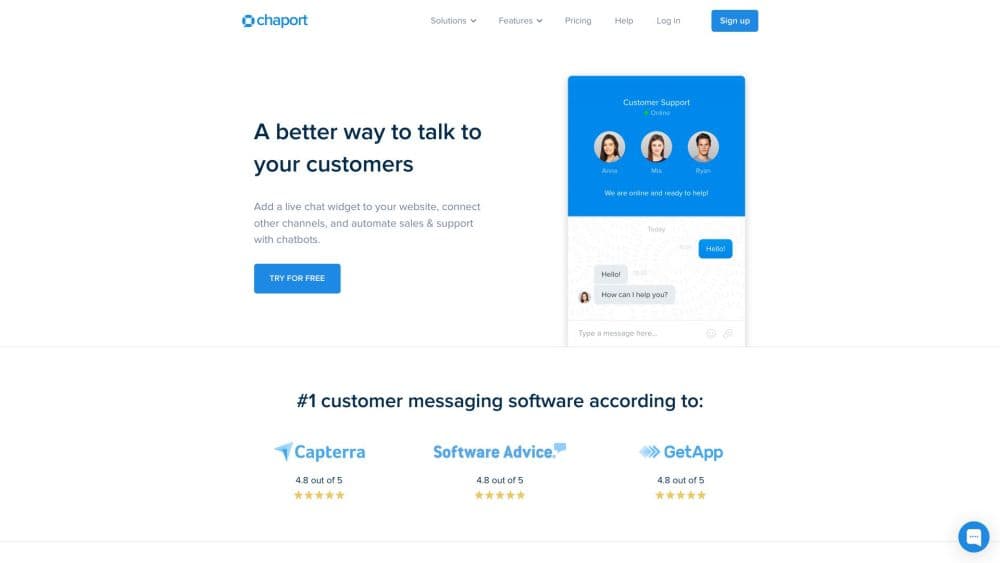
Chaport is a live chat platform for websites that pairs a modern messenger-style widget with chatbots, team routing, and its own mobile and desktop apps.
About Chaport
What Is Chaport
Chaport is a live chat platform for websites that turns visitor questions into conversations your team can answer. Its website chat widget runs as a messenger-style box in the corner of a site, and your operators reply from the same mobile and desktop apps they already use for customer support chat. The company sells it as a support and sales tool for small teams that want something simpler than a full help desk.
The first problem it solves is reach. A visitor with a question can write in without hunting for an email address or a phone number, and the chat lands on your operators no matter where they are. Auto-invitations and typing insights push toward faster replies, so you start chats with the right people at the right moment instead of hoping they fill out a form.
The limits matter too. Chaport is built around live conversations, not a full ticketing suite, so it does not replace a heavyweight help desk with SLAs, macros, and knowledge bases. Prices are billed per operator, and the free plan disables paid features once your 14-day trial ends.
Getting Started
- Sign up on the Chaport site and start the free 14-day trial of the Unlimited plan. No card is needed to try it.
- Add the chat widget to your site by pasting a short JavaScript snippet, or test it in Messenger Mode before you install anything.
- Invite your operators and group them into teams so chats route to the right people.
- Set up pre-chat forms, saved replies, and chatbots to handle questions before a person steps in.
- Answer visitors from the web dashboard or the Chaport apps, then check Reports to see how the team is doing.
Product Information
A quick look at Chaport's pricing, supported platforms, and performance.
Best for
The users, tasks, and scenarios where this tool fits best.
Users
- Small support teams
- Sales and e-commerce teams
- Solo founders and small businesses
- Agencies managing several clients
Tasks
- Answering pre-sale questions
- Handling support requests
- Running chatbots
- Measuring team performance
Scenarios
- Launching a store and adding chat on day one
- Covering customers across time zones
- Trying chat before committing
Key features
Auto-Invitations
You set rules, and Chaport starts a conversation on its own. When a visitor meets your conditions, the widget sends an invitation to chat, which is how teams pull in more conversations than they would by waiting for someone to speak first.
Typing Insights
Operators can watch what a visitor is typing before the message is sent. That head start shortens response time and lets an agent prepare an answer, which matters most on busy pages where every second of reply time counts.
Teams and Group Chats
Chats route to a team rather than a single person. Operators can join a group chat, hand a conversation to a colleague, or watch other chats in real time, so a question is not stuck with whoever happens to be at their desk.
Bots and Saved Replies
Chaport runs chatbots that greet visitors and answer common questions before a person joins. Saved replies cover your frequently asked questions, so operators stop retyping the same answer and keep a consistent tone.
Pre-Chat Form and Custom Fields
Before a chat starts, you can ask for a name, email, phone, or anything else you need. Custom fields extend visitor profiles and can be filled by the form, edited by an operator, or passed in through the JavaScript API.
Cross-Platform Apps
Operators answer from the web dashboard or from Chaport apps on iOS, Android, Windows, and macOS. The same inbox follows them between devices, which is what makes after-hours and mobile coverage realistic for a small team.
Pros and cons
Pros
- The messenger-style widget is easy for visitors to use, so starting a conversation feels like chatting rather than filling out a support form.
- Auto-invitations and typing insights help small teams reach visitors faster and lift the number of conversations they actually start.
- Operators get their own iOS, Android, Windows, and macOS apps, which makes coverage outside the office practical.
- Chatbots, saved replies, and pre-chat forms handle routine questions before an operator picks up the chat.
- A 14-day trial of the Unlimited plan and a free plan that lasts mean you can test the fit before paying per operator.
Cons
- Chaport is a live chat tool, not a full help desk, so ticketing workflows, SLAs, and a knowledge base are not part of the product.
- Pricing is per operator, so the cost climbs as your support team grows.
- After the 14-day trial, the account drops to the free plan and paid features switch off until you subscribe.
- Plans are billed without VAT, and depending on your location you may owe tax on top of the listed price.
Frequently asked questions
Chaport is live chat software for websites. It adds a messenger-style chat widget so visitors can ask questions in real time, and your team replies from web or mobile apps. It also runs chatbots and captures leads through pre-chat forms.
Related content
Explore related tools, skills, and articles for Chaport.
Chaport Alternatives

ngram 2.0
ngram · Video · Marketingngram 2.0 is an AI video generator for teams. It turns a prompt, a screen recording, or a product URL into a narrated explainer, product demo, or AI avatar video, and every scene stays editable.

shippedit.me
Krawlup · Marketing · Businessshippedit.me now redirects to Krawlup, a web platform that audits SEO, AEO and page speed every week, then hands the fixes to AI coding agents over MCP.

MePersona
MePersona, Inc. · Writing · Productivity · MarketingMePersona is an AI unified inbox for creators. It learns your voice, drafts replies to fan messages from 12 platforms, and sends only what you approve.