
ChatArt: AI Chat & Video Maker
iMyFone · AI Detection · Other
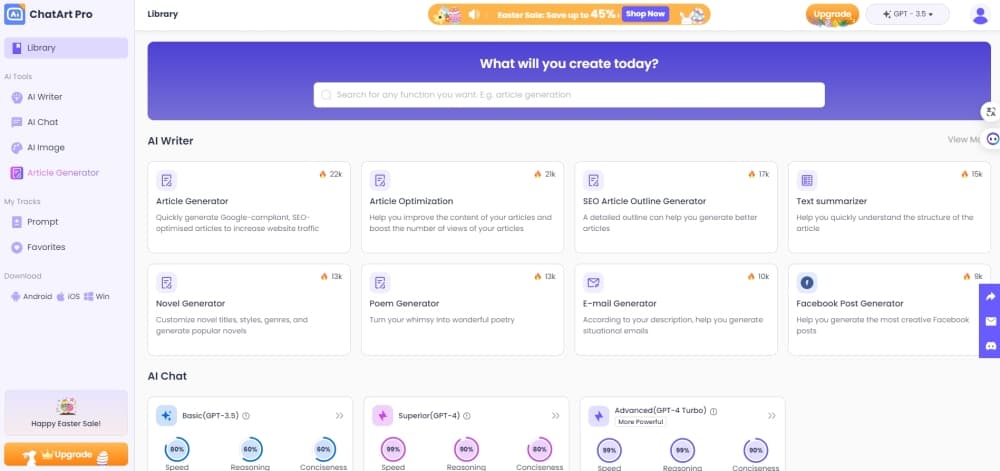
ChatArt is an all-in-one AI creation platform for video, image, music, chat, and writing. You pick a tool, feed it a prompt or a photo, and generate content in one place.
About ChatArt: AI Chat & Video Maker
What Is ChatArt
ChatArt is an all-in-one AI creation platform from iMyFone. It gathers the tools people usually pay for one by one, video generation, image editing, music, story writing, and chat, into a single workspace with one credit balance. You open a studio, pick a model, and generate clips, pictures, songs, or text without jumping between subscriptions.
The pull is breadth under one login. A short prompt can turn into a video clip, a product photo can be animated, and a chat session can draft copy for the same project. Models like GPT Image 2, Seedance, and Kling sit behind the scenes, so you don't manage separate keys or accounts.
Two things decide whether it fits. Credits run the paid tools, and heavier video work burns them faster, so casual users stay on the free trial and regular creators pay. It also leans toward consumer and marketing content rather than studio-grade film editing, so it won't replace a full editing suite.
Getting Started
- Open chatartpro.com or install the app, then sign up for a free account. New users get bonus trial credits to test the tools.
- Pick a workflow from the studio: video, image, music, novel, marketing, agent, or chat.
- Feed your source material. Type a prompt, upload a photo, or drop a short clip, then choose the model you want to render with.
- Generate, review, and refine. Adjust motion or style settings and regenerate until the output matches what you had in mind.
- Download your result or keep building across tools. The credit balance covers every studio, so you spend from one pool.
Product Information
A quick look at ChatArt: AI Chat & Video Maker's pricing, supported platforms, and performance.
Best for
The users, tasks, and scenarios where this tool fits best.
Users
- Solo content creators
- Small business marketers
- Casual AI tinkerers
Tasks
- Making a video from a photo or a prompt
- Removing watermarks and cleaning up images
- Writing a story or novel draft
- Checking text for AI authorship
Scenarios
- Preparing a product launch on a tight schedule
- Turning a song sketch into a full track and video
- Testing ideas before spending
Key features
Multi-Model Video Generation
ChatArt works as an AI video generator with several entry points. Text to video turns a script line into a scene, image to video animates a still, and video extension stretches a short clip so you have enough footage for voiceovers and edits. Seedance and Kling models handle the rendering, and motion controls let you steer camera movement instead of rerolling blind.
Image Studio with Background and Quality Tools
The image studio works as an AI image generator and editor with text to image, image to image, background removal, and image enhancement in one workspace. You can generate art from a prompt, restyle a photo, cut a subject from its background, and sharpen a low-resolution shot before export. It's the part most people use daily, and the free trial covers it enough to judge output quality.
AI Music and Music Videos
The AI music generator creates songs and tracks from a prompt, and the AI MV tool turns those tracks into a music video. That combination suits creators who want original audio and a visual to match without licensing stock music or hiring an editor. Output quality tracks how specific your prompt is.
Marketing Studio
Marketing Studio runs a campaign from idea to assets. You start with a product or angle, and it produces promo videos, product ad clips, and ad copy you can publish. For small teams it replaces a stack of separate design and copy tools, and you still supply the brand direction.
AI Chat and Agent Workspace
The AI chat app connects you to leading models for everyday questions, rewriting, and drafting. The AI Agent, called Claw, handles multi-step tasks inside the same workspace, and the Canvas gives you a visual surface to assemble and edit what you generate. It's the hub that ties the studios together rather than a separate app.
Novel and Story Writing
The Novel workspace and AI Story Generator produce long-form fiction from a premise. You set the outline and tone, and the tools expand it into chapters. It suits writers who want a structured first draft to edit, not a finished manuscript, so the value depends on how much direction you give it.
Pros and cons
Pros
- Several AI tools, video, image, music, writing, and chat, share one account and one credit balance, which cuts multiple subscriptions.
- New models like GPT Image 2, Seedance, and Kling are wired in without separate keys or accounts.
- The free tier is genuinely usable for chat, image, and story tools, so you can judge output before paying.
- Marketing Studio bundles promo videos and ad copy, which saves small teams a design tool.
- A Lifetime Plan is offered, so you can pay once instead of renewing monthly.
Cons
- Credits drive the paid tools, and video generation drains them fastest, so regular video work means topping up often.
- It targets consumer and marketing content, not pro film editing, so it won't replace a full editing suite for complex projects.
- Output quality depends on your prompts and the model you pick, so results vary more than a single fixed tool.
- With so many tools under one roof, the interface can feel crowded at first, and you spend time finding the right studio.
Frequently asked questions
ChatArt is an all-in-one AI creation platform. It handles video generation, image editing, music, story writing, marketing assets, and chat with leading AI models. People use it to produce social videos, product visuals, and written drafts without subscribing to several separate apps.
Related content
Explore related tools, skills, and articles for ChatArt: AI Chat & Video Maker.
ChatArt: AI Chat & Video Maker Alternatives
Isgen AI
Isgen · AI DetectionIsgen AI is a web-based AI detector that scores text for machine authorship and shows you which sentences and phrases push the number up. It's built for teachers, editors, students, and writers. Their question is simple: did this draft come from ChatGPT, GPT-5, Claude, Gemini, DeepSeek, or another model? You paste or upload content, run a scan, and get a Human, AI, and Mixed breakdown in seconds. There's also a companion editor that scores text while you write it.
Humanizeai Tools
Humanizeai Tools · Writing · AI DetectionHumanizeai Tools is a web-based AI humanizer that rewrites machine-generated text so it sounds like a person wrote it, which is the whole point of the category it belongs to. Paste a draft from ChatGPT, Claude, or Gemini, run it through the tool, and it swaps out the phrases and sentence patterns that AI detectors flag. If your goal is to make AI text sound human before you publish it, this is the kind of tool built for exactly that. It suits students, bloggers, and marketers who need copy that reads naturally and clears tools like GPTZero, Copyleaks, and Winston AI after a single pass.

Hidemyai
Hidemyai · Writing · AI DetectionHidemyai is an AI content humanizer. It rewrites text from ChatGPT, Jasper, and similar tools so the result reads like a person wrote it. You paste your draft, pick a document type and tone, and the service returns a version meant to bypass AI detectors such as Originality.ai, Turnitin, and ZeroGPT. It targets writers, marketers, and students who lean on AI drafts but can't ship copy that sounds robotic. The promise is simple: make AI content undetectable.