

ChatBetter
Unsupervised · Other · Chatbot
ChatBetter is a multi-model AI chat platform from Unsupervised. It put ChatGPT, Claude, and Gemini in one interface and routed each prompt to the best model.
About ChatBetter
What Is ChatBetter
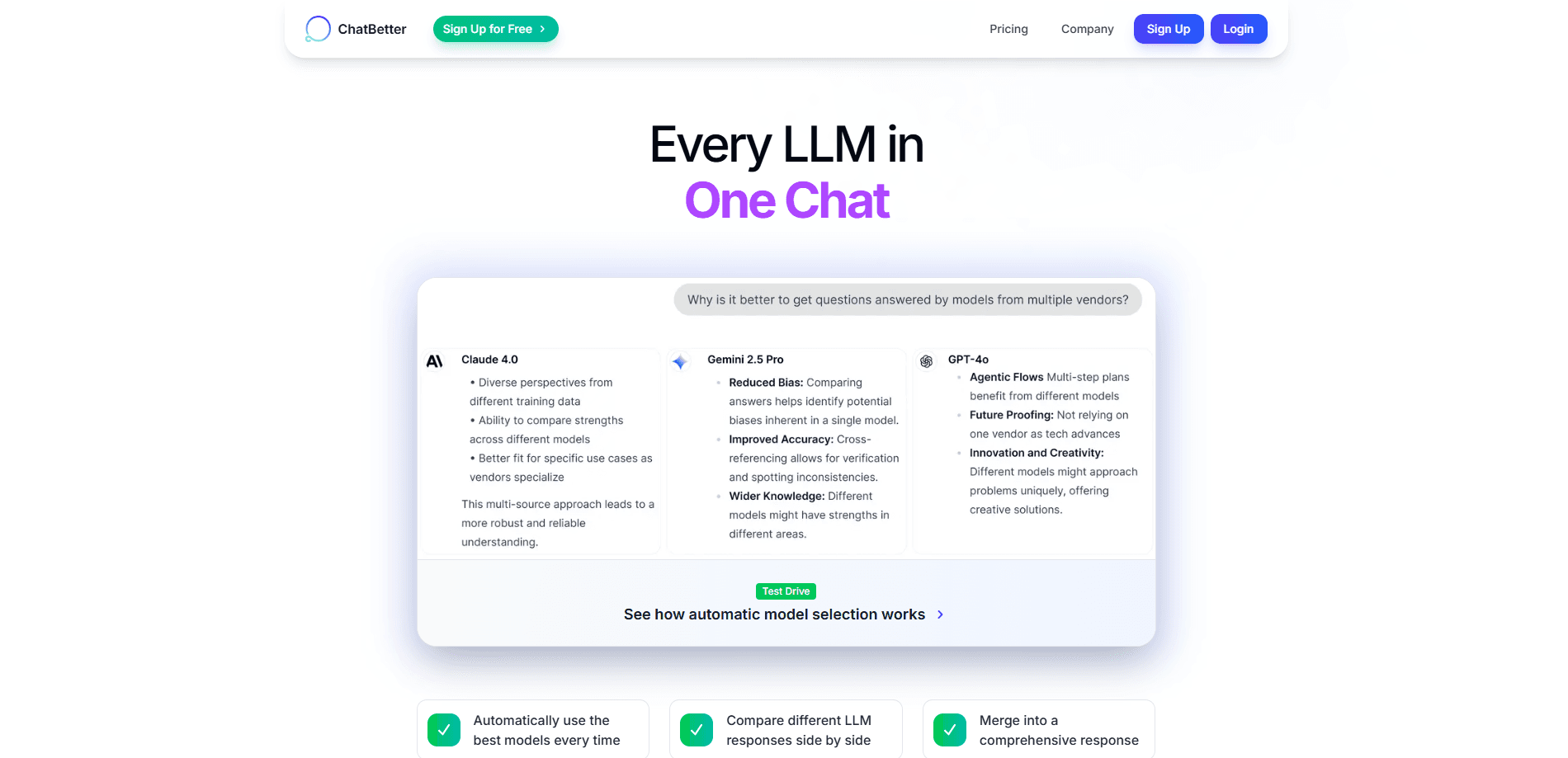
ChatBetter was a web platform that bundled several leading large language models into a single interface. Instead of paying for and switching between separate subscriptions, a user could send one prompt and watch responses from models built by OpenAI, Anthropic, Google, xAI, DeepSeek, Meta, Perplexity, Mistral, and Cohere arrive in the same window. Around that core idea, ChatBetter added automatic model routing, side-by-side comparison, and a way to merge several answers into one. It filled the role of an AI model aggregator, and its side-by-side mode was the closest thing to a ChatGPT Claude Gemini side by side view in one window.
The company behind it, Unsupervised.com, ran ChatBetter as a research preview. According to the team, more than 30,000 people used it to test whether talking to several models at once produced more trustworthy results. What they found was consistent: the strongest answers rarely came from a single model. They came from routing a question to the right model, grounding the reply in source data, and letting agents judge and combine the output.
The service is now closed. Unsupervised shut ChatBetter down and moved its learnings into new products, and the team pointed users to open-source tools that carried parts of the idea forward. So this page covers how ChatBetter worked, who it fit, and what replaced it, rather than a live sign-up path.
Getting Started
- Create a free account and open the chat window.
- Type a question the way you normally would, or let the platform improve your prompt before it runs.
- Watch the platform pick a model, or ask it to send the prompt to several and show the answers side by side.
- Merge the responses you like into one answer and file the result into a project folder.
- On a team plan, share the conversation or add it to the shared prompt library.
Product Information
A quick look at ChatBetter's pricing, supported platforms, and performance.
Best for
The users, tasks, and scenarios where this tool fits best.
Users
- People juggling several AI subscriptions
- Researchers and analysts who want a second opinion
- Teams that need shared AI workflows
- Enterprises with privacy rules
Tasks
- Comparing model output on one question
- Drafting with the best model per task
- Building a reusable prompt library
- Summarizing source material
Scenarios
- Choosing a default AI model for a team
- Checking a high-stakes answer
- Organizing a long research project
- Handing work to a successor tool
Key features
One interface for many models
ChatBetter's headline promise was that you didn't need a separate tab or subscription for each model. A single prompt could reach OpenAI, Anthropic, Google, xAI, DeepSeek, Meta, Perplexity, Mistral, and Cohere through the same chat box. For someone paying for three or four subscriptions, that consolidation was the main draw.
Automatic model routing
Rather than making users guess which model to pick, ChatBetter routed each request on its own. It judged the task and sent the prompt to the model, or mix of models, most likely to answer well. The team said this routing kept answers accurate while also trimming cost, since simpler questions didn't need the most expensive model.
Side-by-side comparison and merging
When a question mattered, users could send it to several models at once and read the answers in columns. From there, ChatBetter could merge the strongest parts into a single reply. The team described this as getting a second opinion without leaving the page, and it was the feature users compared most often to using several apps at once.
Prompt improvement and coaching
ChatBetter rewrote or sharpened prompts before sending them. A user typing a rough question would get a cleaned-up version that the models could act on more precisely. Over time the platform tracked which prompts worked, so a team could reuse a proven phrasing instead of rediscovering it.
Projects, folders, and shared prompt libraries
Chats weren't just a flat list. Users could group conversations by project or client, search across history, and adjust the context a model could see. On team plans, a shared library let colleagues borrow prompts that had already worked, which cut the time spent reinventing instructions.
Team and enterprise controls
Beyond the free tier sat a set of features aimed at companies. Those included single sign-on, role-based access, audit logs, tenant isolation, and connections to tools like Slack, Microsoft Teams, and Databricks. The pitch was that a company could adopt several models without letting every employee roam unchecked.
Pros and cons
Pros
- Pulls the major models into one chat, so you stop switching between apps.
- Routes each prompt to a fitting model, which the team said cut AI spend by 30 to 50%.
- Lets you compare answers side by side and merge the best parts.
- Improves prompts automatically and saves the ones that worked.
- Adds team controls such as single sign-on, audit logs, and shared prompt libraries.
Cons
- The platform is closed, so it can't be used for new work.
- Free-tier limits were tight enough that serious use meant paying.
- History had to be exported before the March 15 deadline or it was lost.
- As a research preview, some features were not fully production-ready.
Frequently asked questions
It was a multi-model AI chat platform from Unsupervised that gave users one interface for ChatGPT, Claude, Gemini, and other large language models, then routed each prompt to the model best suited to answer it.
Related content
Explore related tools, skills, and articles for ChatBetter.
ChatBetter Alternatives

Odyssey 3
Odyssey · OtherOdyssey-3 is Odyssey's foundation world model. It simulates physics in real time, turns a prompt into an interactive environment, and adapts to robots, cars and games.

JarvisCore
Prescott Data · Coding · Productivity · OtherJarvisCore is an open source Python runtime where AI agents work as equal peers on an agent mesh, claim tasks from a shared ledger, and reach external services through a zero-trust broker.
Clef
Cloudflare · Business · OtherClef is Cloudflare's open-source decision model for Workers AI. It returns calibrated probabilities for typed questions, not generated text, so agents can classify, route, and act fast.