

ChatGPT Text Formatter
ChatGPT Text Formatter (independent developer) · Writing
ChatGPT Text Formatter converts raw chatbot output into clean rich text, so headings, bold words and lists paste into Word or Docs as real formatting.
About ChatGPT Text Formatter
What Is ChatGPT Text Formatter
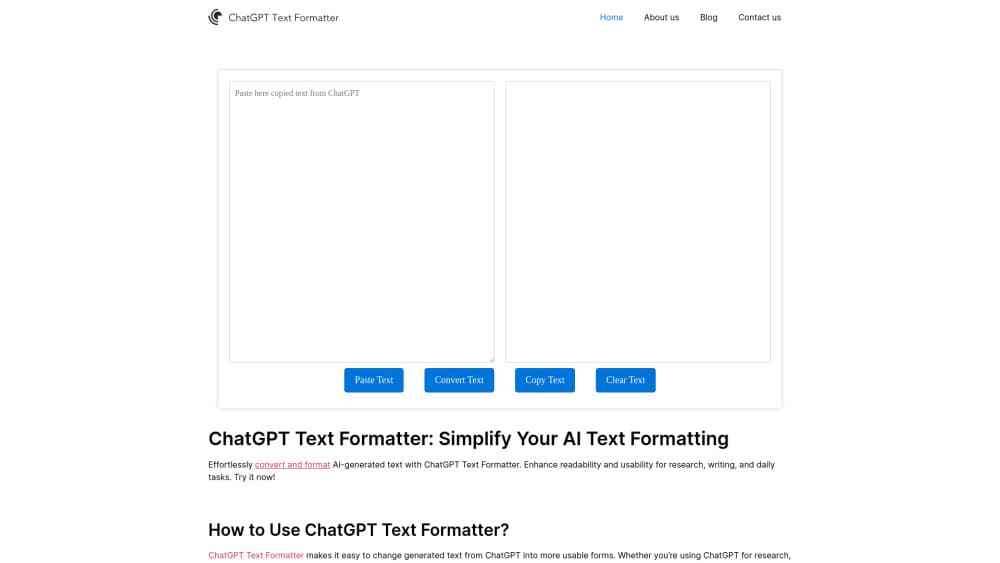
ChatGPT Text Formatter is a single page web tool that takes AI chat output and hands it back as formatted rich text. You paste an answer into the box on the left, press Convert, and the right pane shows the same words with headings, bold text, bullet lists and tables rendered properly. It runs in a desktop browser and needs no install. The site went live in July 2024 and was last refreshed in June 2026.
The problem it solves is dull but constant. ChatGPT, Claude and Gemini all answer in Markdown, so a copied reply arrives in Word or Gmail full of asterisks, hash marks and hyphen bullets. Fixing that by hand takes a minute per paste and people do it dozens of times a week. The site is a ChatGPT text formatter first, and the same page handles output from any assistant that writes in Markdown. You don't need a plugin or an extension to format ChatGPT output, just a browser tab.
The limits are worth knowing before you rely on it. The tool changes structure, not prose. It won't rewrite a clumsy sentence, translate an answer, check a fact or make text read like a person wrote it. Think of it as an AI text cleaner for layout only, not an editor. There's also no history, no file export and no API.
Getting Started
- Open chatgpttextformatter.com in Chrome, Edge, Firefox or Safari on a desktop or laptop.
- Copy the answer with the chat app's own copy button rather than highlighting it by hand, then click Paste. The browser asks for clipboard permission the first time and remembers the choice for that site.
- Press Convert and check the right pane, which shows the rendered result with headings, emphasis and list levels intact.
- Click Copy above the preview, then paste AI text into Word, Google Docs, Excel, PowerPoint, Canva or a CMS editor and the formatting travels with it.
Product Information
A quick look at ChatGPT Text Formatter's pricing, supported platforms, and performance.
Best for
The users, tasks, and scenarios where this tool fits best.
Users
- Students who draft essays and study notes in a chatbot
- Bloggers and content marketers
- Office workers who paste AI summaries into reports and email
Tasks
- Cleaning up a long ChatGPT answer before it goes into a client report
- Moving a nested outline into Google Docs without losing the second and third indent levels that carry the argument.
- Turning a chatbot comparison table into something that survives a paste into Excel or Sheets.
- Tidying meeting notes and action lists that were generated in chat and need to be shared with people who never saw the original prompt.
Scenarios
- Daily use
- Shared documents
- Cross device handoff
Key features
Markdown to Rich Text Conversion
The page parses Markdown in the browser and renders the pasted answer as headings, bold, italics, numbered lists, bullet lists, tables and blockquotes. The wording stays exactly as the chatbot produced it. Only the structure turns into real formatting, which is the whole job of an AI text formatter.
One Click Paste from the Clipboard
The Paste button reads the clipboard directly instead of asking you to press Ctrl and V. Chrome and Edge prompt for permission the first time, and the site remembers the answer after that. It removes the step where a manual selection drops line breaks or picks up half a button label.
Copy That Carries the Formatting
Copy on the right pane grabs the rendered output as rich text, not as source code. Word shows a real heading style instead of a hash mark, and Docs keeps the bullet levels. Pasting into a plain text field falls back to unformatted text, which is usually what you want there anyway.
Side by Side Panes
Input sits on the left and the rendered preview on the right, so you can compare the raw answer with the converted version before committing. If a table collapses or a nested list flattens, the mistake shows up in the preview rather than halfway through a document.
Clear Button for a Fresh Start
One click empties both panes. There's no saved history on the page, which makes it safe to use on a shared office machine or a library computer. It also means an accidental refresh loses the text, so copy the result before you close the tab.
Free, No Account, No Daily Cap
The tool asks for no email, no signup and no card, and the site states that usage is unlimited. Running costs are covered by optional donations through Buy Me a Coffee. There's no Pro tier hiding the useful parts, which is rare enough to be worth mentioning.
Pros and cons
Pros
- Does one job and does it quickly: paste, convert, copy, with no settings to learn.
- Keeps heading hierarchy and nested bullet levels, which is where most manual cleanup goes wrong.
- Free with no account, so it works as a quick fix on a borrowed laptop.
- Handles output from ChatGPT, Claude, Gemini and any other assistant that replies in Markdown.
- The conversion runs in the page itself, so the text you paste isn't sent to a server for processing.
Cons
- No file export. The only way out is the clipboard, so you can't save a .docx or .md file directly.
- It won't improve the writing. Anyone hoping for a rewrite, a tone change or a way around AI detectors is looking at the wrong tool.
- No history or saved documents, and a refresh clears both panes, so long passages need copying out before you close the tab.
- Some editors and form fields strip styling on paste anyway, which means the converted text looks plain again in a few CMS and email tools.
Frequently asked questions
Yes. There's no subscription, no trial and no account. The site covers its costs with optional donations through Buy Me a Coffee, and it states that usage is unlimited.
Related content
Explore related tools, skills, and articles for ChatGPT Text Formatter.
ChatGPT Text Formatter Alternatives

Google EmbeddingGemma 2
Google DeepMind · Writing · Image · CodingGoogle EmbeddingGemma 2 is a 740M-parameter open model that turns text, code, images, audio, and video frames into vectors in one 768-dimension space, running on phones and laptops.

MePersona
MePersona, Inc. · Writing · Productivity · MarketingMePersona is an AI unified inbox for creators. It learns your voice, drafts replies to fan messages from 12 platforms, and sends only what you approve.

Fluence
Yay Software (Yannick Huchard) · Writing · Voice & Language · ProductivityFluence is an Android app that reads PDFs, EPUBs, Word files and web articles aloud, follows each sentence as it speaks, and answers questions about the text on the phone itself.