

ChatShape
ChatShape · Marketing · Chatbot
ChatShape is a no-code AI chatbot builder that crawls your website or docs, trains a support bot on that text, and lets you embed it on your site to answer customer questions.
About ChatShape
What Is ChatShape
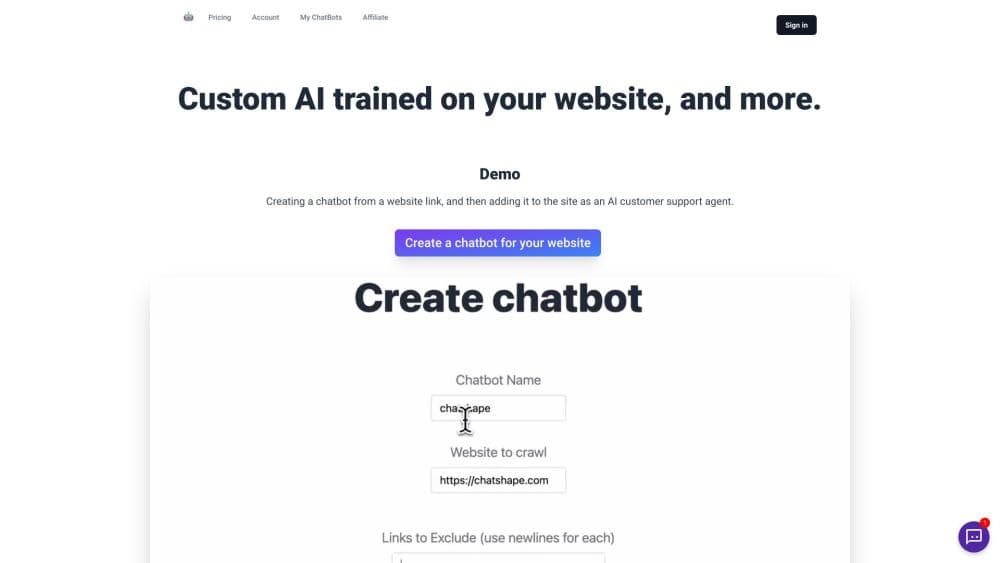
ChatShape is a web tool that builds a custom AI chatbot from content you already have. You point it at a website link or upload PDFs, and it crawls the text, turns it into training material, and hands you a chatbot you can drop into any site with a short script tag. The pitch is simple: answer customer questions around the clock without writing a single reply yourself.
The tool is aimed at small businesses and lean teams. Instead of hiring support staff or paying per seat on a big platform, you let the crawler read your help pages, policies, and product docs, then customize the bot's welcome message and instructions to match your brand. It handles two jobs at once: deflecting routine questions and collecting leads from visitors who are ready to talk.
Three things set the boundaries. The bot only knows what you feed it, so a thin website makes for a thin chatbot. Every plan caps how many messages and chatbot generations you get each month, and the free tier is small. And while it captures emails and exports them as CSV, it leaves the sales follow-up to you.
Getting Started
- Sign up at chatshape.com and open the create page, or install the Chrome extension if you want to build the bot while browsing your own site.
- Add your sources. Paste a website link to crawl, upload PDFs, or point the extension at the pages you want the bot to learn from.
- Click to generate the bot. The crawler shows the links it pulled and the character count, then builds a chatbot from that text.
- Customize the branding, colors, welcome message, and prompt so replies sound like your business.
- Copy the embed script into your site's HTML, or leave the bot unembedded while you tune it. Upgrade the plan only when you need more messages or sources.
Product Information
A quick look at ChatShape's pricing, supported platforms, and performance.
Best for
The users, tasks, and scenarios where this tool fits best.
Users
- Small business owners
- Solo founders and lean teams
- Support and sales teams
Tasks
- Answering repeat questions about hours, pricing, and policies
- Turning website content into a chat assistant
- Collecting visitor emails
- Reviewing what customers ask
Scenarios
- Launching a support channel on a small budget
- Covering nights and weekends
- Testing an idea before committing
Key features
Crawl-to-Chatbot Training
You give ChatShape a website link and its crawler grabs the visible, copyable text on those pages. It shows you every link it pulled and the total character count before you commit, then builds the chatbot from that material. That is the whole setup: no data warehouse, no manual transcription of your docs.
Embeddable Website Widget
The finished bot installs with a script tag you paste into your site's HTML. It then appears as a chat window where visitors already are, so you do not send them off to a separate support portal. If you would rather test first, you can keep it off the site and open it from your dashboard while you tune it.
PDF and Custom Source Support
Beyond crawling pages, you can upload multiple PDF files and train the bot on your internal documents. You can also add custom instructions to the prompt or bolt on more web pages later. For large data sets or a custom integration, ChatShape asks you to email them directly.
Lead Capture and Export
Turn on the email form and the chat window starts collecting leads, along with details like country of origin so you know where they came from. Collected leads land in your dashboard and export to CSV, which plugs into whatever CRM or spreadsheet you already use.
Branding and Prompt Customization
You control the bot's color, branding, welcome message, and the prompt that steers its tone. ChatShape expects you to keep tuning both after the bot goes live, so replies drift toward how you want customers handled. It is the difference between a generic assistant and one that sounds like your business.
Analytics Dashboard
Every conversation is recorded and viewable in the dashboard, and you can export the logs as a file. That lets you read what customers actually ask and where the bot fell short. It also doubles as a way to spot the questions your website never answers.
Pros and cons
Pros
- Setup takes minutes: paste a link, let the crawler run, and you have a working bot to embed.
- The free plan and a $19/mo Hobby tier make it cheap to try before committing.
- Lead capture with country data and CSV export fits straight into an existing sales flow.
- You can train the bot on PDFs and extra pages, not just your live site.
- Branding and prompt controls let the bot match your voice rather than sound generic.
Cons
- The bot only knows the content you give it, so thin or outdated sources produce weak answers.
- Message and generation caps vary by plan, and the free tier runs out fast under real traffic.
- There is no public API, so you cannot wire the chatbot into other software without contacting the team.
- Lead follow-up and data cleanup stay manual once the CSV is exported.
Frequently asked questions
ChatShape is a no-code tool for building AI chatbots from your own content. It crawls a website link or reads your PDFs, trains a bot on that text, and gives you an embed script so the bot can answer customer questions on your site.
Related content
Explore related tools, skills, and articles for ChatShape.
ChatShape Alternatives

ngram 2.0
ngram · Video · Marketingngram 2.0 is an AI video generator for teams. It turns a prompt, a screen recording, or a product URL into a narrated explainer, product demo, or AI avatar video, and every scene stays editable.

shippedit.me
Krawlup · Marketing · Businessshippedit.me now redirects to Krawlup, a web platform that audits SEO, AEO and page speed every week, then hands the fixes to AI coding agents over MCP.

MePersona
MePersona, Inc. · Writing · Productivity · MarketingMePersona is an AI unified inbox for creators. It learns your voice, drafts replies to fan messages from 12 platforms, and sends only what you approve.