

chatWise
ChatWise · Leaning · Chatbot
ChatWise is an AI chatbot platform that pairs a multi-model chat interface (GPT-4, Claude, Gemini and others) with tools to monetize expertise as chatbots you can sell.
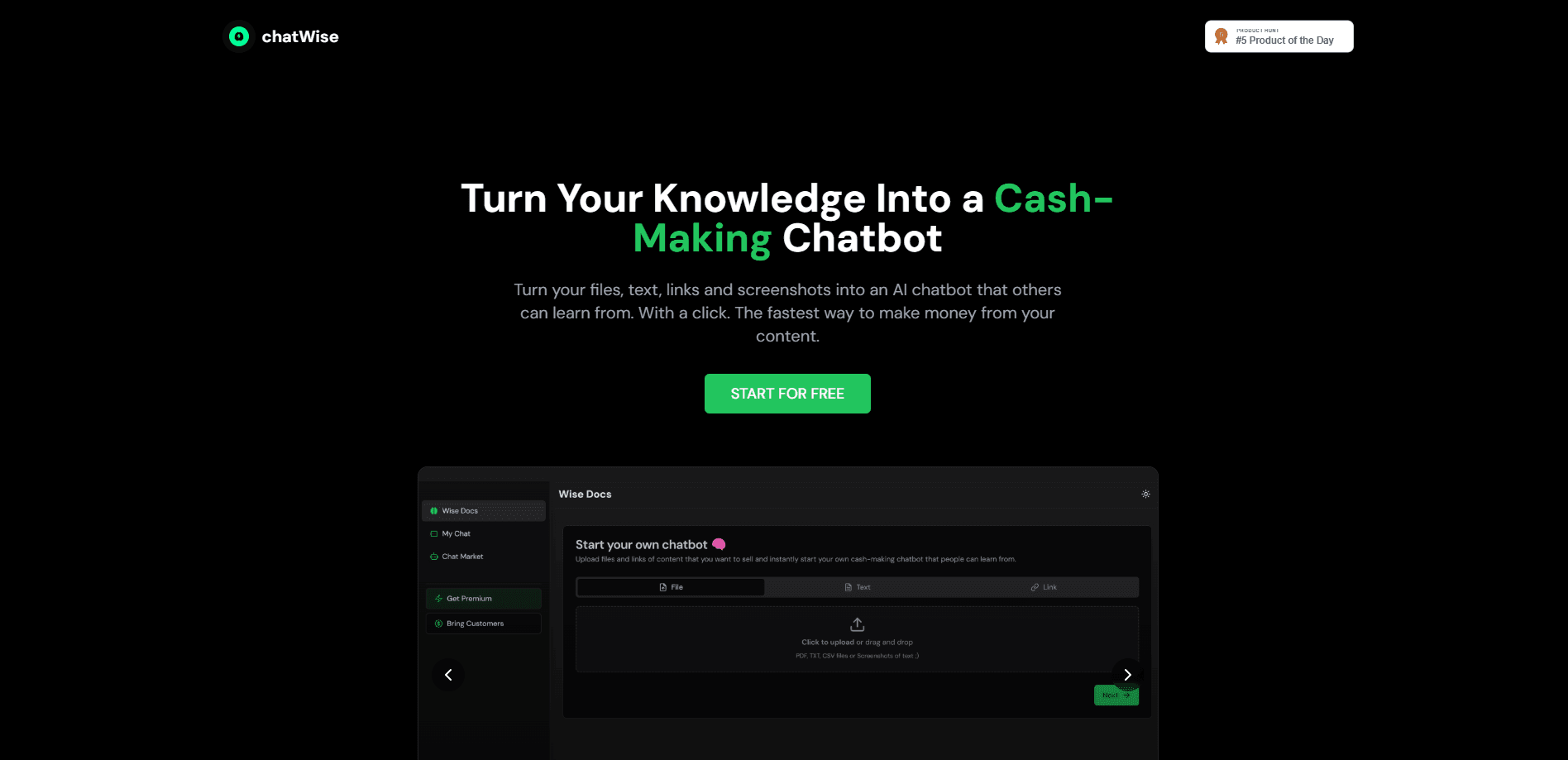
About chatWise
What Is ChatWise
ChatWise is a web platform built around two jobs that usually live in separate products. The first is a general AI chat interface, where you talk to several large language models and pick whichever one handles a task best. The second is content monetization, where you package what you know into a chatbot and charge people to use it.
Most chat apps stop at the conversation. ChatWise adds a publishing layer on top, so the same place you use for everyday questions can also host a product you earn from. Creators, coaches and consultants are the obvious audience, since they already have knowledge somebody will pay for.
The catch is that the official site has been offline or unreachable, so details like exact pricing tiers, supported file formats and the monetization terms can't be confirmed right now. Treat anything specific about fees or payouts as unverified until the vendor publishes it.
Getting Started
- Create an account on the ChatWise website and open the chat workspace.
- Pick a model for the task, or switch between GPT-4, Claude and Gemini to compare answers.
- Build your own chatbot by loading the material you want it to draw on, such as notes, guides or a knowledge base.
- Publish the chatbot and set how people access it, whether that's a link you share or a paid subscription.
- Track who's using it and adjust the content as your audience's questions change.
Product Information
A quick look at chatWise's pricing, supported platforms, and performance.
Best for
The users, tasks, and scenarios where this tool fits best.
Users
- Creators and coaches
- Consultants and freelancers
- Everyday AI users
- Small teams
Tasks
- Comparing model answers
- Turning notes into a chatbot
- Selling access to your knowledge
- Drafting and research
Scenarios
- Answering repeat questions at scale
- Launching a small knowledge product
- Picking a model per project
- Testing monetization ideas
Key features
Multi-model chat interface
ChatWise lets you talk to several large language models from one screen, including GPT-4, Claude and Gemini. That means you can compare answers to the same question without opening three different apps, which is useful when no single model is best at everything.
Chatbot builder for your own content
You can build a chatbot around material you provide, so it answers with your knowledge rather than generic responses. This is the part that turns a personal chat tool into something you could offer to other people.
Content monetization
The platform supports turning a chatbot into an income stream, so you can charge for access to what you've built. This is the main thing that sets it apart from a plain chat app. The exact payout and pricing terms aren't confirmed while the site is down.
Single workspace for chat and publishing
Instead of using one app to chat and another to publish, ChatWise keeps both in one place. That shortens the gap between having an idea and offering it, which matters if you plan to iterate quickly.
Model switching per task
You aren't locked to one model. Switch based on the job in front of you. Coding, writing and reasoning tasks often suit different models, and fewer separate subscriptions is one practical upside.
Pros and cons
Pros
- Combines multi-model chat and monetization tools in one platform, so you can skip a second subscription.
- Lets non-technical creators build a chatbot from their own material without coding.
- Model switching per task helps you match the tool to the job.
- Setting up a paid chatbot is a low-cost way to test whether people will pay for your knowledge.
Cons
- The official site is currently unreachable, so pricing, features and payout terms can't be verified right now.
- Monetization details like fees and payment handling aren't published, which makes revenue hard to plan.
- Depending on one platform for both chat and sales means an outage can affect your income, not just your conversations.
Frequently asked questions
It's used for two things: chatting with multiple AI models in one place, and building chatbots from your own knowledge that you can charge people to use.
Related content
Explore related tools, skills, and articles for chatWise.
chatWise Alternatives
Kaggle AI
Google · Coding · LeaningKaggle AI is a community platform where people build, test, and compare machine learning models against shared data. It combines data science competitions, tens of thousands of public datasets, and free cloud notebooks with GPU and TPU access, so anyone with a browser can train a model without buying hardware. Google owns the platform, and joining costs nothing.

Bunch
Bunch AI · Leaning · BusinessBunch is an AI leadership coaching app that turns a few spare minutes a day into real management practice. It hands you one short, personalized tip each day, tracks how you respond, and lets you compare notes with peers inside private groups. The pitch is simple: you lead better by practicing a little, often, instead of sitting through a weekend seminar. Think of it as a leadership training app you actually open.

AI Mock Interview
SQLPad · Coding · LeaningAI Mock Interview is a practice tool built into SQLPad that simulates real job interviews and gives you instant feedback on both what you say and how you say it. You pick a role template or upload a job description, answer questions out loud in real time, and then review a transcript with notes on structure, clarity, and grammar. It's aimed at data professionals prepping for SQL, Python, data engineering, machine learning, and system design roles, and it works entirely in the browser. No install needed.