
Chatwith
Chatwith · Marketing · Chatbot
Chatwith is a no-code AI chatbot builder that lets you train AI chatbot answers on your website, docs, PDFs and YouTube videos, then embeds it as a widget.
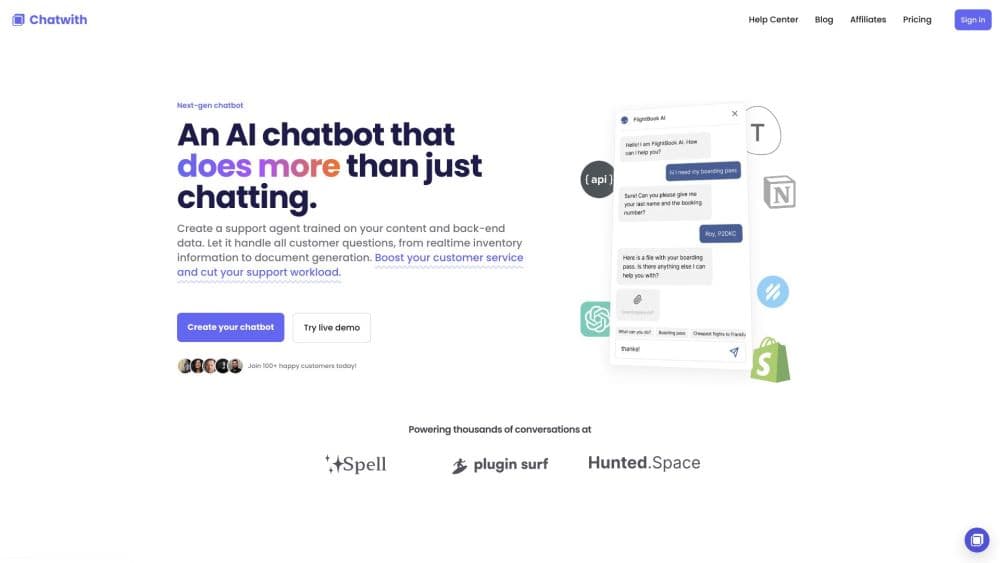
About Chatwith
What Is Chatwith
Chatwith builds an AI support agent from content you already have. Point it at your website, help center, PDFs, plain text, or a YouTube video, and it indexes that material so visitors can ask questions and get answers drawn from your own pages instead of a generic model's guess.
The setup is light. You don't need an OpenAI API key, because the plans include access to the AI models. You copy one script tag into your site, publish, and a chat bubble shows up in the corner. The agent picks up changes to connected sources, so a pricing update on your site reaches the answers without a manual re-import.
The limits are worth knowing before you sign up. Training on YouTube works from the transcript, so anything visual in a video, like slides or on-screen demos, won't be answered. There is no free plan, so you pay from the first month to test answer quality on your own content. And the answers are only as good as the pages you feed it. Thin or outdated help docs produce weak replies.
Getting Started
- Create a Chatwith account and start a new agent.
- Add knowledge sources: website URL, help pages, PDFs, text, or a YouTube link.
- Customize the agent's name, colors, and welcome message to match your brand.
- Copy the script tag from the Install screen and paste it before the closing body tag on your site.
- Test a few real customer questions, then let it run on the live site.
Product Information
A quick look at Chatwith's pricing, supported platforms, and performance.
Best for
The users, tasks, and scenarios where this tool fits best.
Users
- Small support teams
- Ecommerce stores
- Agencies and web shops
Tasks
- Answering repeat questions
- Capturing leads mid-chat
- Running actions in your tools
- Answering after hours
Scenarios
- A visitor hesitating before checkout
- A software team with a deep docs site
- A creator with tutorial videos
Key features
Training on Your Own Sources
Chatwith indexes websites, help centers, PDFs, plain text, and YouTube transcripts into one knowledge base. You choose what the agent reads, which keeps answers tied to your product rather than the open web. Adding a page is a matter of pasting a link, and the agent picks up updates to connected sources.
One-Line Website Widget
Installation is a single script tag pasted before the closing body tag. That works on WordPress, Shopify, Wix, Webflow, Squarespace, Framer, and any plain HTML site, so a non-technical owner can go live without a developer. The website chat widget is customizable in color, name, and welcome message, and it installs the same way on WordPress through a footer code field.
Skills and App Integrations
The agent connects to the tools your team already runs through skills, integrations, and APIs. That turns a question-and-answer bot into something that can look up an order, update a record, or pass a task along. It suits teams that want the chatbot to act, not only talk.
Lead Capture in the Conversation
When a visitor asks about pricing or a demo, the agent can collect contact details in the same chat and store them for your sales follow-up. Leads arrive with context, so a rep knows what the person asked before picking up the thread.
White-Label for Agencies
Agencies get partner pricing and can present the agent under their own brand. Each client runs in a shared workspace, which keeps the billing and setup in one place. It's a practical route for a web shop that wants to sell AI support as part of a package.
Model Access Without an API Key
Plans include the AI models, so you don't bring your own OpenAI key to get started. That removes one account and one bill from the setup, and it suits a small business that wants a working agent without developer overhead.
Pros and cons
Pros
- Setup takes minutes, since you paste one script tag and connect a URL, with no code or API key.
- Training sources cover websites, PDFs, text, and YouTube transcripts, which fits teams with existing documentation.
- Agencies can resell the agent under their own brand and manage clients in one workspace.
- The agent can take actions through skills and integrations, not just answer questions.
Cons
- There's no free plan, so you pay the lowest price to test whether answer quality suits your content.
- YouTube training reads transcripts only, so visual details in a video won't come through in answers.
- Answer quality depends on your docs. Messy or outdated pages lead to vague replies, and cleaning them is on you.
- The entry plan at $9 a month is narrow, and a busy support inbox will likely push you to a higher plan.
Frequently asked questions
Chatwith builds an AI customer support chatbot from your own content and embeds it on your website. Visitors ask questions in a chat bubble, and the agent answers from your pages, documents, and videos.
Related content
Explore related tools, skills, and articles for Chatwith.
Chatwith Alternatives

ngram 2.0
ngram · Video · Marketingngram 2.0 is an AI video generator for teams. It turns a prompt, a screen recording, or a product URL into a narrated explainer, product demo, or AI avatar video, and every scene stays editable.

shippedit.me
Krawlup · Marketing · Businessshippedit.me now redirects to Krawlup, a web platform that audits SEO, AEO and page speed every week, then hands the fixes to AI coding agents over MCP.

MePersona
MePersona, Inc. · Writing · Productivity · MarketingMePersona is an AI unified inbox for creators. It learns your voice, drafts replies to fan messages from 12 platforms, and sends only what you approve.