
ChatWithCloud
Rafal Wilinski · Coding
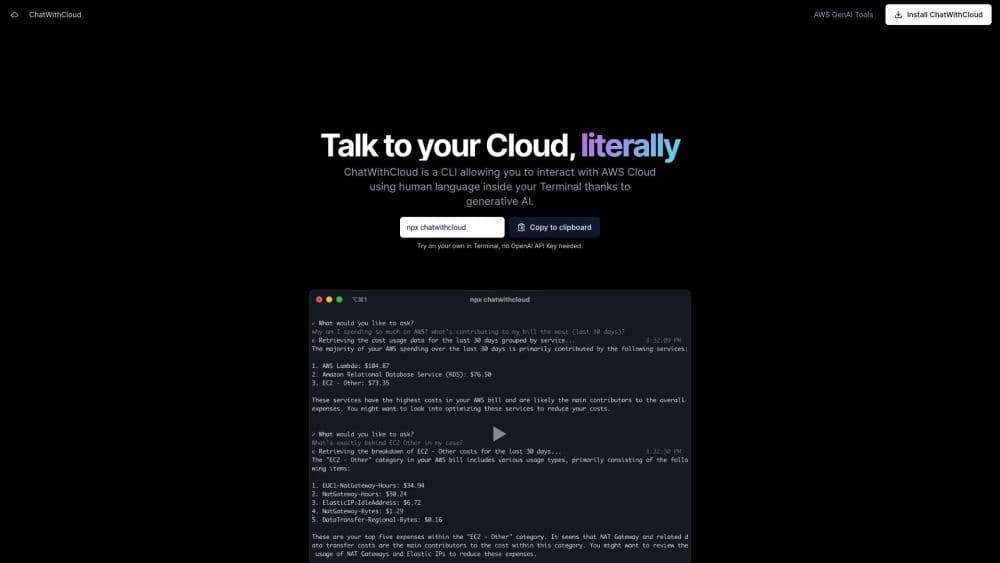
ChatWithCloud is a terminal CLI that turns plain English questions about your AWS account into real API calls, so you can check spending, audit IAM and debug outages without opening the console.
About ChatWithCloud
What Is ChatWithCloud
ChatWithCloud is an AWS natural language CLI from independent developer Rafal Wilinski. You type a question in everyday language, which means you can chat with your AWS account the way you'd chat with a colleague. An AI model writes a short JavaScript script that calls the AWS SDK, the tool runs that script on your machine with your own credentials, and then it explains what came back.
The difference from a general chatbot is specificity. ChatGPT can explain what an S3 bucket policy does. ChatWithCloud can tell you which of your buckets are actually public right now, because it reads your live resources instead of guessing. The same loop covers cost data, IAM users, Lambda errors and CloudWatch alarms.
There are real limits. It works with AWS only, it lives in a terminal, and the generated code runs without a confirmation prompt. You also need Node.js and at least one profile in your ~/.aws files before the first run. The first 15 runs are free and don't require an OpenAI key, which makes the trial cheap to test on a real account.
Getting Started
- Run
npx chatwithcloud, or install through Homebrew, pnpm or Bun if you prefer a permanent command. - Pick one of the AWS profiles found in ~/.aws, then answer two setup questions about your AWS experience level and whether to send anonymous analytics.
- Ask your first question in plain English, for example "what did I spend last month, by service?"
- Read the answer, ask follow-ups in the same session, and type
/settingslater to change the model or your OpenAI key.
Product Information
A quick look at ChatWithCloud's pricing, supported platforms, and performance.
Best for
The users, tasks, and scenarios where this tool fits best.
Users
- Solo developers and indie founders running their own AWS accounts
- DevOps and platform engineers
- Security reviewers who don't live in the console
Tasks
- Monthly cost reviews
- Permission and exposure checks
- Incident triage
- Routine cleanup
Scenarios
- A bill jumps overnight and you need the culprit service before the morning standup.
- An auditor asks for a list of privileged accounts, and you have twenty minutes to produce it.
- You're onboarding to an unfamiliar account and want a guided tour by question rather than by clicking.
Key features
Plain English to AWS SDK calls
Every question becomes a small JavaScript program written against the AWS SDK for JavaScript v2, which then runs locally. If the script fails, the error goes back to the model and it tries a corrected version. You see the answer, not the script syntax. The code stays visible in the session.
Cost breakdowns from your own billing data
The AWS cost analysis CLI side of the tool queries Cost Explorer and returns spend grouped by service, region or tag. From there you can ask follow-up questions about a specific line item and get the resources behind it, which is the part a static dashboard usually leaves out.
IAM and public exposure checks
It can list IAM users with admin access, flag accounts without MFA, and check S3 bucket policies for public grants. Results come back as short summaries with the resource names attached, so you can act on them without exporting anything.
Troubleshooting with CloudWatch context
As an AWS troubleshooting CLI it reads logs, metrics and alarm states around the resource you name. Asking why a checkout Lambda is failing returns recent errors plus the configuration values most likely to be the cause, such as memory or timeout settings.
Changes it can make for you
ChatWithCloud can create, update and delete resources when your credentials allow it. That includes stopping instances, adjusting Lambda timeouts and changing tags. It runs those calls without asking for confirmation first, which is the single most important thing to understand before you point it at a production account.
Local credentials and read-only roles
Credentials are read from ~/.aws and every AWS call is signed on your machine. Your questions and the trimmed JSON results go to the model, never your access keys. Pairing the tool with a read-only IAM role turns it into a pure inspection shell, and any write attempt then fails with an access denied error.
Pros and cons
Pros
- The trial is genuinely usable: 15 runs, no card, no OpenAI key, real account data.
- Local execution keeps AWS credentials off the network, which removes the usual objection to AI tooling in a cloud account.
- Answers are tied to your resources, so you skip the step of translating generic advice into your own account.
- The terminal workflow fits engineers who already live in a shell and resent tab hopping.
- The lifetime license at $399 with your own OpenAI key lets you pick a cheaper model and avoid another subscription.
Cons
- Generated code runs without confirmation, so a wrong question can change or delete real infrastructure. Use a read-only role unless you mean it.
- AWS only. Teams on Azure or Google Cloud get nothing from it, and multi-cloud shops need a second tool.
- Settings, license keys, API keys and full session transcripts sit in ~/.chatwithcloud/aws.json and session files in plain text.
- Cost Explorer queries bill $0.01 each on your AWS account, and asking many cost questions adds up quietly.
Frequently asked questions
It answers questions about your own AWS account from the terminal. Typical uses are cost reviews, IAM audits, finding public resources and debugging failing services.
Related content
Explore related tools, skills, and articles for ChatWithCloud.
ChatWithCloud Alternatives

Base Code
Base44 (Wix) · Coding · ProductivityBase Code is a shared cloud development environment from Base44. Teammates describe changes to an existing GitHub codebase in chat, preview them live and send them back as pull requests.

Google EmbeddingGemma 2
Google DeepMind · Writing · Image · CodingGoogle EmbeddingGemma 2 is a 740M-parameter open model that turns text, code, images, audio, and video frames into vectors in one 768-dimension space, running on phones and laptops.

GitGlow
GitGlow · Coding · ProductivityGitGlow is a local-first desktop Git client that lets independent developers review their own code and their AI agents' changes in one place before shipping.