

Chatzap
Chatzap · Marketing · Chatbot
Chatzap is a no-code AI chatbot that learns from your website and answers visitor questions through an embeddable widget, with lead capture built in for SaaS teams.
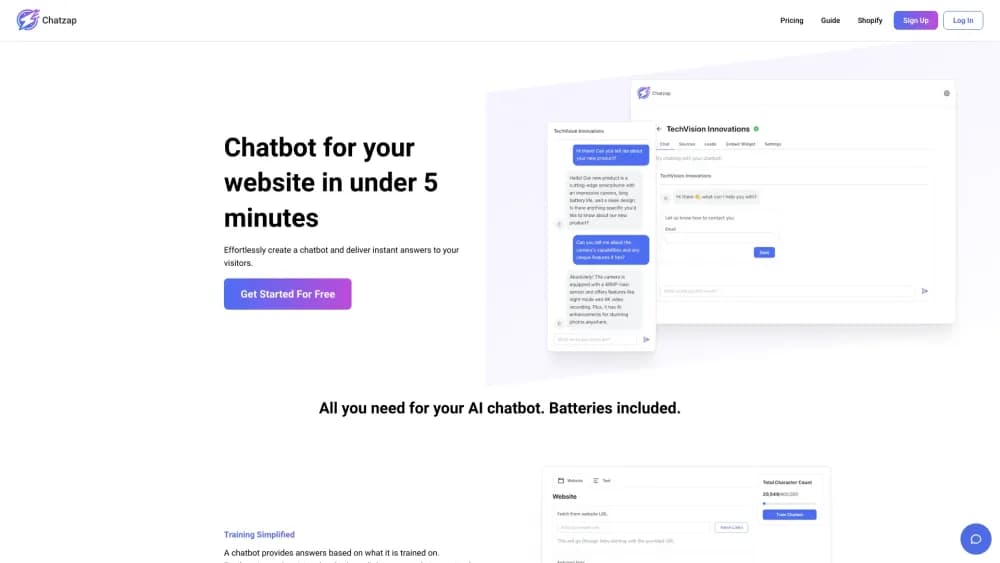
About Chatzap
What Is Chatzap
Chatzap is a website chatbot built for SaaS companies. You paste a link to your site, and the service turns those pages into a chat assistant. The widget answers visitor questions, points people toward a demo or signup, and can collect contact details along the way. The company markets it as an AI sales chatbot rather than a general-purpose support tool.
The appeal is speed. There's no flow builder to learn and no document upload step to manage. One URL is the entire training input. You adjust the widget's colors and placement, check a live preview, and drop a script snippet into your site. For a small team with no support hire, that's a short path from signup to a working bot.
Two things deserve a closer look. The bot only knows what its crawler can read, so pricing buried behind a login or a sales deck won't show up in answers. And in October 2026 the official domain displayed an expired registration notice. Treat availability as unconfirmed and verify the site before you build a workflow around it.
Getting Started
- Create an account on the Chatzap site and open the dashboard.
- Paste your website address. Chatzap crawls the public pages and builds a first version of the bot from that content.
- Customize the widget. Set colors, position, and greeting text, then check the result in the live preview.
- Test the bot with your own questions before it goes public. Ask about pricing, features, and common objections to see where answers fall short.
- Copy the embed snippet into your site and switch lead collection on if you want visitor emails stored for follow-up.
Product Information
A quick look at Chatzap's pricing, supported platforms, and performance.
Best for
The users, tasks, and scenarios where this tool fits best.
Users
- SaaS founders
- Solo marketers
- Small sales teams
Tasks
- Answering pricing and feature questions
- Qualifying visitors before a demo
- Collecting emails from anonymous traffic
- Deflecting repeat support questions
Scenarios
- A marketing site with steady traffic and no chat staff
- A launch page that needs fast answers
- A free trial funnel that loses visitors at signup
Key features
A Chatbot Trained From One URL
The setup starts with your website address. Chatzap reads the public pages, infers what the business sells, and writes responses in that context. There's no separate knowledge base to maintain at the start, which keeps the first version simple.
Embeddable Widget With Live Preview
The chat widget sits in the corner of your site and opens into a conversation panel. A live preview shows how it will look before you publish, so you can catch layout problems without touching production code. Installation is a script snippet.
Appearance Controls
Colors, shape, and placement are editable, and the goal is a widget that blends into your existing design instead of looking bolted on. Changes show up in the preview right away. This matters for brands that already have a strict style guide.
Lead Capture
This is the feature that separates a lead capture chatbot from a plain FAQ bot. When a visitor shows buying intent, the bot can ask for an email or other details and store them for later follow-up. You decide whether to turn it on.
Sales-Oriented Replies
The bot is tuned to move a conversation toward a next step, such as a demo request or a trial signup. It's a different job from a customer support chatbot that only closes tickets. The tradeoff is that sales framing can feel pushy on a support page.
Setup Without Code
No-code chatbot builder tools live or die on the first ten minutes. Here the sequence is short: add a URL, adjust the look, test, embed. A marketer can finish it without filing a ticket with engineering.
Pros and cons
Pros
- Setup is genuinely short, with one URL as the main input.
- No coding is needed for the embed or the appearance changes.
- Lead capture is included rather than sold as a separate add-on.
- The live preview makes design changes easy to check.
- The sales focus fits SaaS teams that want conversations to end in a signup.
Cons
- Answers depend on public pages, so gated pricing or private docs stay invisible to the bot.
- No public pricing page or API documentation was available to check.
- It's a web widget only, with no obvious chat channels beyond the site.
- The official domain showed an expired registration notice in October 2026, so confirm the service is still running before you commit.
Frequently asked questions
Chatzap is a no-code AI chatbot for websites, built around sales conversations. It reads a site, answers visitor questions in a chat widget, and can collect leads for follow-up.
Related content
Explore related tools, skills, and articles for Chatzap.
Chatzap Alternatives

Emailwritr
Emailwritr · Writing · MarketingEmailwritr is an AI email copywriting tool built for affiliates, course creators, and online businesses that want more revenue from the list they already own. Instead of blank pages or generic chatbot prompts, this AI email writer generates welcome sequences, launch campaigns, cart recovery emails, and promo series from frameworks modeled on well-known direct-response copywriters. You connect your autoresponder, answer a few questions about your offer, and it writes the copy for you.

Prosp
Prosp · Writing · Voice & Language · MarketingProsp is an AI LinkedIn outreach tool built for agencies and sales teams, and it writes the message and the voice note in your own voice for each prospect so they actually reply. You connect your accounts, find leads, and let the AI draft and send personalized messages at scale, all from one inbox. It's built for people running outbound at volume. That's the whole pitch. Every touchpoint still has to feel human.

On Model
On Model · Image · MarketingOn Model is an AI fashion model tool that places your clothing on virtual models so online stores can get on-model product photos without booking a photoshoot. It runs as a Shopify app, letting you swap the model in an existing image, change backgrounds, and generate faces for cropped or headless shots. The goal is simple: match your product photos to your customers and stand out from competitors using the same supplier images.