

Chit
Ravdesigns · Coding · Productivity
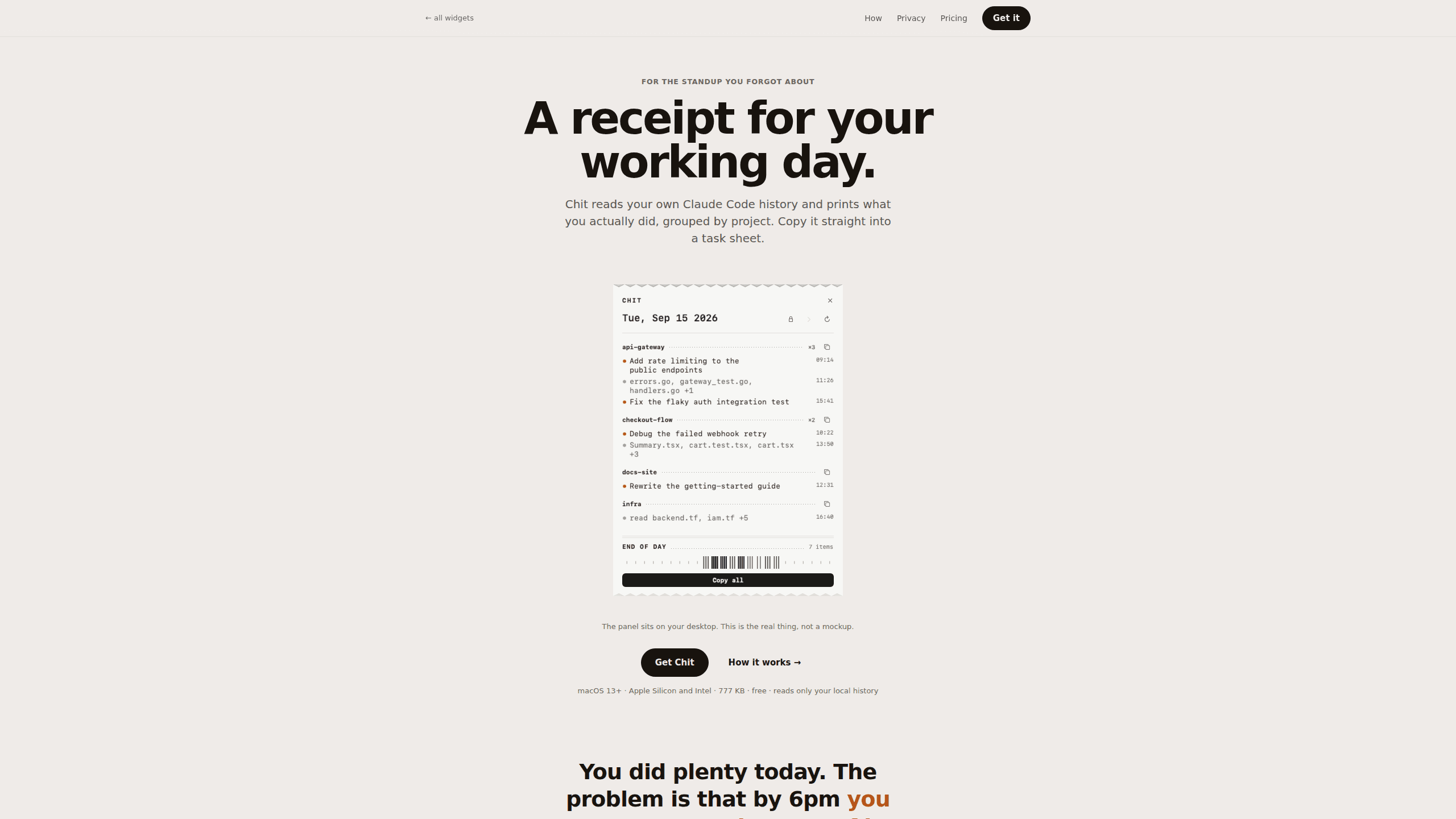
Chit turns the Claude Code transcripts already on your Mac into a daily work receipt, sorted by project and ready to paste into a standup or timesheet.
About Chit
What Is Chit
Chit is a desktop app for macOS that reads the Claude Code history sitting in your home folder and prints the day back as a receipt. It's 777 KB. Double click it and today's work is already on screen, bucketed under the repos you touched. Think of it as a macOS developer tool with one job.
The problem it solves is memory. Most people can't list what they shipped between nine and noon once six o'clock arrives, and a 9:30 standup the next morning makes it worse. Chit doesn't ask you to start a timer or fill in a log. It reads what Claude Code already wrote to ~/.claude/projects, then groups those sessions under their project names, busiest first, so a day of scattered agent sessions becomes a short list you can read aloud. Agent worktrees fold back into the parent project instead of showing up as unknown folders.
There's a limit worth stating early: Chit only knows about Claude Code. What if your day runs through Cursor, Copilot or Codex? The app has nothing to read and shows an empty receipt. It also cares about what changed, not how long you sat there, so it won't produce hourly billing numbers.
Getting Started
- Install it. Take the zip from the site or run the installer script in Terminal:
curl -fsSL https://chit.zopcloud.zop.dev/get.sh | bash. The app isn't notarised yet, so a browser download triggers a Gatekeeper warning once. The terminal route doesn't. - Open Chit. On first launch it scans ~/.claude/projects. A 2.7 GB folder of transcripts takes about a second.
- Read the receipt. Each line comes from a session title Claude Code generated, or from the names of files you changed. Your own prompts never appear.
- Copy what you need. One click copies the whole day, another copies a single project. Both arrive phrased for a task sheet, and a Markdown version is there for tools that render it.
- Add Pro if you need history. A $12 one-time key adds past days, week and month statements, plus the dashboard.
Product Information
A quick look at Chit's pricing, supported platforms, and performance.
Best for
The users, tasks, and scenarios where this tool fits best.
Users
- Developers who live in Claude Code
- Freelancers billing by project
- Team leads checking on progress
Tasks
- Writing standup notes
- Filling in timesheets
- Reviewing a week
Scenarios
- The 9
- Month-end invoicing for client work
- Auditing your own habits
Key features
Daily receipt from your own transcripts
Chit reads the JSONL files Claude Code writes to ~/.claude/projects, then prints one receipt per day. Sessions get a heading, a short title, and the files they touched. No setup, no import step, no account.
Grouped by project, busiest first
Sessions are bucketed under their repo and ordered by activity, so a long day reads as four projects instead of forty chat logs. Worktrees created by agents fold into the parent project, which keeps the receipt accurate about where the work happened instead of scattering one repo across a dozen near-identical names.
Paste-ready text and Markdown
One button copies the full day, another copies one project. Plain text suits Slack, Jira and a task sheet. Markdown is there for a wiki or a README. The wording is written for a standup, not a transcript dump.
Any day in the week
A quiet morning makes a short receipt, a heavy one runs long. Free covers today. Pro steps back through earlier days, then rolls them up into week and month statements for the timesheet crowd.
A CLI for everything else
The app ships with a command line tool: chit --today, --date=, --from= --to=, --markdown. If you already script the Claude Code CLI, pipe the output into whatever eats your timesheets, or schedule it and read the receipt in Terminal.
Local only, and read only
There's no network code in the binary. Chit opens local files, writes nothing back to ~/.claude, and can't affect a running session, which matters when a long agent run is still working in another window. File lines show names like audit.js, never full paths, because a path says who you work for.
Hide whole projects
Client work, NDA work and job hunting can come off the receipt. Hiding a project removes its lines from the display and the copy. It can't remove something you typed about that project inside another repo, and the app says so.
Pros and cons
Pros
- Zero setup: double click and the day is already there.
- Runs entirely on your Mac, with no account or telemetry to opt out of.
- Copies a whole day or one project, in two formats.
- $12 once instead of a subscription, and the key works offline.
- The CLI covers people who live in a terminal.
Cons
- macOS only. Windows and Linux users are out.
- Claude Code only, so sessions in other coding agents don't appear.
- The app isn't notarised, so the first browser download gets a scary warning.
- Hiding a project doesn't scrub mentions of it from other projects.
Frequently asked questions
It reads your Claude Code session files and prints a daily work receipt, grouped by project, that you can paste into a standup or timesheet. Nothing is uploaded and nothing needs configuring.
Related content
Explore related tools, skills, and articles for Chit.
Chit Alternatives

Base Code
Base44 (Wix) · Coding · ProductivityBase Code is a shared cloud development environment from Base44. Teammates describe changes to an existing GitHub codebase in chat, preview them live and send them back as pull requests.

Google EmbeddingGemma 2
Google DeepMind · Writing · Image · CodingGoogle EmbeddingGemma 2 is a 740M-parameter open model that turns text, code, images, audio, and video frames into vectors in one 768-dimension space, running on phones and laptops.

GitGlow
GitGlow · Coding · ProductivityGitGlow is a local-first desktop Git client that lets independent developers review their own code and their AI agents' changes in one place before shipping.