

Chord Mini
Nghia Phan (open-source project) · Voice & Language
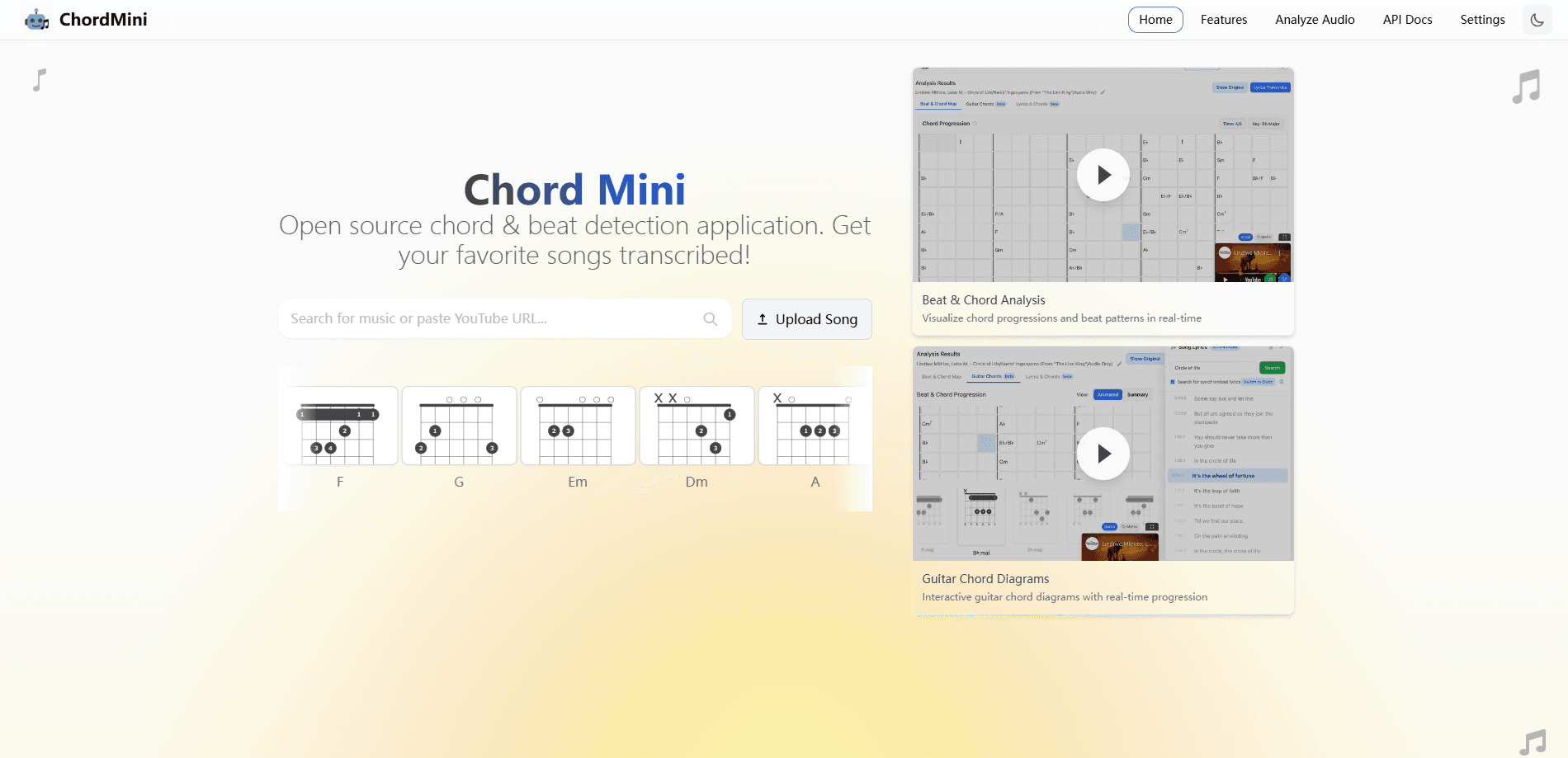
ChordMini is a free, open-source music analysis app. It recognizes chords and beats from YouTube videos or uploaded audio, then shows them in piano, guitar and lyric views.
About Chord Mini
What Is ChordMini
ChordMini is a web app that pulls the harmony out of a song. Point it at a YouTube video or upload an audio file, and it returns a chord progression lined up with the beat, plus guitar diagrams, a piano roll and synchronized lyrics. The project is open source under the MIT license, and the hosted version at chordmini.me is free to use.
The tool grew out of a research effort on automatic chord recognition. The team behind it trains models that label chords from audio without needing the large, legally tangled datasets that usually come with the job, and the web app is the public face of that work. It matters to anyone who learns songs by ear, arranges music or studies harmony, because it turns a slow listen-and-guess routine into a chart you can read in seconds.
Two limits are worth knowing before you start. The application is built for desktop browsers and leans on external services like Firebase and the Gemini API for parts of the workflow, so it is not a polished consumer product with a support desk. And the melody transcription feature is still experimental, which means it can be slower and rougher than the main chord and beat output.
Getting Started
- Open chordmini.me in a desktop browser, or clone the repository and run the front end and Python backend on your own machine
- Paste a YouTube link or search for a video in the app, or upload an MP3, WAV or FLAC file
- Let the pipeline run beat detection, chord recognition and key analysis, then add lyrics transcription if you want the lead sheet view
- Read the chord grid with piano and guitar panels, correct any mistakes by hand, then export the progression as a MIDI file for your DAW
Product Information
A quick look at Chord Mini's pricing, supported platforms, and performance.
Best for
The users, tasks, and scenarios where this tool fits best.
Users
- Musicians learning songs by ear
- Music students and teachers
- Guitarists and pianists
- Developers and researchers
Tasks
- Finding the chords of a song
- Transcribing for practice or arrangement
- Visualizing chords on instruments
- Aligning lyrics to a track
- Moving chords into a DAW
Scenarios
- Learning a cover song
- Studying a favorite track
- Preparing a lesson
- Checking a self-hosted setup
- Exploring the models
Key features
Chord Recognition
ChordMini detects the chord progression of a track and lays it out over time. It runs several models, including Chord-CNN-LSTM and the BTC and ChordNet families, and the app is designed to handle large chord vocabularies with inversions and extensions. The chords appear as a grid you can scrub through, and an enhanced correction step lets you fix what the model gets wrong. For anyone who has used a chord detector that only names a key, the difference here is the detail and the overlap with the beat.
Beat Tracking
Beat detection runs alongside chord recognition so the two stay lined up. The pipeline uses the Beat-Transformer and madmom models to find the pulse, and the chord grid snaps to those beats. That sync is what makes the chart usable for practice, since chord changes land where they actually happen in the song rather than on an even grid.
Piano Visualizer
The piano view turns the progression into a rolling keyboard with falling notes that follow playback. It includes a scrolling chord strip, highlights keys as they sound and shapes dynamics around the song's sections, so a chord you hear maps to a key you see. You can export the progression as a MIDI file and drop it into a DAW.
Guitar Chord Diagrams
Guitar players get interactive fingering diagrams pulled from the chords-db library, covering multiple positions for the same chord. The diagrams stay tied to the beat grid, and slash chords match an exact inversion shape when the database has one. It is aimed at the part most beginners stall on, which is knowing where to put their fingers.
Lyrics Synchronization and Lead Sheet
The app transcribes lyrics and syncs them to the track, then presents them next to the chords in a lead sheet view. A built-in AI assistant, powered by a large language model, can answer questions about the harmony and translate lyrics, which helps when a song is in a language you don't read.
Song Segmentation and Harmonic Analysis
A segmentation pass marks the song's structure, tagging sections like intro, verse, chorus, bridge and outro, and the views adapt to those blocks. On top of the chords, the app adds roman numeral analysis, key modulation signals and simplified notation, so you can see how each chord relates to the key and not only which ones play.
Experimental Melody Transcription
Sheet Sage can sketch an estimated melodic line on top of the piano view, with its own playback, caching and MIDI export. The team labels it experimental, meaning inference runs slower than the main beat and chord pipeline and the note timing or accuracy can be limited. Still, it points at where the project is heading.
Pros and cons
Pros
- Free and open source under the MIT license, with the full web app and research code both public
- Reads harmony from YouTube links and uploads, so you don't need a local audio file for every song
- Combines chords, beats, piano, guitar and lyrics in one place instead of five separate tools
- Adds roman numeral analysis, key change signals and segmentation, which goes past a plain chord list
- MIDI export lets you carry the progression straight into a DAW, and the recognition models are published with checkpoints
Cons
- The melody transcription feature is experimental and slower and less accurate than the main chord and beat output
- The hosted app relies on external services like Firebase and the Gemini API, so self-hosting takes real setup work
- It targets desktop browsers, so there is no mobile app and no native offline mode
- Lyrics transcription depends on third-party services, and some of those integrations have been changing or retiring
Frequently asked questions
ChordMini analyzes a song and shows you its chords. You give it a YouTube video or an audio file, and it produces a chord progression lined up with the beat, along with piano and guitar views and synchronized lyrics. It is an open-source music analysis tool, and the hosted app is free.
Related content
Explore related tools, skills, and articles for Chord Mini.
Chord Mini Alternatives

Foley
Hanamori Labs, LLC · Voice & Language · Productivity · AI AssistantFoley is a voice to-do list that turns a spoken sentence into a filed task, complete with project, date and time, then helps you plan the day around what is already there.

HireKey
HireKey · Voice & Language · Productivity · LeaningHireKey is an AI job search copilot built by a former tech recruiter. It checks role fit, tailors resumes, runs interview practice and tracks every application.

Fluence
Yay Software (Yannick Huchard) · Writing · Voice & Language · ProductivityFluence is an Android app that reads PDFs, EPUBs, Word files and web articles aloud, follows each sentence as it speaks, and answers questions about the text on the phone itself.