

ChordChord
ChordChord OÜ · Voice & Language
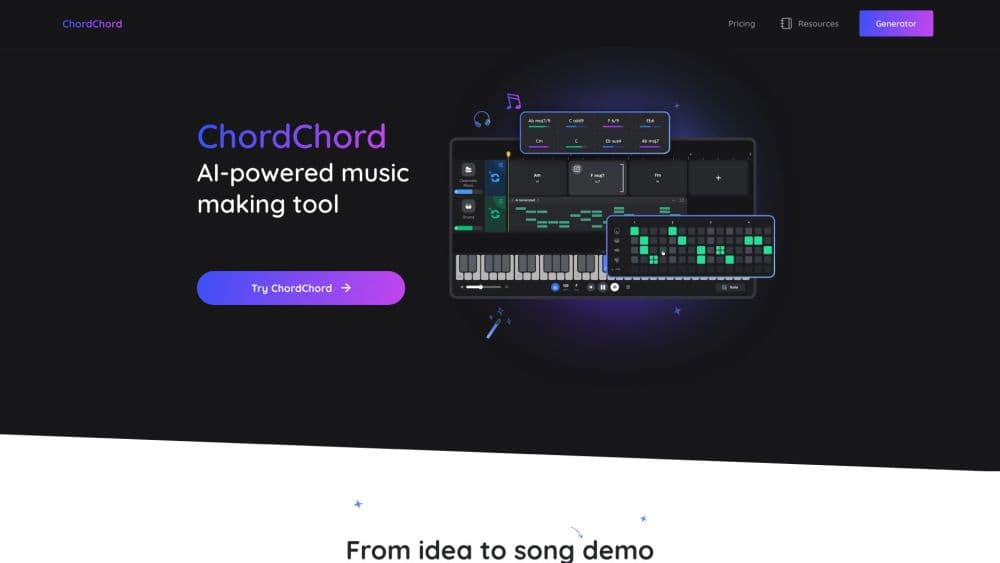
ChordChord is a browser-based chord progression generator and AI chord generator that turns a written prompt or a few chord symbols into editable chords, drums, and melodies you can export to any DAW.
About ChordChord
What Is ChordChord
ChordChord is a songwriting tool for songwriters and producers who want a chord progression fast, without digging through menus or grinding through music theory. You describe a vibe in plain words, or you type in chords you already have, and the Chord Studio builds an editable progression you can hear right away. The pitch is simple: get from a rough idea to a shareable demo in minutes, not hours.
The core problem it solves is the blank page. Most people stall at the first four chords, and ChordChord hands you a working set to react to instead of a wall of empty bars. You change voicings, tempo, and key, add genre-matched drums and melodies, and move the whole thing into your DAW. Everything you export is royalty-free, including the MIDI and WAV files.
The limits matter too. It runs entirely in a browser, so there is nothing to install, but the newer Learn Chords and Track Separation tools need a desktop screen. On the paid side, the Pro plan caps AI prompt generations at 5,000 per month, which is generous for most writers but not unlimited. Time signatures currently stop at 3/4 and 4/4.
Getting Started
- Open chordchord.com in Chrome, Safari, Edge, or a mobile browser and log in with a Google, Facebook, or Apple account. No download is required.
- Start the paid trial if you want the full feature set: 30 days of Pro for $9.99. The free tools, such as the metronome and chord finder, work without it.
- Pick a genre template or type a vibe like "lo-fi heartbreak" and let the Chord Studio write a progression in a few seconds.
- Tweak the result: transpose to a new key, adjust tempo, swap voicings, and layer drums and melodies on top.
- Export MIDI, WAV stems, an MP3, or a PDF chord chart, then drag the files into Logic, Ableton, FL Studio, or any DAW that reads standard MIDI.
Product Information
A quick look at ChordChord's pricing, supported platforms, and performance.
Best for
The users, tasks, and scenarios where this tool fits best.
Users
- Beginners with no theory background
- Songwriters stuck on the first idea
- Bedroom producers
- Music teachers and classrooms
Tasks
- Turning a mood into chords
- Building a full arrangement
- Learning chords on guitar
- Splitting a reference track
Scenarios
- Starting a song on a laptop with no software installed
- Prepping a demo for a collaborator
- Sampling ideas on a phone
Key features
Prompt-to-Demo
Type a description such as "stadium anthem phrygian" or "lo-fi heartbreak" and ChordChord writes a matching progression in a few seconds. It skips the usual menu diving, so you spend your time reacting to real chords instead of hunting for the right palette.
Style Templates and AI Chord Suggestions
Templates cover Pop, R&B, Hip-Hop, EDM, Rock, Acoustic, and dozens more, and you can always start from scratch. The AI suggestions layer proposes the next chord when you want a nudge, which is how beginners get a usable progression without knowing the theory behind it.
Instant Arrangements
Once the chords are set, you layer genre-matched drums and melodies on top and swap grooves in seconds. A section that feels flat gets a different drum pattern or backing band without you rebuilding the whole track.
Export and Share Anywhere
You drag MIDI, WAV stems, full-mix MP3s, or PDF piano chord charts straight out of the browser. Every file is royalty-free with no watermarks, and a share link lets a collaborator listen and make limited edits even without a paid account.
Learn Chords Lessons
A desktop primer runs from open chords like E, Em, and Am all the way to moveable barre shapes for major, minor, dominant 7, and major 7 chords. Each lesson scores what you play, so you drill the shapes you keep missing instead of repeating the ones you already know.
Track Separation
Upload an audio file and ChordChord splits it into vocals and other stems, while also detecting the chords, key, and BPM. It turns a reference track into editable parts you can study or build on, all from the same browser session.
Pros and cons
Pros
- You go from a written prompt to playable chords in seconds, which removes the blank-page stall most songwriters hit first.
- The new chord symbols you paste are auto-detected and extended with tasteful additions, so hand-built progressions still fit the tool.
- Exports are royalty-free with no attribution and cover MIDI, WAV stems, MP3, and PDF charts, which keeps your whole workflow in one place.
- Multiple input methods, including strumming a guitar or playing a piano, mean the tool meets you wherever your idea starts.
- Cross-platform access through any modern browser means no install and no platform lock-in.
Cons
- The Learn Chords and Track Separation tools are desktop only for now, so phone users cannot reach every feature.
- AI prompt generations are capped at 5,000 per month on the Pro plan, which a heavy user could hit before the month ends.
- Time signatures stop at 3/4 and 4/4, so anyone writing in 5/4 or 7/8 has to move that work into a DAW.
- The paid trial costs $9.99 upfront and is non-refundable, and it rolls into $27 per month unless you cancel within the 30-day window.
Frequently asked questions
ChordChord is a chord progression generator for music makers. You describe a vibe or paste chord symbols, and it builds an editable progression with matched drums and melodies. Then you export the parts as MIDI, WAV, or PDF and finish the track in your own DAW.
Related content
Explore related tools, skills, and articles for ChordChord.
ChordChord Alternatives

Foley
Hanamori Labs, LLC · Voice & Language · Productivity · AI AssistantFoley is a voice to-do list that turns a spoken sentence into a filed task, complete with project, date and time, then helps you plan the day around what is already there.

HireKey
HireKey · Voice & Language · Productivity · LeaningHireKey is an AI job search copilot built by a former tech recruiter. It checks role fit, tailors resumes, runs interview practice and tracks every application.

Fluence
Yay Software (Yannick Huchard) · Writing · Voice & Language · ProductivityFluence is an Android app that reads PDFs, EPUBs, Word files and web articles aloud, follows each sentence as it speaks, and answers questions about the text on the phone itself.