

Chorus Songwriting App and Lyrics Assistant
Chorus (writewithchorus.com) · Writing · Voice & Language
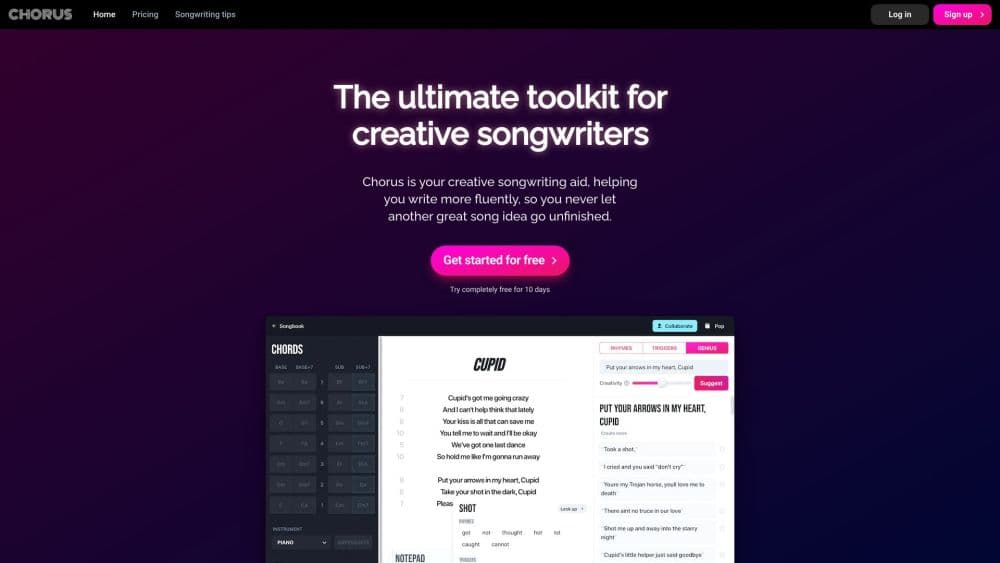
Chorus is a songwriting app and lyrics assistant that helps you find rhymes, spark ideas, play chords in your song's key, and build a writing habit.
About Chorus Songwriting App and Lyrics Assistant
What Is Chorus
Chorus is a songwriting studio and rhyme finder from the UK team behind the writewithchorus.com site. It runs in your browser and as an iOS app for iPhone and iPad, so you can start a song on your phone and keep working on a laptop. Everything lives in one songbook: ideas, works in progress, and finished tracks.
The product targets the two hardest parts of songwriting. First is getting started, when a blank page stalls you before a single line lands. Second is finishing, when a strong verse goes nowhere because the chorus never clicks. Chorus fills those gaps with rhymes, trigger words, chord playback, and a Genius tool that suggests how a line might continue. You write the words and you own them. The team states it never trains on your lyrics.
Treat it as a lyrics assistant and composition aid, not a full studio: there's no mixing, no mastering, and no distribution. Output is text, chords, and recordings you keep inside the app rather than a polished audio file. Songwriting Studio by Chorus, distributed on the App Store under developer Tom Hicks, is a separate native app, so check which build you need before you commit. Anyone expecting a one-click song generator will be disappointed, since every suggestion is meant to be shaped by you.
Getting Started
- Create a free account at writewithchorus.com in your browser, or install the iOS app.
- Start a song or open Song Sketch, which gives you a starting line and a chord sequence instead of a blank page.
- Add rhymes and trigger words to build your verse, then pull in a chord progression to hear how it sits in your song's key.
- Hit Genius when you stall on a line, and keep the ideas that fit your voice.
- Record a rough take, then co-write live or send a link so someone else can read and listen.
Product Information
A quick look at Chorus Songwriting App and Lyrics Assistant's pricing, supported platforms, and performance.
Best for
The users, tasks, and scenarios where this tool fits best.
Users
- Songwriters stuck mid-verse
- Lyricists whose second language is English
- Producers and topline writers
- Beginners building a habit
Tasks
- Finding rhymes that fit the song
- Generating ideas on demand
- Sketching chord progressions and song sketch drafts
- Practicing specific skills
- Capturing a melody before it escapes
Scenarios
- A writer who hits a wall on verse two at 11pm
- A co-writing session split across two cities
- A daily five-minute habit before work
- A non-native speaker drafting in English
Key features
Rhymes That Fit the Song
Chorus works as a rhyme finder tuned for singing, not just for matching endings. The list draws on a database of over 500,000 rhymes and trigger words, filtered to your genre, and puts the usable options first. That means fewer obscure words and more lines you would actually put in a chorus.
Trigger Words
When you know your theme but not your phrase, trigger words hand you a palette of singable options to build from. The suggestions lean on your genre, so a country hook reads differently from a hip hop bar. It's the fastest fix for writer's block, that blank stare that follows a fresh idea.
Genius
Genius steps in when a line stalls or a second verse refuses to start. You feed it the line you have, and it returns a set of directions you can take next. You write the final words and you keep the copyright. Chorus states plainly that it never trains on your lyrics, so your material stays yours.
Playable Chords and Song Sketch
Song Sketch starts you from a line and a chord sequence rather than an empty page. From there, playable chords let you hear progressions in your song's key without wrestling with theory first. As you go, the theory you pick up is a side effect of hearing what works.
Daily Songwriting Practice
The practice mode treats songwriting like a skill you train, not a mood you wait for. Three short exercises a day cover hooks, rhyme, melody, structure, and editing, and the app tracks your streak as you go. A few minutes daily is the whole point, and it compounds into instincts that show up when you write for real.
Recordings and Studio Instruments
You can capture a hummed melody, a chord idea, or a full take inside the song, so audio sits beside the lyrics. A MIDI keyboard plugs in to play the built-in instruments, which cover piano, guitars, electric piano, and strings with playback styles that feel played rather than programmed.
Write Together
Co-writing happens on the same lyric, live, or you can send a link so another writer reads and listens at their own pace. For a session split across cities or time zones, that keeps everyone working from the same draft instead of trading files.
Your Songbook Across Devices
Ideas, songs in progress, and finished songs travel with you between phone, tablet, and laptop. You can start a line on a commute and finish it at a desk, which matters when inspiration does not keep office hours.
Pros and cons
Pros
- As a songwriting app, it keeps rhymes, trigger words, chords, and recordings in one songbook, so you stop bouncing between four separate tools.
- Rhymes and trigger words are filtered to your genre, which surfaces singable options instead of long lists of words no one would use.
- Genius suggests where a line could go while leaving the writing and copyright with you, and the team says it never trains on your lyrics.
- Daily practice turns songwriting into a habit with short drills, which suits beginners who want structure and pros who want a warm-up.
- It runs in a browser and on iPhone and iPad, so a song follows you across devices without a manual export.
- A free account plus a $6.99 monthly plan keeps the cost low compared with a full digital audio workstation.
Cons
- It's a writing and composition aid rather than a production suite, so it has no mixing, mastering, or release tools, which means you still need a separate DAW to finish a track.
- You get lyrics, chords, and in-app recordings rather than a ready audio file, so turning a rough take into a finished mix remains your job.
- Suggestions are meant to be shaped by you, so anyone hoping for a one-click song lyrics generator will find the tool slower than one.
- The mobile app and the browser tool come from related but separate builds, so it's worth checking which one holds the features you need.
Frequently asked questions
Chorus helps you write and finish songs. You use it to find singable rhymes, generate trigger words and line ideas, play chord progressions in your song's key, and record takes, all inside one songbook that runs in a browser or on iPhone and iPad.
Related content
Explore related tools, skills, and articles for Chorus Songwriting App and Lyrics Assistant.
Chorus Songwriting App and Lyrics Assistant Alternatives

Google EmbeddingGemma 2
Google DeepMind · Writing · Image · CodingGoogle EmbeddingGemma 2 is a 740M-parameter open model that turns text, code, images, audio, and video frames into vectors in one 768-dimension space, running on phones and laptops.

MePersona
MePersona, Inc. · Writing · Productivity · MarketingMePersona is an AI unified inbox for creators. It learns your voice, drafts replies to fan messages from 12 platforms, and sends only what you approve.

Fluence
Yay Software (Yannick Huchard) · Writing · Voice & Language · ProductivityFluence is an Android app that reads PDFs, EPUBs, Word files and web articles aloud, follows each sentence as it speaks, and answers questions about the text on the phone itself.