

ClariLayer
ClariLayer · Coding
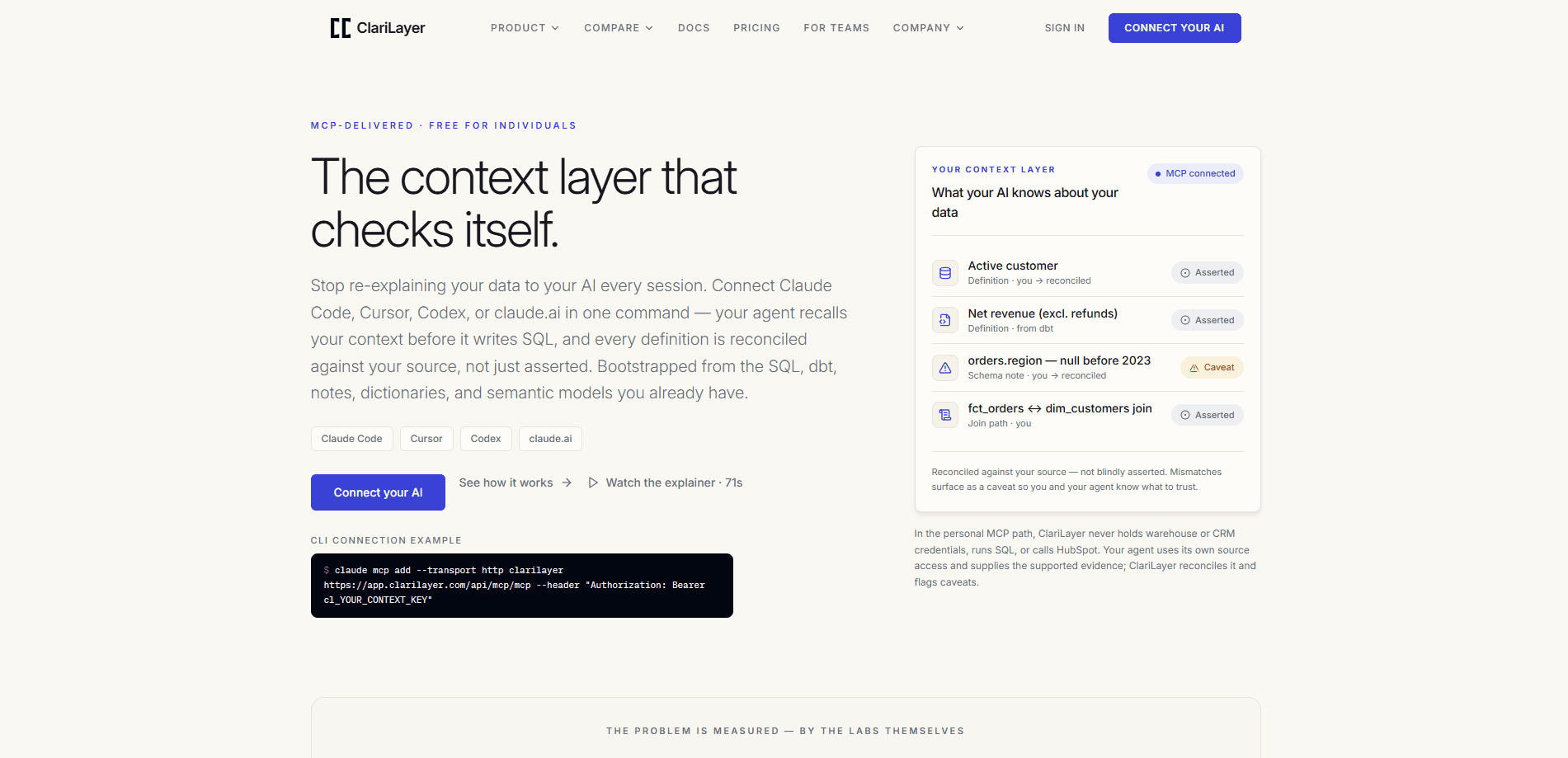
ClariLayer is a personal context layer for AI work, delivered over the Model Context Protocol (MCP). It works as AI context memory: it saves the facts, preferences, decisions, rules, and lessons you confirm, then hands them back to your AI client when a related task starts. Instead of re-explaining the same background every session, you build one authorized space that Claude Code, Cursor, Codex, or claude.ai can read from. It also seeds analytics context from SQL, dbt models, and notes, and checks saved definitions against real source evidence to surface mismatches as caveats.
About ClariLayer
What Is ClariLayer
ClariLayer is a tool that gives your AI assistant a durable memory for how you work. You connect it to the client you already use, save one confirmed decision, and ask for that decision later in a different project or session. The saved entry keeps its source and its applicability. So you can see where a rule came from and which project it applies to.
The bigger idea is context across tools. An AI session normally starts cold, and whatever you settled in one conversation disappears the next time you open a window. ClariLayer keeps that settled context in a space you authorize, and it lets the same space serve relevant context to more than one client. That's AI memory for agents, not just for a single chat. For analysts, it goes further: it can bootstrap context from existing SQL, dbt models, CLAUDE.md notes, a data dictionary, and semantic-layer models, then reconcile a saved metric definition against warehouse evidence.
So why does it matter? Because the cost of a cold start is real. Every session where you re-explain a project decision, a naming rule, or a metric definition is time you don't get back, and the re-explanation often drifts from the original choice anyway.
It's not magic, and the team is upfront about that. General work memory isn't independently verified, and it isn't guaranteed to show up in every answer. The reconciliation and caveat model only applies to the supported analytics evidence paths. Context management sounds effortless in a pitch. In practice, it isn't.
Cursor extraction is limited, and OpenAI extraction providers aren't available yet. That narrows who can use the history import feature today. If you want a system that quietly remembers everything for you, ClariLayer isn't that product. It asks you to choose what it keeps.
Getting Started
- Create an account and connect a compatible AI client. The personal offer starts free, with no credit card.
- Run the guided setup inside your client. Prefer OAuth when the client offers it; otherwise store a context key in a secure local field.
- Verify the connection with a health check, then save one real decision, rule, or constraint from your actual work.
- Select the authorized space where recalled work should apply, so later sessions know the scope.
- Optional: import selected local history or configure ongoing capture. Each step is a separate choice, with its own preview and authorization.
Product Information
A quick look at ClariLayer's pricing, supported platforms, and performance.
Best for
The users, tasks, and scenarios where this tool fits best.
Users
- Data analysts
- Developers using AI coding clients
- Solo builders juggling several projects
Tasks
- Recalling past decisions
- Saving a correction
- Reconciling a metric definition
- Bootstrapping analytics context
Scenarios
- Starting a new AI session on an old project
- Handing work between clients
- Teams arguing over one definition
Key features
Saved context you can inspect and change
Every saved entry keeps its source and applicability visible. You see which conversation a decision came from, which project it applies to, and which version it references. When a plan changes, you correct the decision or forget it from the scope where it no longer belongs. That audit trail matters. An AI memory you can't inspect is hard to trust. Source: clarilayer.com.
Recall and remember, the everyday loop
ClariLayer documents four verbs, and two of them carry most of the daily work. Recall pulls relevant saved decisions, definitions, notes, and caveats into the current task. Remember saves a confirmed decision, constraint, definition, or correction for later sessions. Remember is an explicit write the agent triggers. It doesn't happen behind your back.
Bootstrap for analytics context
You can seed context from structured sources: SQL, dbt models, CLAUDE.md notes, a data dictionary or codebook, and semantic-layer models. That gives an agent the definitional grounding it needs before it touches an analysis. Setup is deliberate. You pick a source, a space, and an extraction provider, then review the exact proposal before accepting it.
Reconcile against real evidence
Reconcile checks a compatible analytics SQL definition against warehouse actual_sample evidence, or a HubSpot CRM contract against row-free crm_evidence. When they don't match, the mismatch shows up as a caveat. The site calls this a check no notes file can make, and that's a fair claim. A caveat tied to live source evidence beats a stale comment every time.
Controlled history import
Connection alone doesn't read your history or start capturing. You select a supported local history source, a space, and an extraction provider, then preview the batch before accepting it. Ongoing capture is enabled separately, with its own authorization and exclusions, so nothing starts reading your history until you explicitly say it can and review exactly what it would pull in. Here's the catch. Current qualified extraction uses a version-specific Claude CLI profile. OpenAI and Cursor extraction providers aren't available, and native Cursor history qualification remains limited.
Works with the AI clients you already use
ClariLayer connects as a remote MCP server over Streamable HTTP, so it slots into clients that support the protocol. The site lists Claude Code, Cursor, Codex, and claude.ai. Setup runs through each client's own configuration, and OAuth is offered where compatible, which means you keep your existing workflow instead of moving everything into a new app just to get persistent context.
Governed context for teams
The Governed Context Edge is a shared layer for team definitions. You propose a definition up to a shared canon, adopt the canon down with your own agency, and keep disagreement visible. It's in private pilot with no public price. Worth knowing: project context is proposed deliberately, and personal memory is never silently promoted into the team layer.
Pros and cons
Pros
- Persistent context means fewer repeated explanations across sessions and clients.
- Saved entries carry source, scope, and version. You can inspect and correct them.
- Reconciliation against live warehouse or CRM evidence produces caveats a notes file can't.
- The personal plan starts free with no credit card. Testing the loop costs nothing.
- Explicit writes and previewed imports keep control with you, not the agent.
Cons
- General work memory isn't independently verified and isn't guaranteed in every answer, so you can't rely on it like a database.
- Extraction support is narrow right now. OpenAI extraction is unavailable, and native Cursor history qualification is limited.
- Team governance sits behind a private pilot with no public price. Shared-definition users can't just sign up.
- The analytics reconciliation path is a specialist feature that expects compatible warehouse or HubSpot definitions.
Frequently asked questions
It saves the decisions, rules, preferences, and definitions you confirm, then returns the relevant ones when a related task starts. Think of it as a personal context layer that sits between you and your AI client, delivered over MCP.
Related content
Explore related tools, skills, and articles for ClariLayer.
ClariLayer Alternatives
Forefront
Forefront · CodingForefront is a web platform for building with open-source AI. It lets you fine-tune leading open-source language models on your own data, evaluate how they perform, and run them through an API or export them to host yourself. Developers who want the convenience of a closed-source platform but insist on owning their models and data are the target audience here.

Startkit
StartKit.AI · CodingStartkit is a boilerplate for building AI SaaS and AI wrapper products. Think of it as an AI startup boilerplate with the boring parts already wired up: authentication, Stripe and Lemon Squeezy payments, usage limits, transactional email, and an AI API starter that talks to OpenAI, Anthropic, Groq, or Llama. You clone the repo, set your price, and start on the part of your product that people actually pay for. It's Next.js under React and Tailwind, so most of the boilerplate code already feels familiar.
Testim
Tricentis · CodingTestim is an AI-powered test automation platform for building and running end-to-end tests across web, mobile, and Salesforce applications. It leans on machine learning to keep tests stable when an interface changes, so teams spend less time fixing broken selectors. Not bad for an automated testing tool you can start using today. You create tests by recording actions in a browser, then optionally add JavaScript when you need more control. It's a solid pick for busy QA teams.