

Clear for Slack
Clear · Writing · Marketing
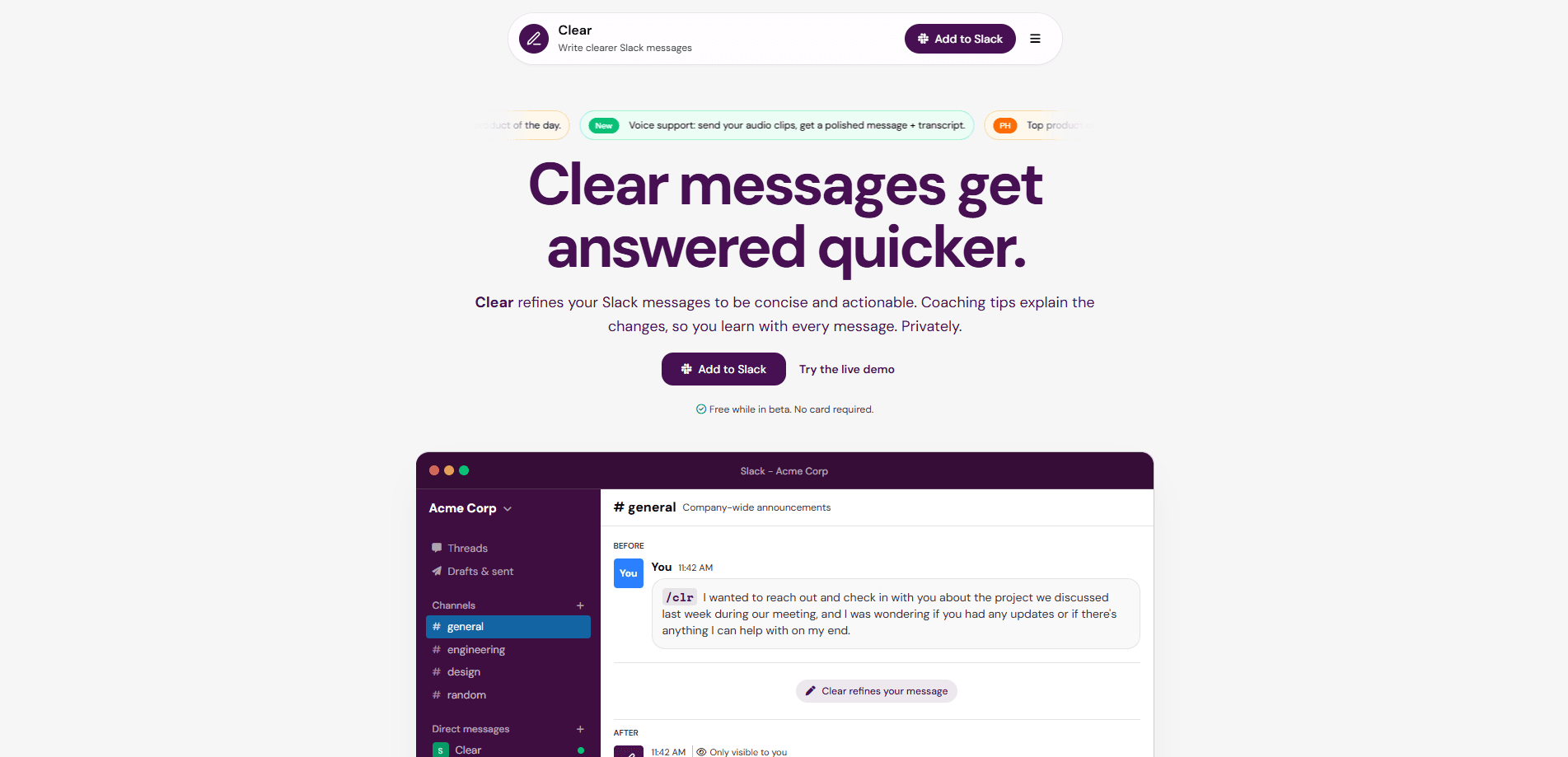
Clear for Slack is an AI messaging app that turns the voice notes you record on your phone into short, readable Slack messages. It's built for people who work from a phone and want to send updates without thumb-typing. You hold the mic, talk like you're leaving a voicemail, and Clear transcribes and rewrites the ramble into something a teammate can skim in ten seconds. Think of it as a Slack voice memo app that does the cleanup for you.
About Clear for Slack
What Is Clear for Slack
Clear for Slack fixes one specific annoyance: voice memos are easy to send and painful to receive. You record a three-minute ramble while walking to a meeting. Your team has to stop, put in headphones, and scrub through it to find the actual ask. Clear flips that. It records where you already are, then hands your team a clean message instead of an audio file.
The tool runs inside Slack. On mobile you DM the Clear bot and hold the mic. On desktop you type /clr in any channel to get the same kind of refinement for text. Names, acronyms, and technical terms are meant to stay intact, and the rewrite aims to preserve your intent and tone rather than flatten everything into corporate boilerplate.
Privacy is the part Clear leans on hardest. Voice notes are transcribed, refined, and then deleted. The company says audio and text aren't stored, and there are no logs kept as training data. One honest caveat: like any AI assistant, Clear uses large language models, so a refinement can occasionally be inaccurate. You're still expected to read before you send.
Getting Started
- Add Clear to your Slack workspace from app.installclear.com/slack/install.
- Open the Slack app on your phone and find the Clear bot in your direct messages.
- Hold the mic and talk normally, or type
/clron desktop if you'd rather refine text. - Paste the refined message into the channel you meant to reach. Only you see the draft; your team sees the clean version.
- Read the optional coaching tips if you want to learn what changed and write tighter notes next time.
Product Information
A quick look at Clear for Slack's pricing, supported platforms, and performance.
Best for
The users, tasks, and scenarios where this tool fits best.
Users
- People who work from a phone
- Managers sending quick updates
- Non-native English speakers
Tasks
- Turning a long voice memo into a Slack message
- Drafting channel updates on desktop
- Writing clearer async standups
Scenarios
- Commuting or walking between meetings
- Sending a recap after a call
- Rolling Clear out to a support or ops team
Key features
Voice Memo to Readable Message
The core loop is simple. You record a voice note in the Slack app on your phone, and Clear turns it into a short, scannable message. The point isn't transcription for its own sake. It's turning a three-minute ramble into something a teammate can skim in ten seconds, which is why Clear pushes length and clarity rather than word-for-word accuracy. So what happens to the audio? It's gone once the message is written.
Fine-Tuned Rewriting That Keeps Your Details
Clear uses fine-tuned language models to preserve your intent and tone while tightening the message. Names, acronyms, and technical terms stay intact, so "the Q3 API migration" doesn't get smoothed into vague mush. That detail retention matters more than elegant prose when your team needs to act on what you actually said in a meeting you're already late for.
Privacy-First Handling of Audio and Text
Voice notes are transcribed, refined, and then deleted. Clear states that audio and text aren't stored, and no logs are kept as training data. If your workplace is cautious about what gets sent to an AI tool, this is the feature you'll care about most. Confirm it against your company's own policy anyway.
`/clr` Command for Desktop Text
You don't have to be on mobile to use Clear. Type /clr in any Slack channel or message and get the same refinement for typed text. It's the fallback for when you're at a desk but still want a shorter, clearer version of a draft before it goes out into a busy channel where nobody reads long paragraphs anyway.
Coaching Tips
Each refinement can come with optional tips explaining what changed, with references to BLUF (bottom line up front) and KISS (keep it short and simple). Over time you learn what makes a message land, so your first drafts get tighter without the tool doing all the work.
Usage Controls and Priority Routing
On the Team plan, Clear adds per-workspace usage controls and priority AI routing for faster responses, plus dedicated support for rollout and training. For teams that want clarity as a default rather than a personal habit, these controls matter.
Pros and cons
Pros
- Cuts a long voice memo down to a message your team will actually read, so the ask lands fast and nobody has to scrub through three minutes of audio to find it.
- Lives inside Slack, so you keep the mobile workflow you already use instead of switching apps.
- Keeps names, acronyms, and technical terms intact rather than flattening everything.
- Deletes audio and text after conversion and says it keeps no training logs, which suits privacy-conscious teams.
- Free Starter plan during beta, with a cheap Team tier at $1.99 per user per month.
Cons
- Rewrites can occasionally be inaccurate, so you're expected to review every message before sending.
- Requires your team to work in Slack. If your team lives elsewhere, there's little here for you.
- No public API is documented, so you can't wire Clear into your own workflows or tools.
- Usability depends on a good microphone and a quiet enough place to talk.
Frequently asked questions
It turns voice memos recorded on your phone into short, readable Slack messages. You hold the mic in the Slack app, talk normally, and Clear transcribes and rewrites your ramble into something your team can skim quickly.
Related content
Explore related tools, skills, and articles for Clear for Slack.
Clear for Slack Alternatives

Google EmbeddingGemma 2
Google DeepMind · Writing · Image · CodingGoogle EmbeddingGemma 2 is a 740M-parameter open model that turns text, code, images, audio, and video frames into vectors in one 768-dimension space, running on phones and laptops.

MePersona
MePersona, Inc. · Writing · Productivity · MarketingMePersona is an AI unified inbox for creators. It learns your voice, drafts replies to fan messages from 12 platforms, and sends only what you approve.

Fluence
Yay Software (Yannick Huchard) · Writing · Voice & Language · ProductivityFluence is an Android app that reads PDFs, EPUBs, Word files and web articles aloud, follows each sentence as it speaks, and answers questions about the text on the phone itself.