
CleverSpinner - AI Humanizer & Paraphrasing Tool
CleverSpinner.com · Writing
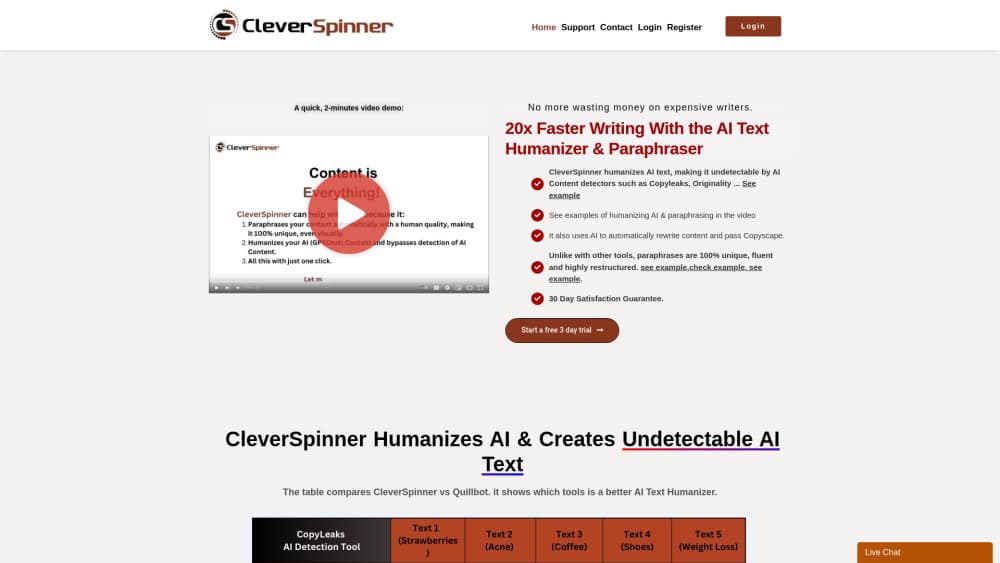
CleverSpinner is an AI humanizer and paraphrasing tool that rebuilds robotic text sentence by sentence, scores grammar, and condenses long drafts for $9.90 a month after a 3-day trial.
About CleverSpinner - AI Humanizer & Paraphrasing Tool
What Is CleverSpinner
CleverSpinner is a browser-based article rewriter built for one job: taking text that reads like a machine wrote it and making it read like a person did. You paste a draft, pick a mode, and get a second version beside the original.
Its approach differs from the synonym swappers that dominated this category. The tool converts a sentence into a vector that represents meaning, then writes a new sentence from that meaning. Word order changes, clauses move, and the vocabulary shifts. That's why the output often looks nothing like the input while keeping the same point.
The same page also holds a grammar checker with a score, a summarizer, and a simplifier. Those extras matter when you're cleaning up a draft you already trust rather than rebuilding it from scratch. Everything runs in a browser tab. There's no desktop install.
Limits show up fast. The interface and the output are English-only, so writers working in Spanish or Japanese need another tool. The rewrite also can't tell a correct fact from a wrong one, which means a bad claim survives the rewrite looking fresher than before.
Getting Started
- Open cleverspinner.com and start the 3-day unrestricted trial. Billing at $9.90 a month begins if you don't cancel.
- Paste your draft into the input box and choose a mode: paraphrase, humanize, summarize, or simplify.
- Run the rewrite. The new text appears next to the original so you can compare sentence by sentence.
- Copy the result into your editor, or run the grammar check before you publish.
Product Information
A quick look at CleverSpinner - AI Humanizer & Paraphrasing Tool's pricing, supported platforms, and performance.
Best for
The users, tasks, and scenarios where this tool fits best.
Users
- Bloggers and niche site owners
- Students and non-native English speakers
- SEO and marketing freelancers
Tasks
- Rewriting AI-generated drafts
- Paraphrasing source material you own
- Condensing long reports
- Fixing awkward phrasing before publishing
Scenarios
- Cleaning up a batch of product descriptions
- Editing a first draft late at night
- Repurposing one article into shorter posts
Key features
Sentence-Level Rewriting
Most cheap paraphrasers swap words and leave the sentence skeleton intact. CleverSpinner works as a sentence rewriter that rebuilds the skeleton. It reads the meaning, then produces a new sentence with different clause order and different vocabulary, so two runs on the same paragraph rarely match.
AI Text Humanizer
The humanizer mode targets the flat rhythm that gives AI drafts away: even sentence length, repeated transitions, tidy three-part lists. Output gets shorter sentences mixed with longer ones. If you want to rewrite AI text so it reads like a person typed it and publish under your own name, this is the feature you'll use most.
Grammar Check and Scoring
Paste text and the checker returns corrections plus a score you can track between drafts. It caught spelling slips and subject-verb problems in our test paragraphs. Treat the score as a rough signal, not a grade, because it measures mechanics and not clarity.
Summarizer for Long Drafts
The summarizer compresses a pasted document into its main points. That's useful before a meeting or when you inherit a 20-page handover with no time to read it. Expect a tight overview rather than a detailed one, so check the details that matter.
Text Simplifier
Simplifier mode rewrites heavy sentences into plain ones without dropping the argument. It suits anyone writing for readers who skim: help pages, onboarding emails, policy summaries. Sentences come out shorter, and the jargon usually goes with them.
One-Click Workflow and Word Allowance
Everything runs from one box with one button, which is the whole point of a $9.90 tool. The plan carries a monthly word allowance that the site lists at up to 500,000 words, enough for a heavy blog schedule. There's no editor to learn and no project setup.
Pros and cons
Pros
- Restructures sentences rather than swapping synonyms, so the output doesn't read like a thesaurus was set loose on your draft.
- One flat price of $9.90 a month, which is cheaper than most AI humanizers with comparable word limits.
- Three unrestricted trial days plus a 30-day refund window, so you can test on real work before committing.
- Grammar scoring, summarizing, and simplifying sit on the same page, which saves a second subscription.
- Runs in any browser with no install and no onboarding call.
Cons
- No free tier beyond the trial, and the trial asks for billing details up front, so casual users pay to experiment.
- English only. The interface, the output, and the support material assume English, which rules out multilingual publishing.
- Technical or legal text can drift during a rewrite, so you'll proofread anything where a changed clause carries risk.
- No documented API and no team workspace, which keeps it out of automated publishing pipelines and agency workflows.
Frequently asked questions
It rewrites text at the sentence level to make AI-generated or awkward drafts read more naturally. The same page includes grammar checking, summarizing, and simplifying, so it handles light editing jobs too.
Related content
Explore related tools, skills, and articles for CleverSpinner - AI Humanizer & Paraphrasing Tool.
CleverSpinner - AI Humanizer & Paraphrasing Tool Alternatives

Google EmbeddingGemma 2
Google DeepMind · Writing · Image · CodingGoogle EmbeddingGemma 2 is a 740M-parameter open model that turns text, code, images, audio, and video frames into vectors in one 768-dimension space, running on phones and laptops.

MePersona
MePersona, Inc. · Writing · Productivity · MarketingMePersona is an AI unified inbox for creators. It learns your voice, drafts replies to fan messages from 12 platforms, and sends only what you approve.

Fluence
Yay Software (Yannick Huchard) · Writing · Voice & Language · ProductivityFluence is an Android app that reads PDFs, EPUBs, Word files and web articles aloud, follows each sentence as it speaks, and answers questions about the text on the phone itself.