

Clicks.page
Jaisal · Marketing · Business
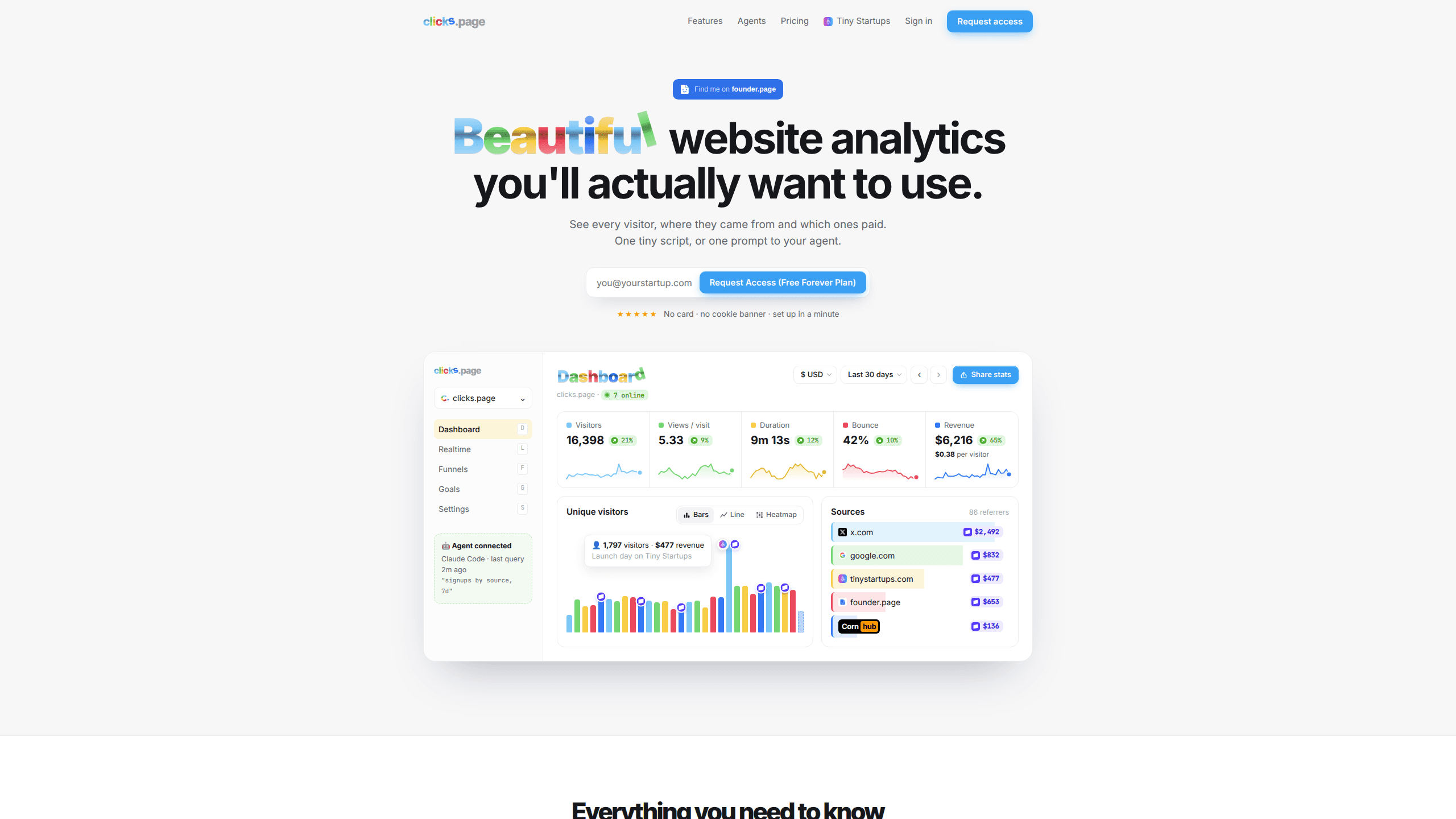
Clicks.page is cookieless website analytics for founders and small teams. It ties traffic to Stripe, Paddle and Polar revenue, filters bots, and lets an AI agent install it and answer questions.
About Clicks.page
What Is Clicks.page
Clicks.page is a web analytics service for founders, indie makers, and small product teams. The dashboard shows pageviews, referrers, live visitors, and the revenue those visitors produced. Stripe connects in about two minutes, while Paddle, Polar, and Creem come in through a small server call. The whole product answers one question: which clicks make money.
Most analytics tools answer a different question, which is how many people showed up. Clicks.page puts revenue beside the traffic chart and credits renewals to the source behind the first visit. That suits a solo founder deciding where to post next week. It suits a marketing department with five-touch attribution models a lot less.
Two limits matter before you sign up. New accounts have no lasting free plan: installing the script costs nothing, then a 14-day trial runs for $1 and plans start at $9 a month. The privacy design is also strict. No cookies, no stored IP addresses, and a visitor hash that rotates daily. You get clean numbers and no consent banner, and you give up long-term visitor identity, so audience segments and retargeting lists aren't on the table.
Getting Started
- Sign up with an email address and the domain you want to track. The agent signup endpoint returns an API key, a site record, and the script tag in one response.
- Approve the login. Run the setup from a CLI and it prints a device code to confirm in the browser.
- Add the script to your layout. The docs cover Next.js, Astro, React, Vue, and Svelte, and a plain HTML site takes the tag as it is.
- Confirm the first pageview in the dashboard, then paste your Stripe payment link so payments carry the anonymous session reference.
- Pick a pageview plan when the trial ends. Tracking continues during the trial, so you can compare a quiet week with a launch week before choosing a size.
Product Information
A quick look at Clicks.page's pricing, supported platforms, and performance.
Best for
The users, tasks, and scenarios where this tool fits best.
Users
- Solo founders and indie makers
- Small SaaS teams
- Newsletter and content operators
- Privacy-conscious sites in the EU
Tasks
- Finding the channel that pays
- Watching a launch
- Cleaning up bot noise
Scenarios
- A landing page goes live on Friday
- A paid newsletter wants to know which issue sold subscriptions
- A client needs numbers without a consent popup
Key features
Revenue Attribution by First Source
Clicks.page passes an anonymous session reference into Stripe Payment Links, or into client_reference_id on Checkout. When a payment arrives, the dashboard credits the page, source, and campaign that produced the visit. Renewals stay with the original source, so a customer who reads one post and pays six months later doesn't land in "direct". This is the part that makes it Stripe analytics rather than another traffic counter. Paddle, Polar, and Creem need a short server call.
Realtime Visitors and a Live Map
The realtime view shows a live visitor count, a world map, and an activity feed. Realtime visitor tracking updates as people move between pages, which helps during a launch or a paid campaign. Treat it as a pulse check. You can't open an individual session or replay it.
Agent Setup and an MCP Server
The setup doc is written for coding agents. Paste one prompt into Claude Code, Cursor, or Codex and the agent fetches clicks.page/setup.md, asks you to approve a login, edits the layout file, and calls a verify endpoint to confirm the first pageview. Ten MCP tools handle later questions, so "which source made the most money this month" works as a chat message. A REST API with API keys covers scripts and custom dashboards.
Bot Filtering
Crawlers, headless browsers, datacenter ranges, and known referrer spam are removed before counting. Bot filtering leaves you with smaller traffic numbers than a raw log analysis and a conversion rate you can defend. For a site that gets scraped often, that's the difference between a believable report and a chart full of noise.
Cookieless Tracking
The script sets no cookies and stores nothing on the visitor's device. IP addresses aren't stored, and visitors are counted with a salted hash whose salt is discarded every day. As a Google Analytics alternative, this one lets EU sites skip the consent banner. The trade-off is simple: you can't recognize a returning visitor across weeks.
Funnels, Goals, and Campaign Tags
Funnels build from pages and events you already send. A goal can be a page visit or a custom event with a conversion rate attached, and UTM tags break traffic down by source, medium, campaign, term, and content. Custom events go through clicks.track() or a data-clicks-event attribute. They're tracked for free and don't count toward the pageview limit.
Pros and cons
Pros
- Revenue per visitor and first-touch renewals answer the "which channel pays" question without a spreadsheet export.
- Every feature ships on every plan. There are no overage charges either: traffic above the limit waits for an upgrade instead of generating a bill.
- Setup through an agent prompt takes minutes, and the MCP server means later questions don't require opening the dashboard.
- Cookieless and IP-free, which removes the consent banner for EU traffic.
- Up to 100 websites, subdomains included, sit under one pageview limit.
Cons
- New accounts get no lasting free plan. You need a card for the $1 trial, and the cheapest plan after that is $9 a month.
- Numbers won't match GA4. Bot filtering and daily rotating hashes drop traffic that other tools keep, so year-over-year comparisons need a note.
- No session recordings, cohorts, or user-level profiles. Teams used to Mixpanel or Amplitude will miss building funnels around a person.
- Revenue attribution is most complete on Stripe. Paddle, Polar, and Creem require server code, which pushes non-technical users toward Stripe.
Frequently asked questions
Clicks.page is a web analytics tool for founders and small teams. It tracks pageviews, sources, live visitors, and revenue from Stripe, Paddle, Polar, or Creem in one dashboard, then lets you query the data through an API or an MCP server.
Related content
Explore related tools, skills, and articles for Clicks.page.
Clicks.page Alternatives

ngram 2.0
ngram · Video · Marketingngram 2.0 is an AI video generator for teams. It turns a prompt, a screen recording, or a product URL into a narrated explainer, product demo, or AI avatar video, and every scene stays editable.

shippedit.me
Krawlup · Marketing · Businessshippedit.me now redirects to Krawlup, a web platform that audits SEO, AEO and page speed every week, then hands the fixes to AI coding agents over MCP.

MePersona
MePersona, Inc. · Writing · Productivity · MarketingMePersona is an AI unified inbox for creators. It learns your voice, drafts replies to fan messages from 12 platforms, and sends only what you approve.