

CodeCrab
CodeCrab · Coding · Productivity
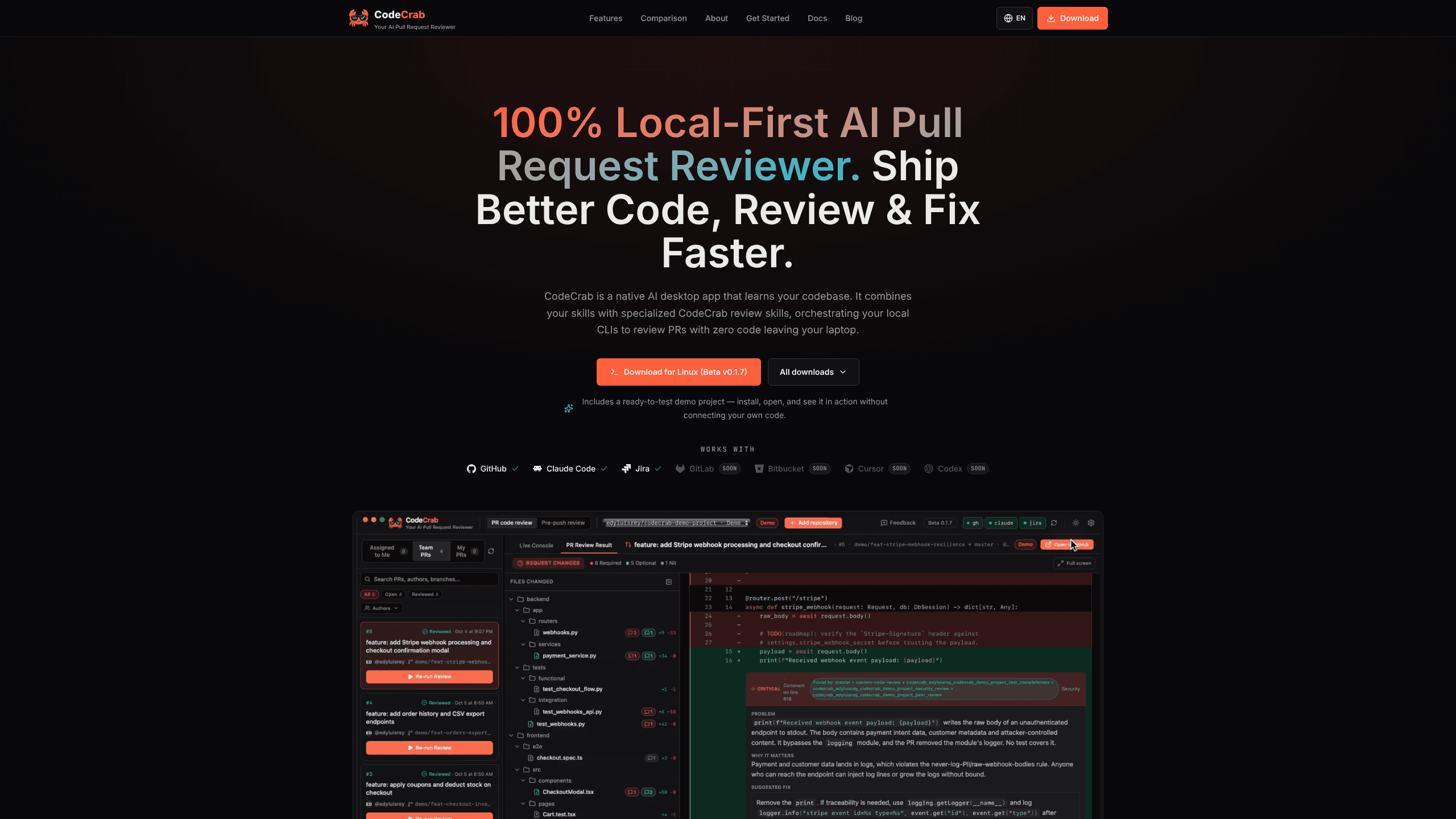
CodeCrab is a desktop AI code reviewer that runs on your machine and drives the Claude Code, Codex, Cursor or Copilot CLI you already use. It reviews PRs and local changes before you push.
About CodeCrab
What Is CodeCrab
CodeCrab is a native desktop app for reviewing code with AI. It does not host a model or sell a review service. Instead it starts the AI coding CLI already installed on your machine, points it at your local clone, and turns the answers into line-level observations on a diff.
That choice answers the objection many teams raise about cloud review bots. The diff, the surrounding files and your keys stay on the laptop. The model side is BYOK: you connect the subscription or keys you already have. You can run a Claude Code review, a Cursor CLI review or a Codex CLI review, and CodeCrab keeps every observation in one window. With a local model, nothing leaves the machine at all. That is the pitch: a private code review that never uploads your repository. CodeCrab works as an AI pull request reviewer first and a pre-push checker second.
The limits deserve equal space. You need a GitHub or GitLab account plus one authenticated AI CLI, and you pay that provider directly. Reviews run at the speed of your terminal agent, so a large diff takes longer than a queued cloud bot would. There is no web dashboard, because the app is the product. The tool is in public beta, currently version 0.1.14, and the Windows build is not code-signed yet, so SmartScreen warns on install.
Getting Started
- Download the build for macOS, Windows or Linux from the CodeCrab site and install it. macOS builds are signed and notarized.
- Sign in to the GitHub CLI with gh auth login, or to GitLab with glab auth login.
- Install and sign in to one agent: Claude Code, Cursor CLI, Codex CLI or Copilot CLI. The badge in the app turns green when CodeCrab can see it.
- Add a repository and point CodeCrab at your local clone under Settings, then Repositories. Wait for the review profile to finish building.
- Open Assigned to Me or Pre-push, pick a pull request or your working tree, and start a review. The demo project that ships with the app works before you connect anything.
Product Information
A quick look at CodeCrab's pricing, supported platforms, and performance.
Best for
The users, tasks, and scenarios where this tool fits best.
Users
- Engineers who review other people's pull requests and want a second pass before approving
- Teams that cannot send source code to a vendor
- Solo developers and small teams on tight budgets
Tasks
- Reviewing a teammate's pull request
- Understanding feedback on your own PR
- Catching bugs before the PR exists
- Applying a fix with proof
Scenarios
- A regulated codebase where uploads are banned
- A large monorepo with its own conventions
- A morning review queue
Key features
Pull request review with full repo context
Open a PR from a colleague and CodeCrab shows the file tree, the diff and its observations side by side. The agent reads your local clone, not only the patch, so it can spot a broken caller or a type change three files away. Every observation lands on the line that caused it, and you decide whether to post it to GitHub.
Pre-push review of local changes
Most bugs are cheaper to fix before a PR exists. CodeCrab reviews uncommitted and unpushed work in read-only mode, then lets you investigate a finding while the context is still fresh. Nothing is committed or pushed without your click.
Feedback investigation on your own PRs
In My PRs, CodeCrab reads each reviewer comment on your branch, traces the code it refers to and explains what the reviewer wants. It separates a real defect from a style preference, which is the part that usually eats a long chat thread. A fix is proposed on your local branch, never applied blind.
A review profile for each repository
Connect a repo and CodeCrab builds a profile of its patterns: naming, layering, test layout and the rules your team enforces in review. That profile drives the review agents, so two repositories with different conventions get different reviews. Profiles live with the repository settings on your disk.
Your skills, your agents, your models
CodeCrab reads the skills you already keep for Claude Code and combines them with its own review skills. You pick the agent and the model per repository, and the app shows a live console with that agent's stdout and stderr. If a review looks wrong, you can inspect the command that produced it.
Read-only by default, verified against your tests
Reviews never edit files, switch branches, approve a merge or push. The optional step is posting a comment, which you trigger per finding. When you ask for a fix, CodeCrab applies it on a local branch and runs your own suite, such as pytest, npm test or cargo test, before calling the job done.
Pros and cons
Pros
- Code stays on the machine: no upload, no proxy, no vendor copy of your repository, which makes the app usable in strict environments.
- Reuses the AI subscription and keys you already own, so there is no second bill for the model and no per-seat price during beta.
- Reads the full local clone instead of the diff alone, which catches regressions that line-level bots miss.
- Review skills and profiles are editable files, so house rules can be versioned next to the code.
- The execution console exposes the underlying command, which makes an odd finding easy to check.
Cons
- You need a working GitHub or GitLab CLI login and one signed-in AI CLI before any review runs, so setup takes about 15 minutes.
- Review speed tracks your terminal agent. A large diff can take minutes, and there is no cloud queue to fall back on.
- The Windows build is unsigned, so SmartScreen shows a warning and some managed laptops will block the installer.
- Bitbucket is listed as coming soon, so teams on that host cannot use CodeCrab yet.
Frequently asked questions
No. CodeCrab reads your local clone and never sends code to its own servers. The AI CLI you choose sends the relevant files to its provider under your account and data terms, and a local model keeps everything on the machine.
Related content
Explore related tools, skills, and articles for CodeCrab.
CodeCrab Alternatives

Base Code
Base44 (Wix) · Coding · ProductivityBase Code is a shared cloud development environment from Base44. Teammates describe changes to an existing GitHub codebase in chat, preview them live and send them back as pull requests.

Google EmbeddingGemma 2
Google DeepMind · Writing · Image · CodingGoogle EmbeddingGemma 2 is a 740M-parameter open model that turns text, code, images, audio, and video frames into vectors in one 768-dimension space, running on phones and laptops.

GitGlow
GitGlow · Coding · ProductivityGitGlow is a local-first desktop Git client that lets independent developers review their own code and their AI agents' changes in one place before shipping.